

%3Aquality(90)%2F&w=3840&q=75)
%3Aquality(90)%2F&w=3840&q=75)
What is high cardinality, and is it as scary as people make it out to be?


Dawid Dębowski is a software engineer at G2A.COM and a Grafana Champion. Holding an MS of Computer Science, Dawid’s main fields of interest related to observability are PromQL and data visualizations using Grafana.
If you’ve ever worked with custom metrics in a Prometheus environment, you've probably heard about something called "high cardinality"—or at least I hope you have. You likely know that high cardinality is undesirable, and you might have even heard that it’s costly on resources. But do you know what it actually is and how it can affect you and your workloads in particular?
In this post, we’ll look a bit into what high cardinality is, why it's “bad” (or if it even is bad to begin with), and how to make sure you won’t cause problems for the team responsible for the Prometheus instance(s) in your company. Notice that this post is mostly for developers that don’t want to anger their admins. If you’re an admin using Grafana Cloud, check out Adaptive Metrics to help address this issue!
Spoiler alert: If you decided to drop this post right here—yes, high cardinality is bad.
What is high cardinality?
Let’s start with a basic definition: cardinality is the number of unique time series stored in the database.
%3Aquality(90)%2F&w=3840&q=75)
The cardinality of metric http_requests_total in the example above is six, as there are six unique time series (two different instances and three different status codes). Easy, right? Of course, in your environment it might be a bit more complicated, as metrics usually have more labels to provide more information.
A database has high cardinality when there are many, many, many different time series. The easiest way to "achieve" this is by exposing a metric with a quickly changing (and potentially infinite) label value. Think of any kind of IDs (like transaction ID, user ID, emails, etc.) in any form— standalone or in a request path. Basically, anything that isn’t a finite (and small) set of values should raise a red flag for potential high cardinality.
What are the negative impacts of high cardinality?
Now that we've established what high cardinality is, let's take a closer look at the main reasons you don't want to run into it.
1. Increased costs
High cardinality might (and probably will) negatively affect the database instance, as more unique time series mean more time spent on reads and writes, more cache insert operations, less reads and writes from cache, etc.
The resource usage increases and the team managing Prometheus instances needs to add more power to the servers (if that’s even possible), which increases costs. Look at the CPU usage of metrics storage when something like that happens quickly (many time series are created in short span of time):
%3Aquality(90)%2F&w=3840&q=75)
The example above was a result of a controlled deployment of a moderate amount of time series (a couple million). Now imagine if several instances of your applications expose tens of millions of series at once.
And those are only the costs of the setup in OSS. Many cloud providers will bill you for packs of time series—high cardinality will drain those packs like they are nothing!
2. Application resource usage
To help illustrate this next example of why high cardinality is undesirable, I created a custom anti-example application to show you what you should not do.
The application is a simple server in FastApi that has a single endpoint to expose metrics. There’s an endless loop that adds another time series with a new transactionId each 0.01 second.
In the real world, such a metric would probably cost an arm and a leg on the Prometheus instance, especially when the instance is not for your own use and there are already lots of time series. Look at the snippet below, where an example of such an application is shown:
%3Aquality(90)%2F&w=3840&q=75)
While we've already addressed how high cardinality increases resource usage for your Prometheus instance, you need to remember that your application also needs to store those metrics somewhere. Each time series—though tiny by itself—impacts resource usage of your application. The more series you have, the more memory will be used just on exposing the series. This can also slow down your application.
Prometheus scrapes occur every interval set by the config (15 seconds, by default). When your application needs to respond to the scrape request with a massive amount of data, it will consume more CPU, therefore it has less CPU to handle important business logic. Not to mention, if your application can't respond to Prometheus, the metrics won’t be accessible anywhere, so why bother even having them in the first place?
Just look at the screenshot below, where memory usage of the application from the anti-example is presented. For an application that’s only job is to expose metrics, 160 MB is pretty crazy (starting at 60 MB).
%3Aquality(90)%2F&w=3840&q=75)
3. Grafana variables
We all love Grafana variables. They're an easy way to make your dashboard more interactive and reusable. And though it's less important in the grand scheme of things, they also show you know your way around Grafana!
However, if your cardinality is too high, it can make those variables unusable.
Prometheus can and does enforce limits on how many samples are being returned as the query result (VictoriaMetrics can even limit how many series are being queried). If the cardinality is too high, you might get an error while creating a variable. Or even worse, you won’t get the error while creating the dashboard but during the use of it.
Imagine you’ve been woken up at 3 a.m., the production is on fire, you go to your trusted dashboard and there are errors everywhere and no monitoring data is displayed. Even if you’re lucky and you don’t get the error, just imagine how hard it would be to scroll the variable’s value list if there were too many of them—let alone finding something specific in it!
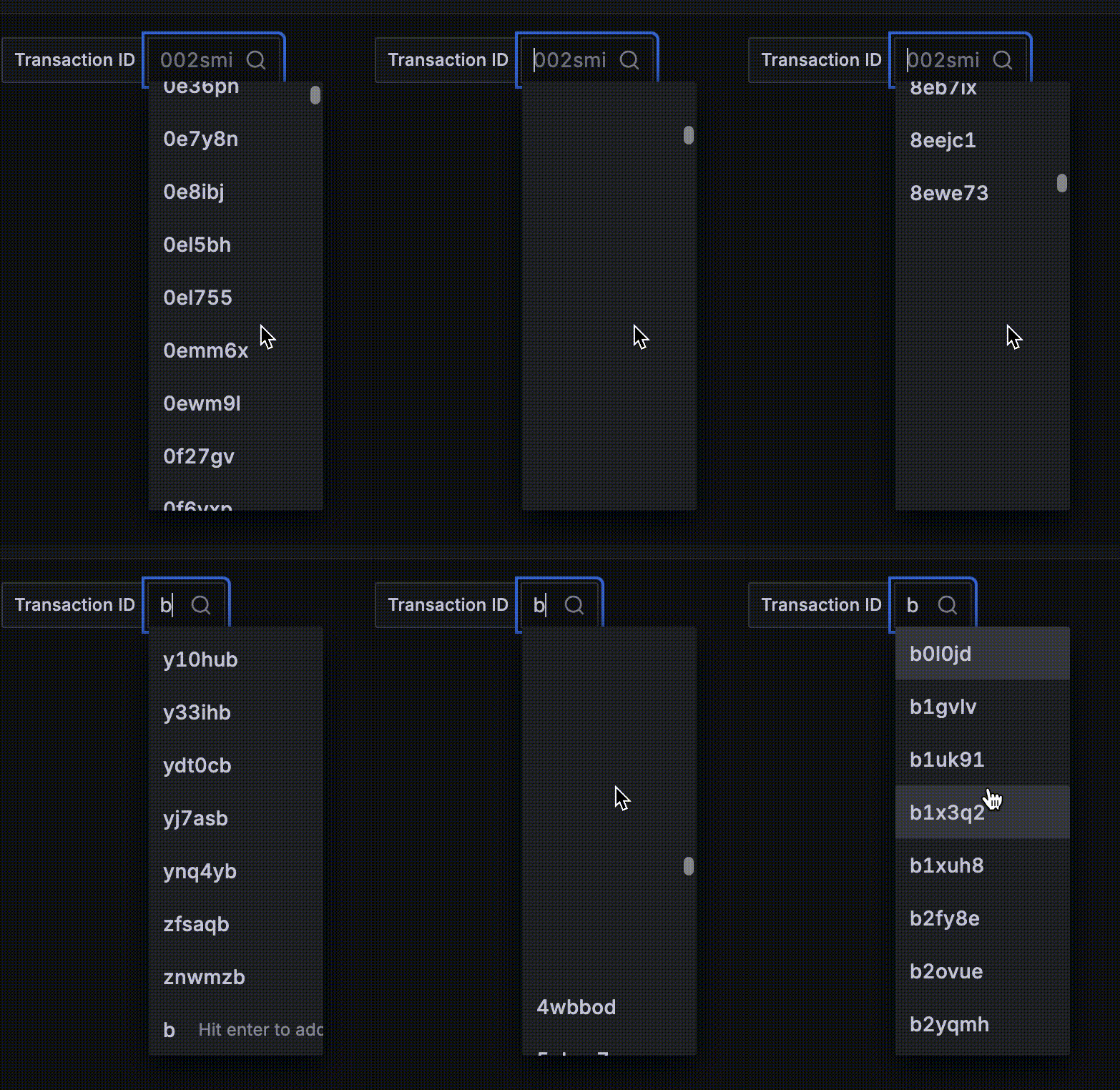
Going back to our anti-example application, look at the screen recording I took of a variable created from the metric exposed by the app. It’s just the beginning of the scrolling list and who knows where it would end!
4. Queries throw errors
As we just discussed, Prometheus does enforce some limits on how many data points you can query. Those limits might vary between deployments, but they are there regardless. With too many series each exposing the same amount of data points, those limits are easy to breach, resulting in errors like in this GitHub issue.
%3Aquality(90)%2F&w=3840&q=75)
Even if you don’t exceed Prometheus' limits, having queries like that will definitely increase resource usage of the instance, as well as the response time. Imagine if the dashboard you’ve created was composed of only such panels. If there was an incident, you’d lose money just waiting for your queries to execute—not to mention that an alert created on such a query might never fire when necessary.
5. Queries act 'strangely'
There is one more thing you need to worry about with high cardinality while querying the data. In our anti-example, we exposed a metric (demo_transactions_total) where you have a label transactionId representing a unique identifier of a transaction in your shop. Since you have a metric representing transactions, let's say you want to make a panel with the number of processed transactions—pretty easy, right? Expression like sum(increase(demo_transactions_total{}[5m])) should work, so you type it in and see:
%3Aquality(90)%2F&w=3840&q=75)
You stare at the screen, seeing 0 but you know you have multiple transactions. So then you query just the series and the data is there:
%3Aquality(90)%2F&w=3840&q=75)
Every transaction is recorded neatly, so why didn’t your expression work? It's because the Increase function, as its name suggests, calculates the increase in time series. Since all the series don’t change (they all report constant value: 1), there’s no increase in single time series. Therefore, the value of the function is 0 for each series. The sum of 0s is still 0.
So, no labels for me?
Don’t get too discouraged. Everything we've discussed so far is there to convince you to think before you expose the metrics, not to forbid you from ever adding labels to your metrics.
Labeling is a powerful tool for getting more out of your telemetry. Just use them carefully.
Here's a tip for how to handle that in practice. When you’re thinking of adding a new label, ask yourself: "Can I imagine myself writing down all the possible values of this label? "
- If the answer is, "Yes, with ease!" then add it—if it’s adding value to your telemetry. Examples of such labels might include states in state machine (e.g., transaction changes from new -> pending -> completed, then you can use the state as a label).
- If the answer is "Yes, I think I’ll be done in a day or two," then it's best to think about it. Chances are that there are multiple values, but you might be good with that. After all, Kubernetes metrics also expose pod names, of which there are multiple (though those are essential so your metrics won’t get dropped).
- If the answer is, "Are you nuts? It’s endless!" then you already have your answer. If you can’t even imagine the number of values, the metrics backend might not do that better. Basically anything numeric or continuous should not be used as a label. Examples might include: IP addresses, user names or IDs, dates, etc.
But I really need that information…
And you still can get it! Remember that metrics are only one of the observability pillars. For example, if you need a users’ ID, logs or traces can provide that information. I like to create metrics for the event of a transaction and a log message for more detailed information. In code it could look like that:
%3Aquality(90)%2F&w=3840&q=75)
With such instrumentation, I can create a panel showing the number of transactions and check logs for user and transaction IDs. Use all the tools you have at your disposal wisely and you’ll be unstoppable.
How can I check if I’m exposing high cardinality metrics already?
There’s one easy step to make sure—and two more complicated ones that require more permissions to do so.
Since you’re exposing the metrics, you must (at the risk of repeating myself) expose them somewhere, right? It might be some endpoint like /metrics, /stats, or /prometheus/stats depending on your application. Just go onto the application (in Kubernetes, port-forward the pod) and visit the page. All the metrics exposed by your application should be right there, as long as you don't have some crazy setup with multiple endpoints covered by multiple scrapers. It will look similarly to this:
%3Aquality(90)%2F&w=3840&q=75)
If you’re pushing metrics to PushGateway, you can always check the PushGateway in the same way, though PushGateway exposes a UI where you can find your metrics.
A nice way to get the gist of the number of metrics is to wait a few minutes, count the series exposed by the application, then refresh the page. If there are many more series, you’re probably heavily contributing to the cardinality. Don’t do that on the start of the application though—iit’s pretty normal for a fresh app to not have many series exposed right off the bat.
The second method requires access to the Prometheus instance’s UI. In there, there’s a tab in the top bar called Status. Click on that and go to the TSDB status page.
%3Aquality(90)%2F&w=3840&q=75)
Notice that it might take a while to load, depending on how many time series there are already.
This page is a comprehensive status of Prometheus' inner database. You can inspect how many time series are there in the database, how much memory are labels using (by default top 10), and—most importantly for our use case—what metrics and what labels have the highest value count. For our anti-example application it wasn't long before the transactionID label topped the list.
%3Aquality(90)%2F&w=3840&q=75)
The last method is limited to Grafana Cloud, but it might be the most comprehensive and intuitive one.
If you have access to the Cost Management tab in the Administration menu, go to the Metrics page (or ask someone to check that for you). In there you’ll find various tools to check for the cardinality of the metrics, like the cardinality management dashboard:
%3Aquality(90)%2F&w=3840&q=75)
You can filter down to the label that you’re interested in or the metric names you’d like to check. Definitely check that option out, as it’s the most intuitive and gives the best overview of the three!
Right, I’m definitely exposing high cardinality metrics
I hope you're asking "What now?" because otherwise I failed my mission.
First of all, clean them on your end. Review the labels you’re producing, change the code, and deploy (unless it’s 4 p.m. on Friday and it’s the last thing you’re doing at work). Notify the team responsible for the Prometheus instance and plan the work with them. It may be enough to wait for the metrics to be deleted with the end of retention, or maybe they will want to clean them up earlier (Prometheus supports deleting series via HTTP API).
The team might also decude that they should not be fixed. After all, Adaptive Metrics in Grafana Cloud can aggregate incoming series! So don’t worry so much and admit to your mistakes. It’s the only way they can be fixed!
Wrapping up
Going forward, when someone says they had to wake up and add resources to Prometheus' instance because of high cardinality, you’ll know what they're talking about. And hopefully, you won’t be the reason why they had to do that!
Grafana Cloud is the easiest way to get started with metrics, logs, traces, dashboards, and more. We have a generous forever-free tier and plans for every use case. Sign up for free now!
%3Aquality(90)%2F&w=3840&q=75)
%3Aquality(90)%2F&w=3840&q=75)


