
%3Aquality(90)%2F&w=3840&q=75)
%3Aquality(90)%2F&w=3840&q=75)
ChatOps that actually works: Grafana Cloud, Slack, and AI-powered observability


TL;DR
Context switching isn’t just inefficient—under pressure, it’s exhausting. It slows decision-making, increases the risk of mistakes, and makes even experienced engineers feel like they’re always a step behind the system they’re responsible for.
At Grafana Labs, we want to build tools that meet you where you are. That's why we embedded Grafana Assistant, our context-aware AI assistant, directly in Grafana Cloud. It's also why we’re excited to introduce the Grafana Cloud app for Slack, designed to bring observability and incident response closer to where teams already collaborate.
Currently in public preview, your team can now connect metrics, logs, alerts, and incident response workflows in Grafana Cloud directly to Slack. This means fewer links, fewer repeated questions, and less time spent hopping between tools just to answer basic questions about what’s happening in your systems right now.
Why incidents feel harder than they should
If you're part of an engineering team that's worked through an incident, you're undoubtedly familiar with this scenario: Someone pastes a dashboard link into Slack. Someone else replies with a log snippet. A third person asks, “Is this related to the deploy from earlier?” Someone answers “Maybe,” and then another alert fires.
No one is confused about where to talk; they're already in Slack. What’s missing is shared understanding.
As modern engineering teams, we don’t struggle with a lack of data. We struggle with fragmentation. Metrics live in one place, logs in another, traces somewhere else, alerts somewhere else again. And during an incident, the cost of jumping between all of them—mentally and operationally—adds up fast.
Slack became the place where decisions were made because that’s where people already were. But for a long time, it wasn’t where insight lived. ChatOps promised to bring operational work into the place teams already communicate, but in practice it often meant specialized commands and limited integrations—powerful in narrow cases, but hard to scale across the messy, ambiguous reality of modern systems.
That’s the gap modern AI can finally fill. Not by replacing engineers or automating decisions, but by reducing the cognitive load required to make sense of complex systems, directly inside the workflows teams already use.
AI that helps teams make sense of systems—in Slack
This is where Grafana Assistant comes in. Now available directly in Slack, Grafana Assistant helps teams fill gaps in understanding as incidents unfold—without switching tools or breaking the flow of collaboration. Instead of manually digging through dashboards or jumping between tools, a simple "@Grafana" mention lets engineers use natural language to explore what’s happening and decide what to do next, directly in Slack.
For example, you can ask about the overall health of the system. Grafana Assistant responds with a concise summary—calling out recent error rates, anomalous behavior, and the services most likely involved—and points your team toward the next questions worth asking.
%3Aquality(90)%2F&w=3840&q=75)
Understanding what’s happening is only part of the response. The next question is often who needs to be involved. From the same Slack conversation, you can ask about the on-call schedule for a particular team, helping you coordinate response without breaking context or slowing things down.
%3Aquality(90)%2F&w=3840&q=75)
Not every question in Slack is tied to an active issue. Often, engineers need to understand the platform itself—how features work, what options are available, and how to use them effectively. Instead of breaking focus to search through websites or documentation, you can ask Grafana Assistant general questions about Grafana Cloud and get clear, practical answers directly in Slack.
%3Aquality(90)%2F&w=3840&q=75)
Grafana Assistant can also be used via direct message, giving engineers a private space to explore questions, test ideas, and build understanding without adding noise to shared channels.
%3Aquality(90)%2F&w=3840&q=75)
Grafana Assistant also works in Slack on your phone, making it easy to check alerts, see what’s changed, and decide next steps when you’re on the go.
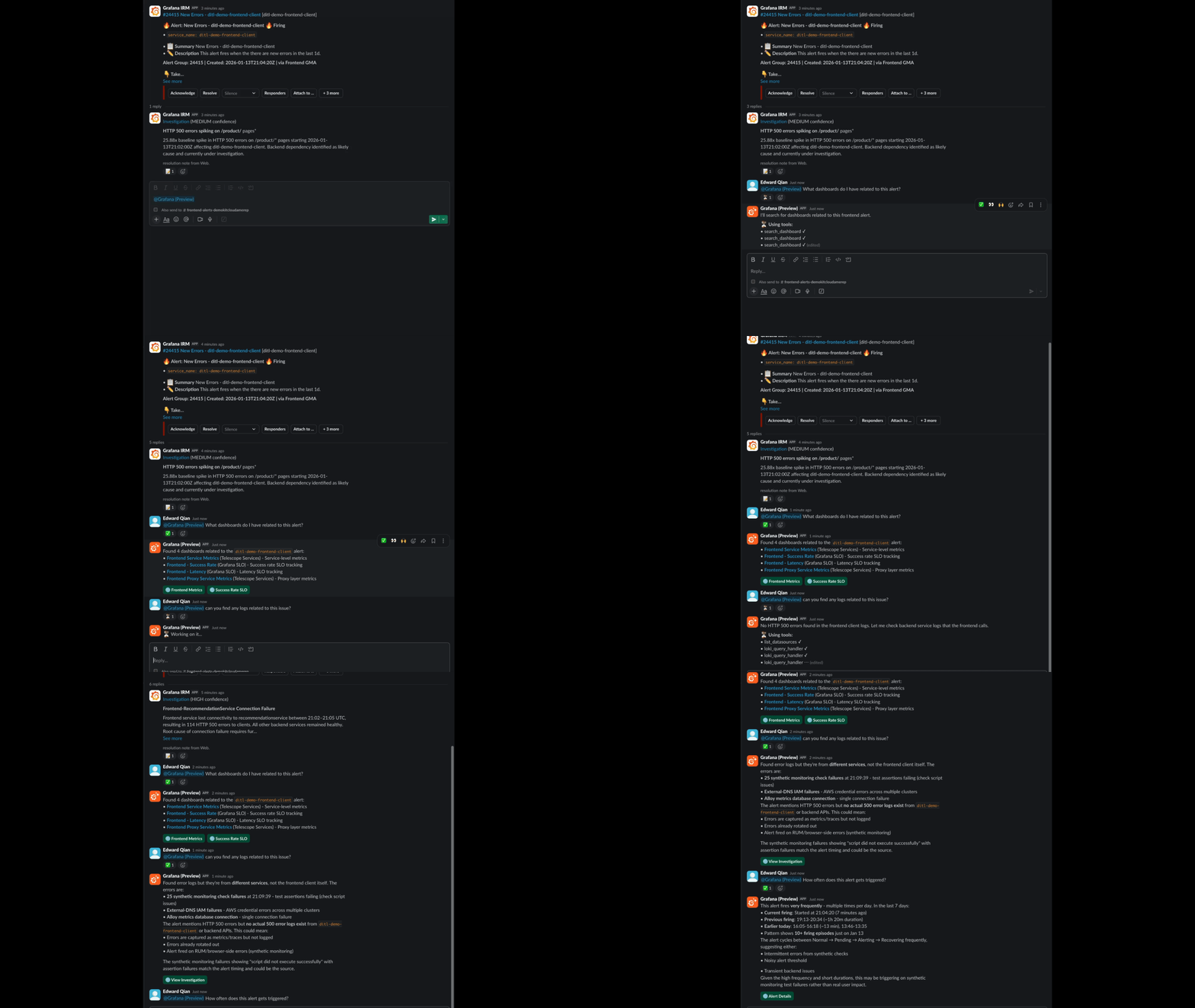
And Grafana Assistant doesn’t just rely on general LLM knowledge. It understands your Grafana environment and uses that context to provide explanations grounded in real data. The intent here is not magic answers, but faster understanding. AI as an assistive layer that helps teams orient themselves, rule things out, and focus their attention where it matters most.
Built for existing incident response workflows
Our new Slack app is a re-imagining of our existing IRM integration for Slack. For teams already using the integration, all existing IRM functionality continues to work as before. When the Grafana Cloud app is connected to your workspace, teams can:
- Receive firing alerts and notifications directly in Slack channels, so critical events are seen in real time
- Configure escalation chains and on-call notification preferences, ensuring the right people are notified at the right time
- Acknowledge, resolve, and add notes to alert groups without leaving Slack
- Automatically create dedicated incident channels and post timeline updates for each incident, giving responders a focused space for collaboration.
- Interact with incidents via slash commands, tracking and managing the lifecycle of incidents directly in Slack
What’s new with the Grafana Cloud app for Slack is that these workflows are enhanced. You’ll now benefit from improved experiences such as:
- Dashboard and panel unfurling: Relevant Grafana links (to dashboards, alerts, incidents, etc.) automatically expand with contextual preview cards, so teams spend less time deciphering URLs.
%3Aquality(90)%2F&w=3840&q=75)
- A new incident creation modal: Declare and configure incidents using a guided, interactive interface right inside Slack, reducing friction and keeping teams aligned from the start of a response.
%3Aquality(90)%2F&w=3840&q=75)
Getting started is straightforward
To get started with the Grafana Cloud app for Slack, navigate to Alerts & IRM > IRM > Integrations in Grafana Cloud, select Slack, and click Install integration. You’ll then be redirected to Slack to authorize the app for your workspace, verify the correct workspace, and choose a default channel. Once connected, the app can begin sending alerts, managing notifications, and collaborating on incidents directly within Slack.
ChatOps: finally fitting with the way teams work
The best tools don’t demand new habits. They fit into the ones teams already have. Slack is where engineering teams talk through problems, challenge assumptions, and align on next steps. By bringing observability and AI-driven insight directly into that space, the Grafana Cloud app for Slack makes the original ChatOps vision practical.
This is what we mean by actually useful AI: practical, explanatory, and designed to support human decision-making—not replace it.
Grafana Cloud is the easiest way to get started with metrics, logs, traces, dashboards, and more. We have a generous forever-free tier and plans for every use case. Sign up for free now!
FAQ: Grafana Cloud app for Slack
What is the Grafana Cloud app for Slack?
The Grafana Cloud app for Slack is an integration that connects your Slack workspace with your Grafana Cloud account. It enables teams to interact with observability data, alerts, incident workflows, and AI-assisted insights directly within Slack.
Where can I find the official documentation for the Grafana Cloud app for Slack?
For detailed instructions on how to get started with the Grafana Cloud app for Slack, see our docs page.
How does the Grafana Assistant work in Slack?
The Grafana Assistant lets you ask questions in natural language by mentioning @Grafana in Slack. It can fetch dashboards, investigate issues, and surface insights based on your query.
How can I manage incidents using the Grafana Cloud app for Slack?
You can manage incidents directly in Slack when Grafana Cloud IRM is enabled on your stack. Using slash commands or natural language prompts, you can declare and update incidents, automatically create and manage incident channels, assign roles and coordinate responders, escalate issues to on-call users or teams, track incident status and timelines, and more.
Do I need to be an IRM user to use the Grafana Cloud app for Slack?
No, you do not need to be an IRM user to install or use the Grafana Cloud app for Slack. Anyone can use the Slack app to interact with the Grafana Assistant (@Grafana) in Slack. However, IRM-specific features do require IRM access. To use capabilities such as:
- Declaring and managing incidents
- Participating in on-call rotations
- Escalating incidents or paging users
- Assigning incident roles and managing incident workflows
you must:
- Have Grafana IRM enabled on your stack, and
- Be assigned the appropriate IRM role and permissions in Grafana Cloud.
For more information, refer to the Manage on-call and incident response from Slack section of the documentation.
Can I use the Grafana Cloud app for Slack without AI?
Using AI is completely optional when using the Grafana Cloud app for Slack. AI is only used if you choose to interact with the Grafana Assistant by mentioning @Grafana.
You can use the Slack app without any AI features to:
- Manage incidents and on-call workflows (with the appropriate IRM permissions)
- Use
/grafanaslash commands
If you don’t use the Assistant (@Grafana mention):
- No AI-driven interactions occur
- The Slack app functions as a standard integration
Is there any additional cost to use the Grafana Cloud app for Slack?
The Grafana Cloud app for Slack is included with all Grafana Cloud plans, including the free tier, and installing or using the app does not create a separate line item on your Grafana Cloud bill.
If you are an existing Grafana IRM user, there is no additional cost to use the incident response and on-call features through Slack. Alerts, notifications, and Slack-based workflows themselves do not incur extra charges. If you are not an existing IRM user, you will not be able to use the incident response features of the Slack app.
During the public preview phase, using the Grafana Assistant (@Grafana) via Slack does not count as active Assistant usage and thus is free to use.
%3Aquality(90)%2F&w=3840&q=75)
%3Aquality(90)%2F&w=3840&q=75)


