

%3Aquality(90)%2F&w=3840&q=75)
eBPF profiling pros and cons


This post was originally published on pyroscope.io. Grafana Labs acquired Pyrsocope in 2023.
What is eBPF?
At its root, eBPF takes advantage of the kernel’s privileged ability to oversee and control the entire system. With eBPF, you can run sandboxed programs in a privileged context such as the operating system kernel. To better understand the implications and learn more, check out this blog post, which goes into much more detail. For profiling, this typically means running a program that pulls stack traces for the whole system at a constant rate (e.g., 100Hz).
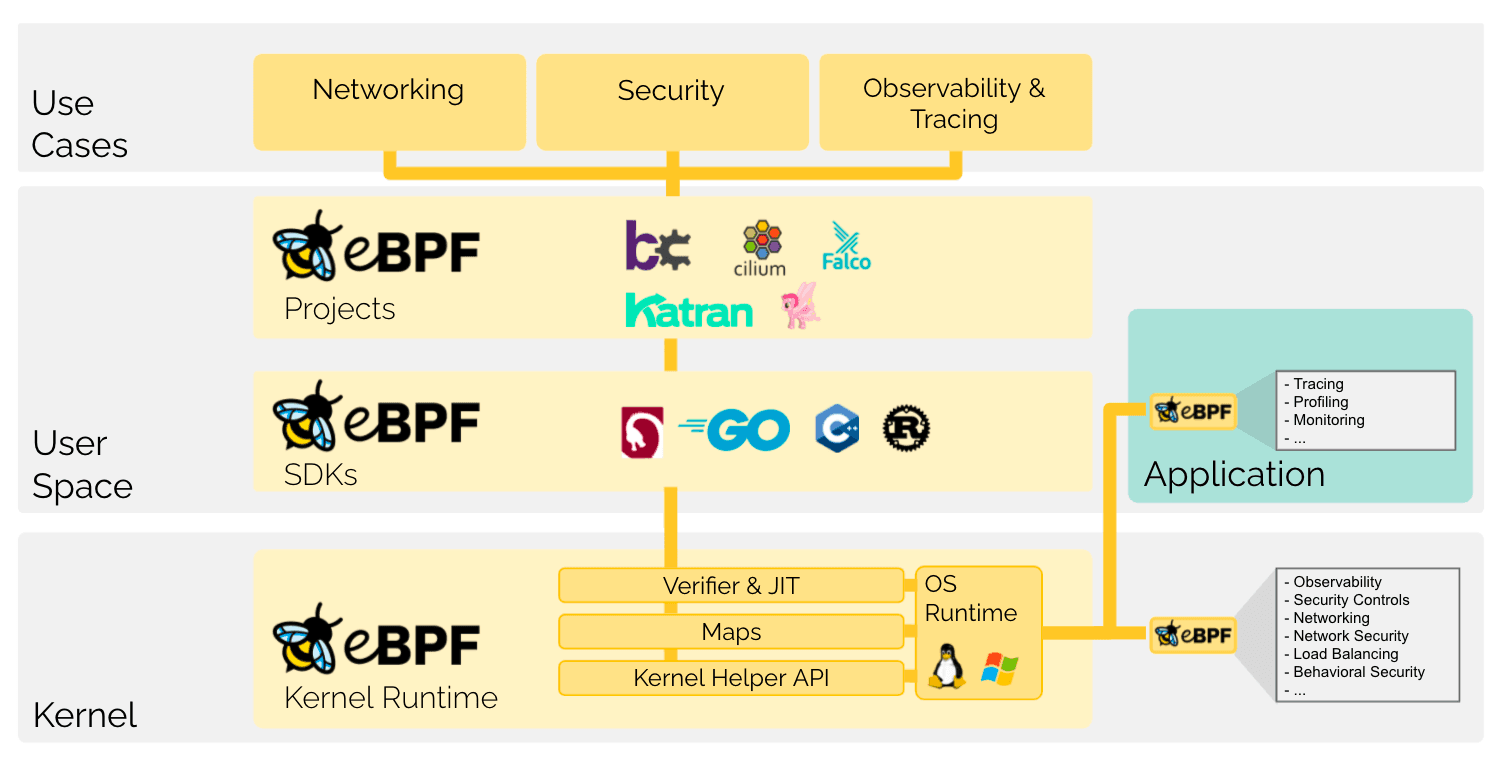
As you can see in the diagram, some of the most popular use cases for eBPF are related to networking, security, and most relevant to this blog post — observability (logs, metrics, traces, and profiles).
Landscape of eBPF profiling
Over the past few years there has been significant growth in the profiling space as well as the eBPF space and there are a few notable companies and open source projects innovating at the intersection of profiling and eBPF. Some examples include:
- Prodfiler (closed source)
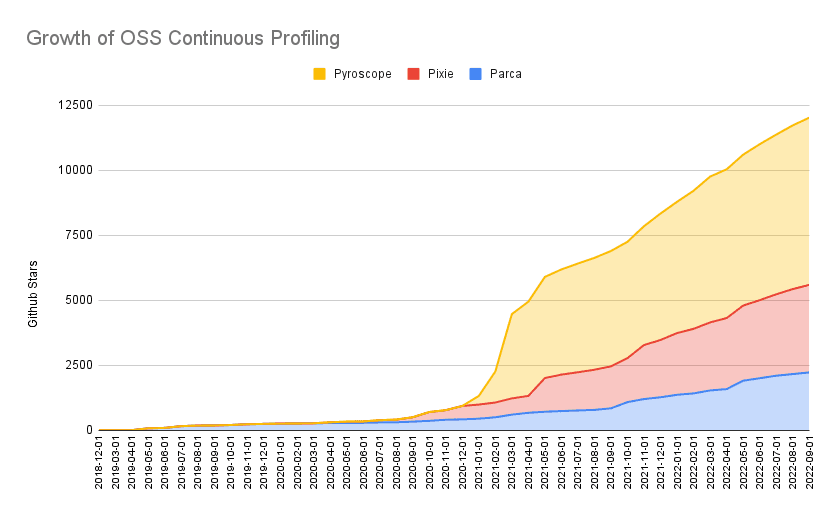
The collective growth is representative of the rapidly growing interest in this space as projects like Pyroscope, Pixie, and Parca all gained a significant amount of traction over this time period.
It’s also worth noting that the growth of profiling is not limited to eBPF; the prevalence of profiling tools has grown to the point where it is now possible to find a tool for almost any language or runtime. As a result, profiling is more frequently being considered a first-class citizen in observability suites.
For example, OpenTelemetry has kicked off efforts to standardize profiling in order to enable more effective observability. For more information on those efforts check out the #otel-profiling channel on the CNCF Slack!
Pros and cons of eBPF and non-eBPF profiling
When it comes to modern continuous profiling, there are two ways of getting profiling data:
- User-space level: Popular profilers like pprof, async-profiler, rbspy, py-spy, pprof-rs, dotnet-trace, etc. operate at this level
- Kernel level: eBPF profilers and linux perf are able to get stacktraces for the whole system from the kernel
Pyroscope is designed to be language agnostic and supports ingesting profiles originating from either or both of these methods.
However, each approach comes with its own set of pros and cons:
Native-language profiling pros and cons
Pros
Cons
Ability to tag application code in flexible way (e.g., tagging spans, controllers, functions)
Complexity for large multi-language systems to get fleet-wide view
Ability to profile various specific parts of code (e.g., Lambda functions, test suites, scripts)
Constraints on ability to auto-tag infrastructure metadata (e.g., Kubernetes)
Ability/simplicity to profile other types of data (e.g., memory profiling, goroutines)
Consistency of access to symbols across all languages
Simplicity of using in local development
eBPF profiling pros and cons
Pros
Cons
Ability to get fleet-wide, whole-system metrics easily
Requirements call for particular Linux kernel versions
Ability to auto-tag metadata that’s available when profiling whole system (e.g., Kubernetes pods, namespaces)
Constraints on being able to tag user-level code
Simplicity of adding profiling at infrastructure level (e.g., multi-language systems)
Constraints on performant ways to retrieve certain profile types (e.g., memory, goroutines)
Consistency of access to symbols across all languages
Difficulty of developing locally for developers
Simplicity of using in local development
Pyroscope’s solution: merge eBPF profiling and native-language profiling
We believe that there’s benefits to both eBPF and native-language profiling and our focus long term is to integrate them together seamlessly in Pyroscope. The cons of eBPF profiling are the pros of native-language profiling and vice versa. As a result, the best way to get the most value out of profiling itself is to actually combine the two.
Profiling compiled languages (Golang, Java, C++, etc.)
When profiling compiled languages, like Golang, the eBPF profiler is able to get very similar information to the non-eBPF profiler.
TOGGLE FLAME GRAPH HERE
Profiling interpreted languages (Ruby, Python, etc.)
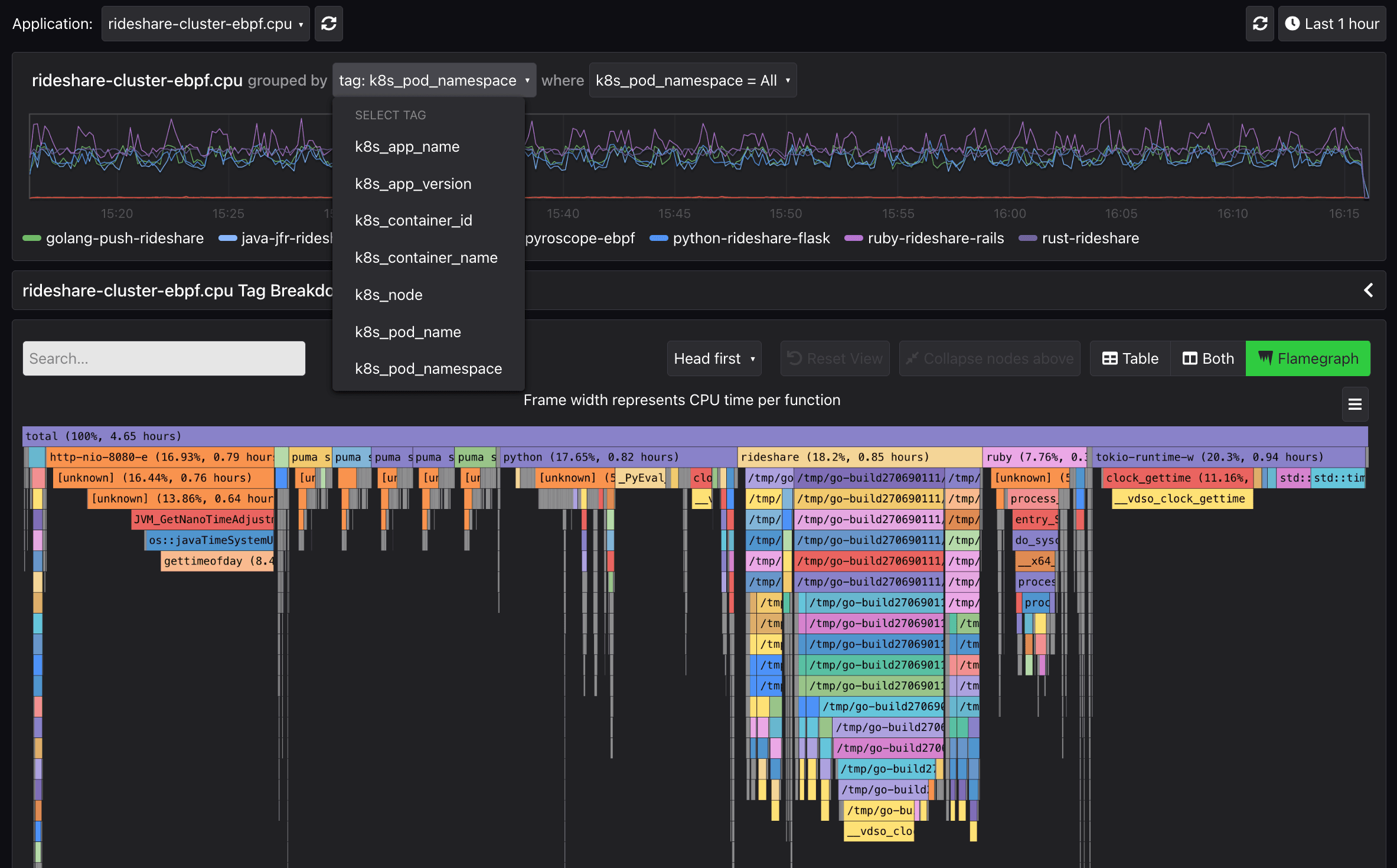
With interpreted languages like Ruby or Python, stack traces in their runtimes are not easily accessible from the kernel. As a result, the eBPF profiler is not able to parse user-space stack traces for interpreted languages. You can see how the kernel interprets stack traces of compiled languages (Go) vs. how the kernel interprets stack traces from interpreted languages (Ruby/Python) in the examples below.
TOGGLE FLAME GRAPH HERE
How to use eBPF for cluster-level profiling
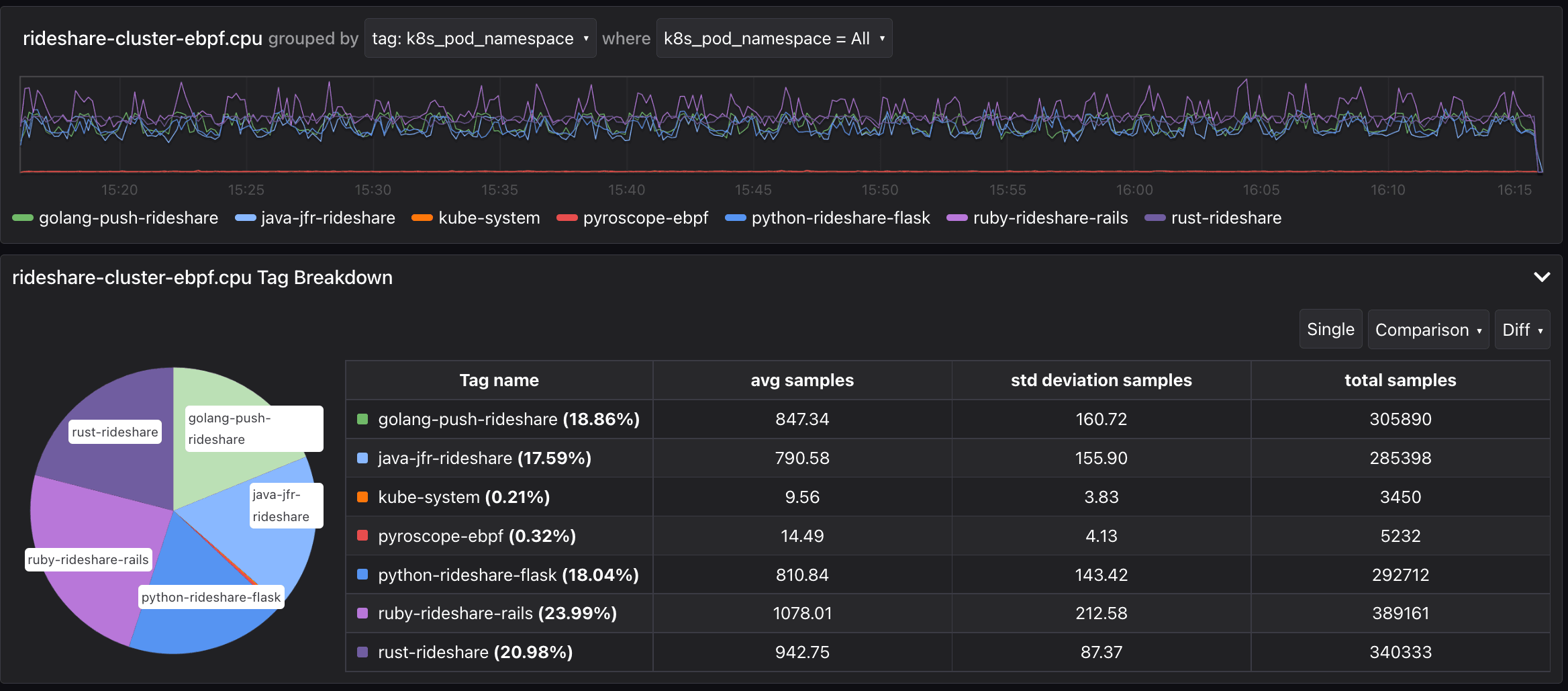
Using Pyroscope’s auto-tagging feature in the eBPF integration you can get a breakdown of CPU usage by Kubernetes metadata. In this case, we can see which namespace is consuming the most CPU resources for our demo instance after adding Pyroscope with two lines of code:
# Add Pyroscope eBPF integration to your kubernetes cluster
helm repo add pyroscope-io https://pyroscope-io.github.io/helm-chart
helm install pyroscope-ebpf pyroscope-io/pyroscope-ebpf
And you can also see the flame graph representing CPU utilization for the entire cluster:
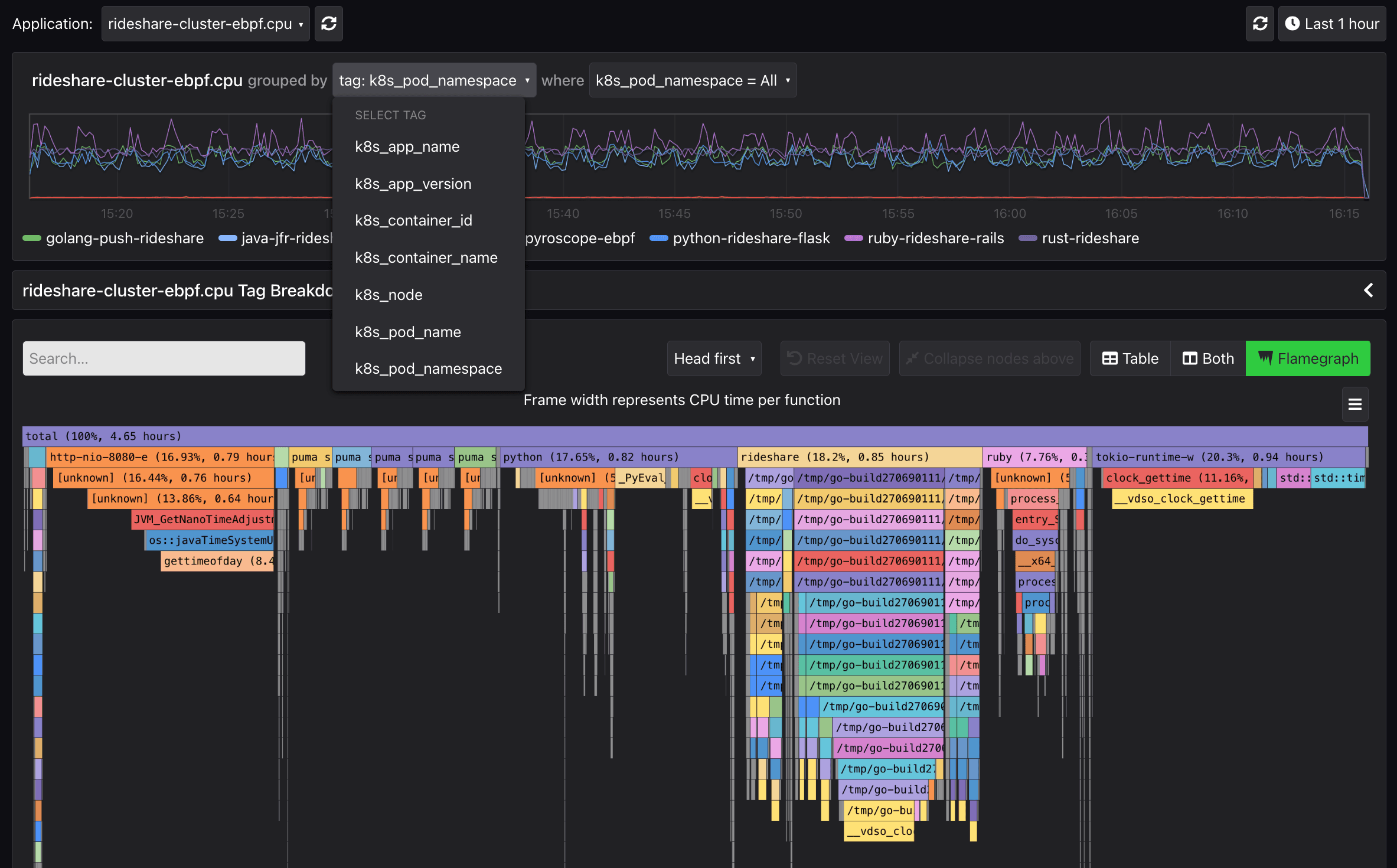
Internally, we use a variety of integrations to get both a high level overview of what’s going on in our cluster, but also a very detailed view for each runtime that we use:
- We use our eBPF integration for our Kubernetes cluster
- We use RubyGems, pip package, Go client, and Java client with tags for our k8s services and github action test suites
- We us our otel-profiling integrations (Go, Java) to get span-specific profiles inside our traces
- We use our Lambda extension to profile the code inside Lambda functions
The next evolution: merging kernel and user-space profiling
With the help of our community, we’ve charted out several promising paths to improving our integrations by merging the eBPF and user-space profiles within the integration. One of the most promising approaches is using:
- Non-eBPF language-specific integrations for more granular control and analytic capabilities (i.e. dynamic tags and labels)
- eBPF integration for a comprehensive view of the whole cluster
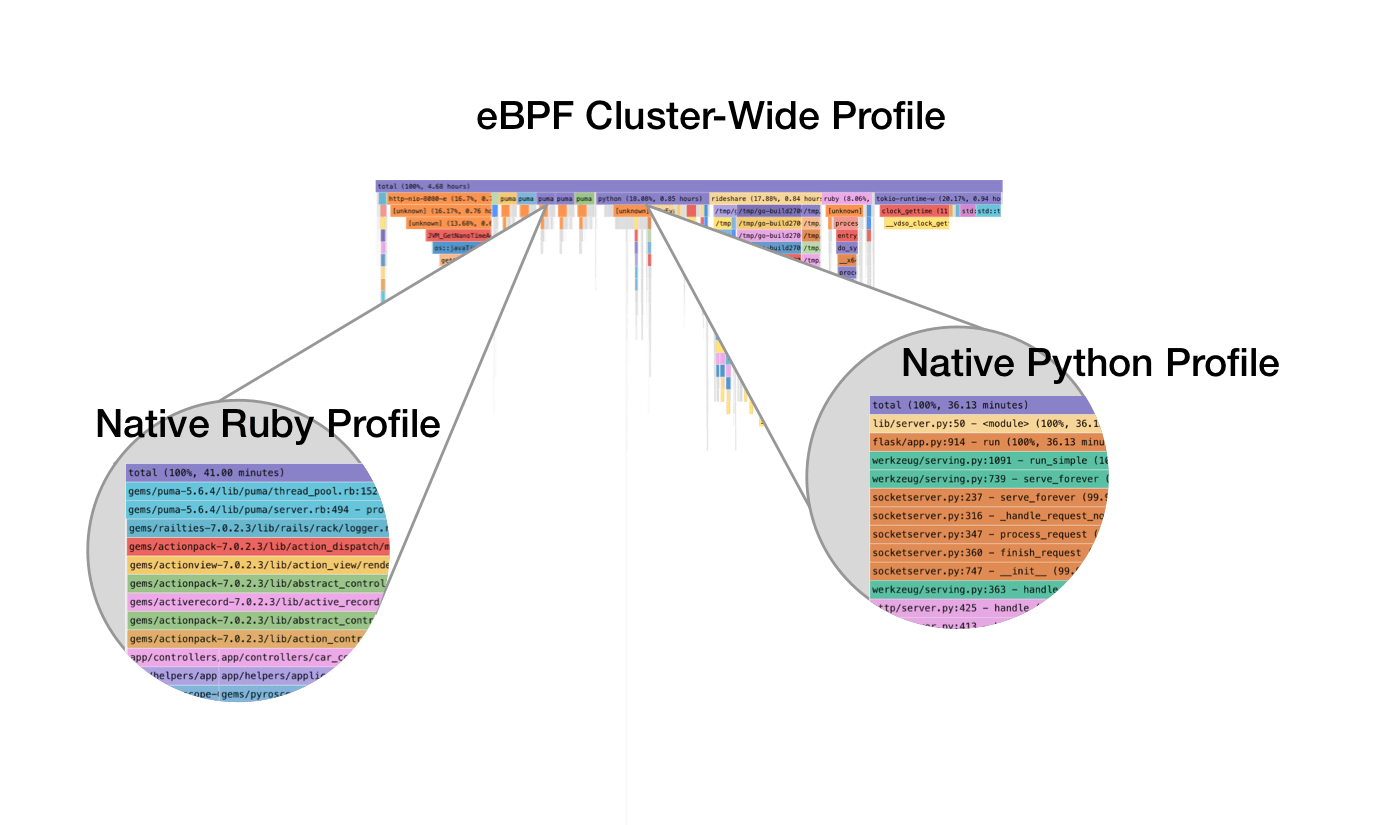
Stay tuned for more progress on these efforts. In them meantime check out the docs to get started with eBPF or the other integrations!
%3Aquality(90)%2F&w=3840&q=75)
%3Aquality(90)%2F&w=3840&q=75)


