Plugins 〉Radio Panel
Radio Panel
Radio Panel
Interactive vinyl-style radio panel for Grafana. The panel supports weekday-based station scheduling, optional timed override, and now playing metadata per station.
Screenshots
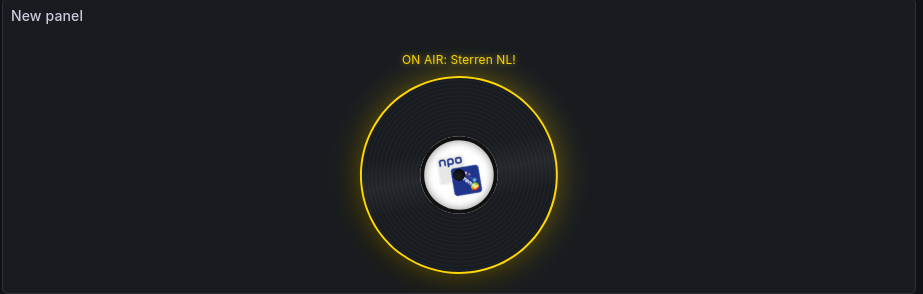
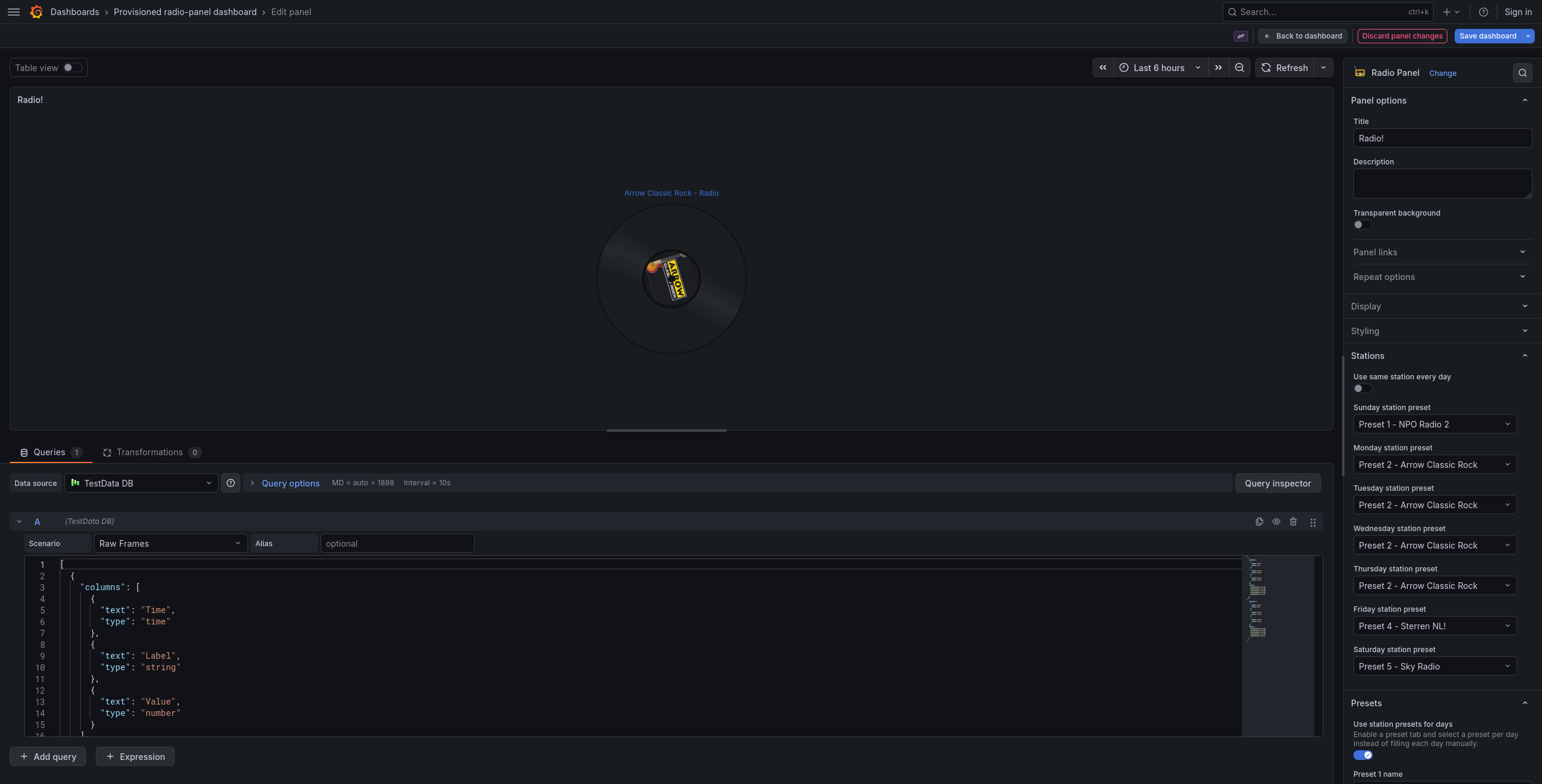
Features
- Clickable vinyl disk UI that plays a configured radio stream.
- Day-by-day station setup or one shared station for all days.
- Optional station presets with per-day preset selection.
- Timed override for selected weekdays starting at a specific hour.
- Now playing presets for NPO Sterren NL, Arrow Classic Rock, and custom JSON APIs.
- Optional continuous playback mode for dashboard playlist transitions.
- Styling controls for panel, disk, and label borders.
- Grafana variable support in station name, stream URL, and logo URL.
Station presets
You can optionally use presets as a faster way to configure day schedules.
- Enable
Use station presets for daysin panel options. - Configure preset slots in the
Presetscategory. - Select a preset per day in the
Stationscategory. - Choose
No presetfor a day to use that day's custom station fields.
This is additive and non-breaking: existing day-by-day station setup continues to work.
Now Playing and CORS
This panel runs in the browser as a Grafana panel plugin and cannot use Grafana's server-side data source proxy for arbitrary HTTP requests. Some external now-playing APIs block browser-origin requests due to CORS policy.
The Arrow Classic Rock preset uses r.jina.ai as a default CORS-friendly wrapper so metadata can be fetched in browser context.
You can set one global CORS proxy for all stations with the panel option Now playing CORS proxy URL.
- Leave empty to use the preset default behavior.
- Use a URL prefix (for example
https://r.jina.ai/) to prepend the API URL. - Or use
{{url}}placeholder when your proxy expects a query parameter (for examplehttps://my-proxy.example/fetch?url={{url}}).
When a now-playing request is blocked by CORS (or another network-level browser restriction), the panel stops polling that endpoint for the active station and falls back to normal station/status text. To keep now-playing metadata enabled, use endpoints that allow browser CORS or place a CORS-enabled proxy in front of the metadata API.
Add your own now-playing API
Yes. You can configure your own endpoint without code changes:
- Set the station
now playing presettoCustom JSON API. - Fill in
now playing API URLwith your endpoint. - Optionally set
Now playing CORS proxy URLwhen the endpoint blocks browser CORS.
The custom parser tries common keys such as artist, title, song, track, image, and coverUrl.
Requirements
- Grafana
>=12.3.0
Support
Grafana Cloud Free
- Free tier: Limited to 3 users
- Paid plans: $55 / user / month above included usage
- Access to all Enterprise Plugins
- Fully managed service (not available to self-manage)
Self-hosted Grafana Enterprise
- Access to all Enterprise plugins
- All Grafana Enterprise features
- Self-manage on your own infrastructure
Grafana Cloud Free
- Free tier: Limited to 3 users
- Paid plans: $55 / user / month above included usage
- Access to all Enterprise Plugins
- Fully managed service (not available to self-manage)
Self-hosted Grafana Enterprise
- Access to all Enterprise plugins
- All Grafana Enterprise features
- Self-manage on your own infrastructure
Grafana Cloud Free
- Free tier: Limited to 3 users
- Paid plans: $55 / user / month above included usage
- Access to all Enterprise Plugins
- Fully managed service (not available to self-manage)
Self-hosted Grafana Enterprise
- Access to all Enterprise plugins
- All Grafana Enterprise features
- Self-manage on your own infrastructure
Grafana Cloud Free
- Free tier: Limited to 3 users
- Paid plans: $55 / user / month above included usage
- Access to all Enterprise Plugins
- Fully managed service (not available to self-manage)
Self-hosted Grafana Enterprise
- Access to all Enterprise plugins
- All Grafana Enterprise features
- Self-manage on your own infrastructure
Grafana Cloud Free
- Free tier: Limited to 3 users
- Paid plans: $55 / user / month above included usage
- Access to all Enterprise Plugins
- Fully managed service (not available to self-manage)
Self-hosted Grafana Enterprise
- Access to all Enterprise plugins
- All Grafana Enterprise features
- Self-manage on your own infrastructure
Installing Radio Panel on Grafana Cloud:
Installing plugins on a Grafana Cloud instance is a one-click install; same with updates. Cool, right?
Note that it could take up to 1 minute to see the plugin show up in your Grafana.
Warning
Plugin installation from this page will be removed in February 2026. Use the Plugin Catalog in your Grafana instance instead. Refer to Install a plugin in the Grafana documentation for more information.
Installing plugins on a Grafana Cloud instance is a one-click install; same with updates. Cool, right?
Note that it could take up to 1 minute to see the plugin show up in your Grafana.
Warning
Plugin installation from this page will be removed in February 2026. Use the Plugin Catalog in your Grafana instance instead. Refer to Install a plugin in the Grafana documentation for more information.
Installing plugins on a Grafana Cloud instance is a one-click install; same with updates. Cool, right?
Note that it could take up to 1 minute to see the plugin show up in your Grafana.
Warning
Plugin installation from this page will be removed in February 2026. Use the Plugin Catalog in your Grafana instance instead. Refer to Install a plugin in the Grafana documentation for more information.
Installing plugins on a Grafana Cloud instance is a one-click install; same with updates. Cool, right?
Note that it could take up to 1 minute to see the plugin show up in your Grafana.
Warning
Plugin installation from this page will be removed in February 2026. Use the Plugin Catalog in your Grafana instance instead. Refer to Install a plugin in the Grafana documentation for more information.
Installing plugins on a Grafana Cloud instance is a one-click install; same with updates. Cool, right?
Note that it could take up to 1 minute to see the plugin show up in your Grafana.
Warning
Plugin installation from this page will be removed in February 2026. Use the Plugin Catalog in your Grafana instance instead. Refer to Install a plugin in the Grafana documentation for more information.
Installing plugins on a Grafana Cloud instance is a one-click install; same with updates. Cool, right?
Note that it could take up to 1 minute to see the plugin show up in your Grafana.
Installing plugins on a Grafana Cloud instance is a one-click install; same with updates. Cool, right?
Note that it could take up to 1 minute to see the plugin show up in your Grafana.
Warning
Plugin installation from this page will be removed in February 2026. Use the Plugin Catalog in your Grafana instance instead. Refer to Install a plugin in the Grafana documentation for more information.
Installing plugins on a Grafana Cloud instance is a one-click install; same with updates. Cool, right?
Note that it could take up to 1 minute to see the plugin show up in your Grafana.
Marketplace plugins
This is a paid plugin developed by a marketplace partner. To purchase an entitlement, sign in first, then fill out the contact form.
Get this plugin
This is a paid for plugin developed by a marketplace partner. To purchase entitlement please fill out the contact us form.
What to expect:
- Grafana Labs will reach out to discuss your needs
- Payment will be taken by Grafana Labs
- Once purchased the plugin will be available for you to install (cloud) or a signed version will be provided (on-premise)
Thank you! We will be in touch.
For more information, visit the docs on plugin installation.
Installing on a local Grafana:
For local instances, plugins are installed and updated via a simple CLI command. Plugins are not updated automatically, however you will be notified when updates are available right within your Grafana.
1. Install the Panel
Use the grafana-cli tool to install Radio Panel from the commandline:
grafana-cli plugins install The plugin will be installed into your grafana plugins directory; the default is /var/lib/grafana/plugins. More information on the cli tool.
Alternatively, you can manually download the .zip file for your architecture below and unpack it into your grafana plugins directory.
Alternatively, you can manually download the .zip file and unpack it into your grafana plugins directory.
2. Add the Panel to a Dashboard
Installed panels are available immediately in the Dashboards section in your Grafana main menu, and can be added like any other core panel in Grafana.
To see a list of installed panels, click the Plugins item in the main menu. Both core panels and installed panels will appear.
Changelog
1.2.0 (2026-04-02)
Added
- Added optional station presets as a non-breaking addition to day-by-day configuration.
- Added five editable preset slots with stream URL, logo URL, and now playing settings.
- Added per-day preset selection with fallback to custom day station fields when no preset is selected.
Changed
- Refactored panel option builder to helper-based station/day option generation to reduce duplication and regression risk.
- Updated day preset selector to show dynamic preset display names based on configured station names.
- New Screenshot 2.
1.1.3 (2026-04-02)
Changed
- More complete readme
1.1.2 (2026-04-02)
Added
- New logo
Changed
- Better restart stream handling
1.1 (2026-03-31)
Added
- Added automatic stream watchdog restart when playback stalls for 10 seconds.
- Added support for Custom JSON now playing APIs.
- Added a global CORS proxy setting for now playing API requests.
Changed
- Updated Arrow Classic Rock now playing preset to use a CORS-friendly proxy route by default.
- Improved now playing parsing for wrapped JSON and markdown-like proxy responses.
- Updated default option text labels to English.
Fixed
- Updated panel styles to use Grafana theme tokens instead of hardcoded colors and fonts.
- Added cleanup for the shared global audio element when the last panel instance unmounts.
- Reduced repeated now playing polling noise after fetch failures.
1.0.1 (2026-03-09)
Fixed
- Updated build dependency
copy-webpack-pluginto14.0.0. - Removed high-severity
serialize-javascriptvulnerability from lockfile dependency tree.
1.0.0 (2026-03-09)
Added
- Initial community release of LP Radio Panel.
- Vinyl-style interactive radio playback panel.
- Weekday station scheduling with optional timed override.
- Now playing presets for NPO Sterren NL and Arrow Classic Rock.
- Playlist-friendly continuous playback option.
- Styling controls and Grafana variable support for station settings.


