
Compass Panel


Overview / Introduction
Compass is a Grafana visualization plugin for displaying heading or orientation data on a compass dial.
It is especially useful for ship navigation, robotics, UAVs, or any time-series data representing direction in degrees (0–360).
Optionally the panel can display true and/or apparent wind angle.

Features
- Smoothly animated compass dial that rotates with heading values.
- Multiple needle types:
- Default: classic north/south needle with red tip.
- Arrow: bold arrow-style needle.
- Ship: minimal ship silhouette pointing forward.
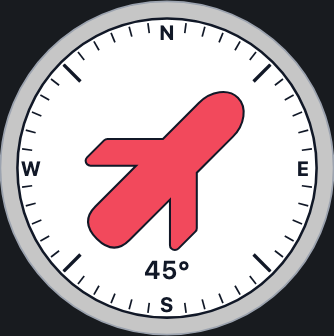
- Airplane: swept-wing top-down aircraft silhouette.
- Helicopter: 4-blade helicopter silhouette.
- Underwater Drone: glider-shaped AUV silhouette.
- Quadcopter: four-arm drone frame and rotor silhouette.
- ROV: Remotely Operated Vehicle silhouette.
- Custom SVG: load your own vector as a needle.
- Custom PNG: load your own bitmap as a needle.
- Cardinal direction labels (N/E/S/W).
- Configurable colors for bezel, dial, text, needle, and tail.
- Minor and major tick marks for easy orientation.
- Optional numeric heading readout (e.g.
273°). - Optional indicator and numeric heading for true wind direction.
- Optional indicator and numeric heading for apparent wind direction.
- Optional numeric display for true wind speed.
- Optional numeric display for apparent wind speed.
Getting Started
- Install the plugin by copying it into Grafana’s plugin directory or installing from the Grafana Marketplace.
- Restart Grafana.
- Add a new panel and select Compass as the visualization.
- Configure the data source and select the field representing heading (0–360 degrees).
Options
Data Options
- Heading Field: Select the numeric field in your series that represents heading in degrees.
- Truewind Direction Field: Select the numeric field in your series that represents true wind direction, as an absolute compass bearing (0-360°, independent of the ship's heading).
- Truewind Velocity Field: Select the numeric field in your series that represents truewind velocity in degrees.
- Apparent wind Direction Field: Select the numeric field in your series that represents apparent wind angle, relative to the ship's bow (0-360°, as read directly off a wind vane/anemometer). This is not an absolute compass bearing — a rotational wind sensor can only measure angle relative to the bow it's mounted on, so the panel combines it with the Heading Field to compute the wind's true position on the compass. If your data source already outputs an absolute apparent wind direction (e.g. some chartplotters/NMEA multiplexers compute this for you), subtract the heading from it upstream to get a bow-relative angle before wiring it in here.
- Apparent wind Velocity Field: Select the numeric field in your series that represents apparent wind velocity in degrees.
Display Options
- Show Labels: Toggle cardinal direction labels (N/E/S/W).
- Show Numeric Heading: Display a numeric degree readout below the compass.
- Truewind Velocity UOM: Select the unit of measure for the truewind.
- Apparent wind Velocity UOM: Select the unit of measure for the apparent wind.
- Rotation Mode: Select to rotate the needle (North up) or rotate the dial (Bow up).
- Animation Duration (ms): How long needle/dial/wind-arrow rotations take to animate (default 600ms). Lower this, or set it to 0 to disable animation, for high-frequency live data (e.g. Grafana Live streams updating tens of times per second) where the default speed lags behind incoming updates.
Needle Options
Needle Type
Default- classic north/south needle with red tip.Arrow- bold arrow-style needle.Ship- minimal ship silhouette pointing forward.Airplane- swept-wing top-down aircraft silhouette.Helicopter- 4-blade helicopter silhouette.Underwater Drone- glider-shaped AUV silhouette.Quadcopter- four-arm drone frame and rotor silhouette.ROV- Remotely Operated Vehicle silhouette.Custom SVG– Load a custom vector (provide URL or relative path)Custom PNG– Load a custom image (provide URL or relative path)
Needle Color: Color of the primary needle (or the front rotor, for the quadcopter).
Tail Color: Color of the tail (for the default needle).
Custom SVG: Path/URL to your own SVG asset.
Custom PNG: Path/URL to your own PNG asset.
Colors
- Dial Color – Background color of compass dial.
- Bezel Color – Color of outer rim.
- Text Color – Color of labels, ticks, numeric heading.
- True Wind Color: Color of the true wind indicator and labels.
- Apparent Wind Color: Color of the apparent wind indicator and labels.
Screenshots
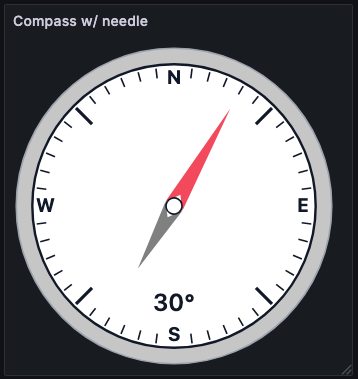
Default needle with labels and numeric heading enabled
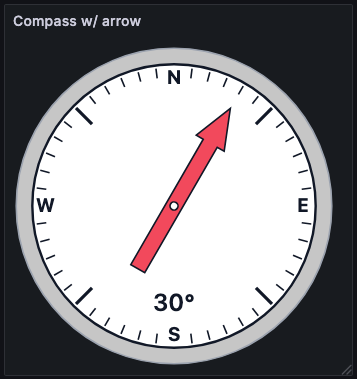
Arrow needle with labels and numeric heading enabled
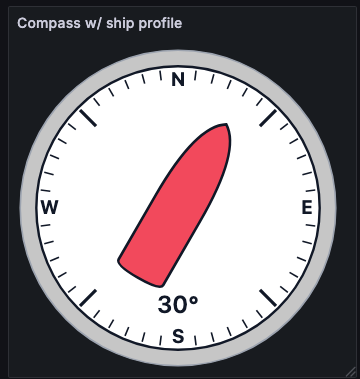
Ship silhouette needle for vessel heading visualization
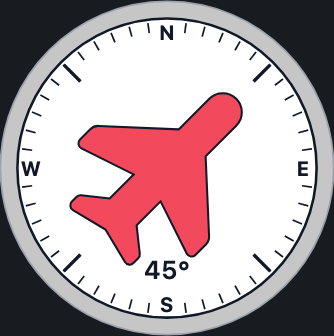
Airplane needle for aircraft heading visualization
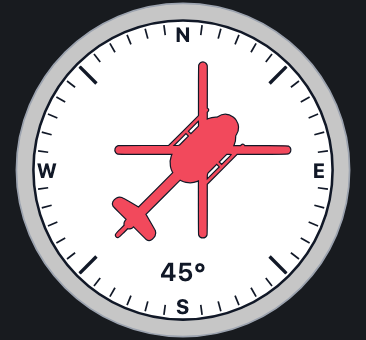
Helicopter needle for rotorcraft heading visualization
Underwater drone needle for ROV/AUV heading visualization
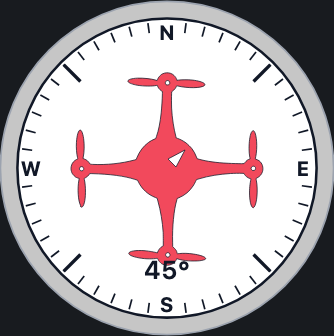
Quadcopter needle for rotorcraft heading visualization
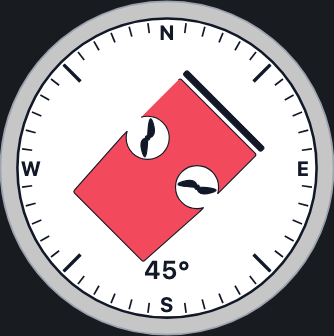
ROV needle for underwater vehicle heading visualization
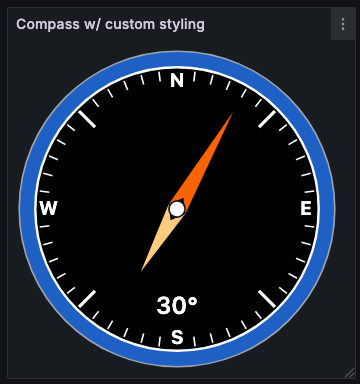
Default needle with custom styling visualization
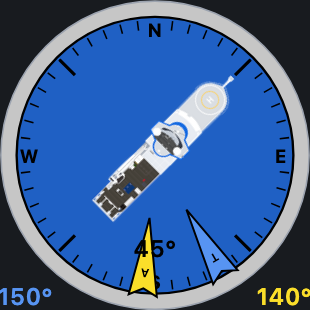
Custom PNG needle styling visualization
North up orientation for wind indicator visualization

Bow up orientation for wind indicator visualization
Grafana Cloud
Connect any plugin in Grafana Cloud.
- 150+ data source integrations
- Grafana Assistant - AI that correlates your data, builds queries, and answers questions
- 10k Prometheus metrics + 50 GB logs, traces, and profiles on the free tier
- ...and more
Insights
- Adoption
Running on 516 active Grafana instances.
- Activity
Last updated 16 Sep 2026.
3 releases in the past year.
- Version
- 2.2.0
- Dependencies
- Grafana >=12.0.10 <12.1 || >=12.1.7 <12.2 || >=12.2.5
- Developer
- oceandatatools
Grafana Cloud
Connect any plugin in Grafana Cloud.
- 150+ data source integrations
- Grafana Assistant - AI that correlates your data, builds queries, and answers questions
- 10k Prometheus metrics + 50 GB logs, traces, and profiles on the free tier
- ...and more