Plugins 〉Grafmaid
Grafmaid
Grafmaid
Grafana + Mermaid.js = Grafmaid
A Grafana panel plugin that renders Mermaid.js diagrams with live data from queries, dashboard variables, and threshold-based styling — turning static architecture diagrams into dynamic, data-driven visuals.

Screenshots


Features
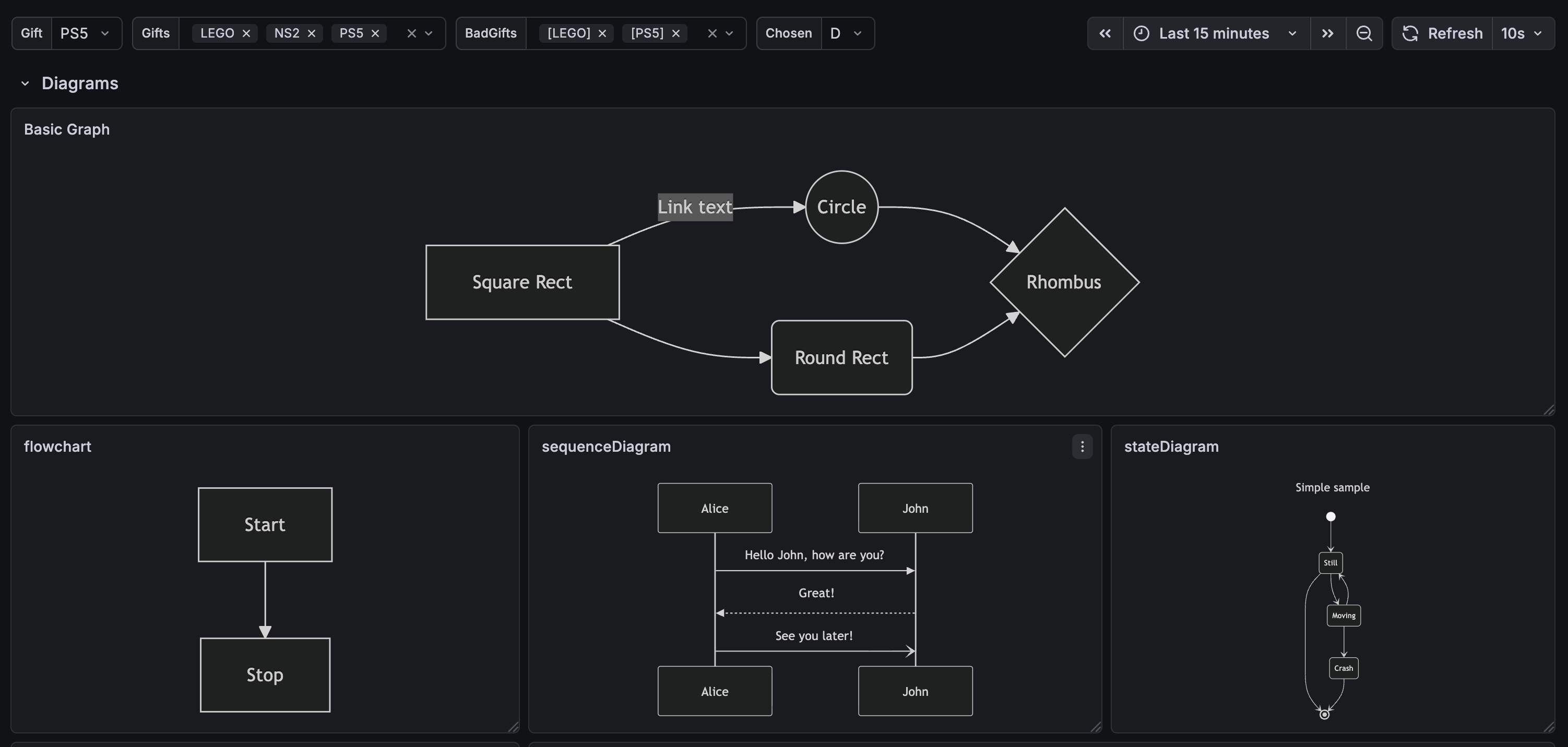
- All Mermaid diagram types — Flowchart, Sequence, Class, State, ER, Gantt, Pie, Mindmap, Timeline, Git Graph, C4, and more
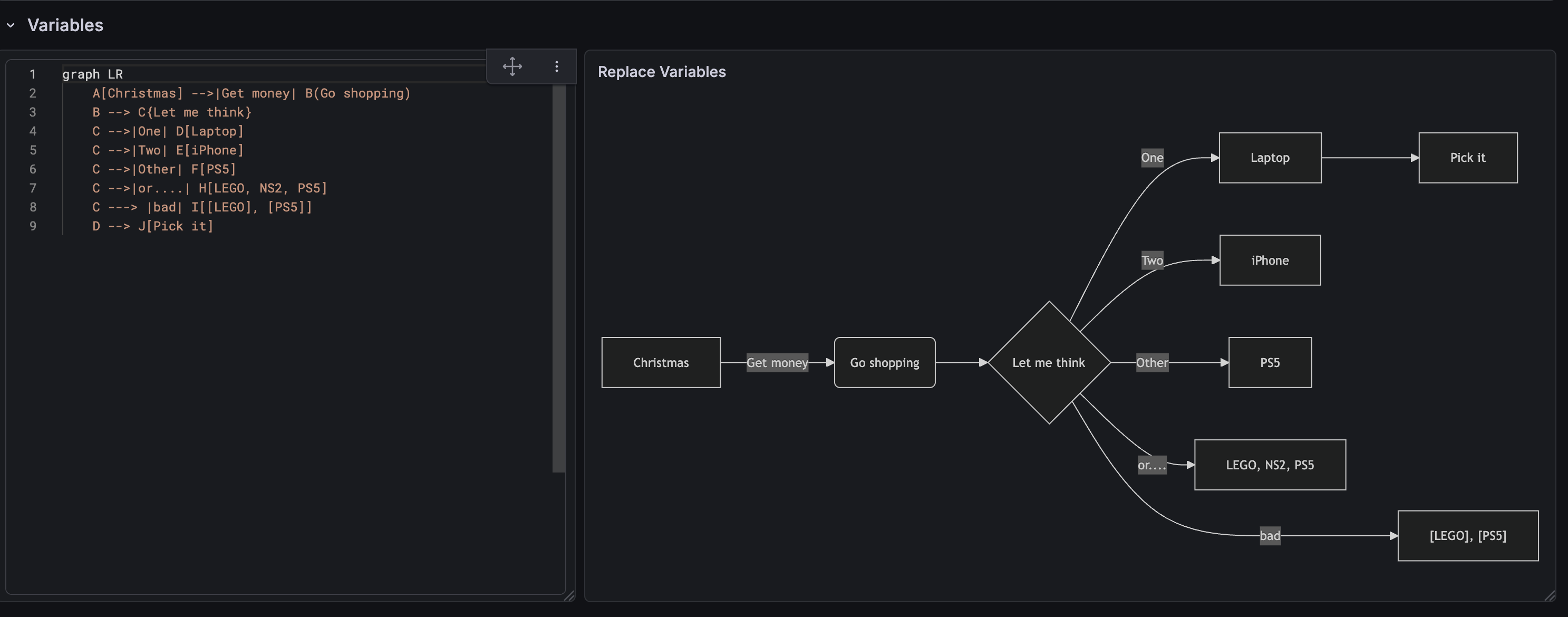
- Dashboard Variables — Use
$variable/${variable}syntax and{{#each var}}multi-value expansion - Data Queries — Inject live metric values via
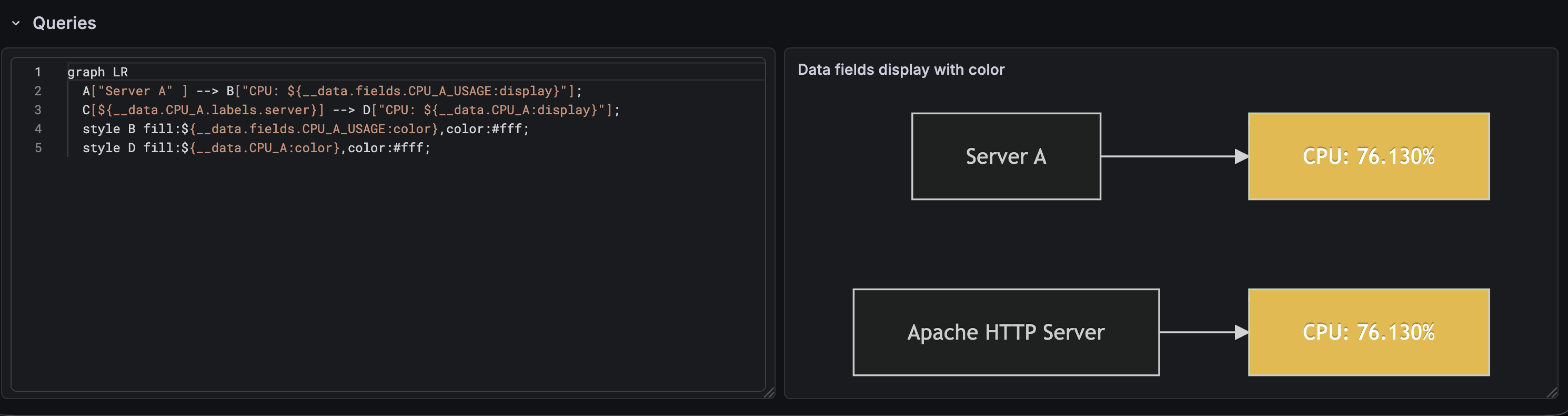
${__data.CPU_A:display}shorthand or${__data.fields.X}full syntax - Labels — Access metric labels with
${__data.CPU_A.labels.http_status} - Field Config — Standard Options support: Units, Thresholds, Value Mappings, Color scheme, Decimals
- Threshold coloring — Color diagram nodes dynamically based on threshold values using
${__data.CPU_A:color} - Special character escaping — Auto-escape
[ ] { } | > <in variable values to prevent syntax errors - Theme-aware — Auto-switches Mermaid theme based on Grafana dark/light mode
- Responsive — SVG diagrams auto-scale with panel dimensions
Requirements
- Grafana >= 12.3.0
Getting Started
- Install the plugin from the Grafana plugin catalog
- Add a new panel and select Grafmaid as the visualization
- Write your Mermaid diagram in the Mermaid Content option
- (Optional) Configure data source queries to inject live values
Configuration
Panel Options
| Option | Default | Description |
|---|---|---|
| Mermaid Content | Example flowchart | Mermaid diagram definition with variable/data syntax |
| Escape special characters | true | Auto-escape Mermaid special characters in values |
| Max data rows | 100 | Max rows for {{#each data}} expansion (0 = unlimited) |
Standard Options
The panel supports Grafana Standard Options via Field Config:
- Unit — Format numeric values (percent, bytes, etc.)
- Thresholds — Define color breakpoints (default: green base, red at 80)
- Value Mappings — Map values to custom text
- Color scheme — Defaults to "From thresholds (by value)"
- Decimals — Control decimal precision
Data Syntax Quick Reference
| Syntax | Description |
|---|---|
$variable | Dashboard variable substitution |
{{#each var}}...{{value}}...{{/each}} | Multi-value variable expansion |
${__data.CPU_A:display} | Formatted value from query (auto value field) |
${__data.CPU_A:color} | Threshold color from query |
${__data.CPU_A.labels.server} | Metric label value |
${__data.fields.Value} | Explicit field access from series[0] |
{{#each data.CPU_A}}...{{/each}} | Iterate over query rows |
Example: Threshold-colored Diagram
graph LR
A["${__data.CPU_A.labels.server}"] --> B["CPU: ${__data.CPU_A:display}"]
style B fill:${__data.CPU_A:color},color:#fff
Documentation
For detailed documentation, see docs/README.md.
Contributing
- Report bugs: GitHub Issues
- Feature requests: GitHub Issues
- Source code: GitHub Repository
License
Apache License 2.0 — see LICENSE.
Third-Party Notices
This plugin bundles the following open-source software:
| Package | License | Copyright |
|---|---|---|
| mermaid | MIT | © 2014-2022 Knut Sveidqvist |
| dagre-d3-es | MIT | © 2013 Chris Pettitt |
| dayjs | MIT | © 2018-present iamkun |
| lodash-es | MIT | © OpenJS Foundation |
| marked | MIT | © 2018+ MarkedJS |
| roughjs | MIT | © 2019 Preet Shihn |
| KaTeX | MIT | © 2013-2020 Khan Academy |
| stylis | MIT | © 2016-present Sultan Tarimo |
| uuid | MIT | © 2010-2020 Robert Kieffer |
| DOMPurify | MPL-2.0 OR Apache-2.0 | © 2024 Cure53 |
Full license texts are available in the NOTICES file.
Version
1.0.6 (built on 2026-04-06)
Grafana Cloud Free
- Free tier: Limited to 3 users
- Paid plans: $55 / user / month above included usage
- Access to all Enterprise Plugins
- Fully managed service (not available to self-manage)
Self-hosted Grafana Enterprise
- Access to all Enterprise plugins
- All Grafana Enterprise features
- Self-manage on your own infrastructure
Grafana Cloud Free
- Free tier: Limited to 3 users
- Paid plans: $55 / user / month above included usage
- Access to all Enterprise Plugins
- Fully managed service (not available to self-manage)
Self-hosted Grafana Enterprise
- Access to all Enterprise plugins
- All Grafana Enterprise features
- Self-manage on your own infrastructure
Grafana Cloud Free
- Free tier: Limited to 3 users
- Paid plans: $55 / user / month above included usage
- Access to all Enterprise Plugins
- Fully managed service (not available to self-manage)
Self-hosted Grafana Enterprise
- Access to all Enterprise plugins
- All Grafana Enterprise features
- Self-manage on your own infrastructure
Grafana Cloud Free
- Free tier: Limited to 3 users
- Paid plans: $55 / user / month above included usage
- Access to all Enterprise Plugins
- Fully managed service (not available to self-manage)
Self-hosted Grafana Enterprise
- Access to all Enterprise plugins
- All Grafana Enterprise features
- Self-manage on your own infrastructure
Grafana Cloud Free
- Free tier: Limited to 3 users
- Paid plans: $55 / user / month above included usage
- Access to all Enterprise Plugins
- Fully managed service (not available to self-manage)
Self-hosted Grafana Enterprise
- Access to all Enterprise plugins
- All Grafana Enterprise features
- Self-manage on your own infrastructure
Installing Grafmaid on Grafana Cloud:
Installing plugins on a Grafana Cloud instance is a one-click install; same with updates. Cool, right?
Note that it could take up to 1 minute to see the plugin show up in your Grafana.
Warning
Plugin installation from this page will be removed in February 2026. Use the Plugin Catalog in your Grafana instance instead. Refer to Install a plugin in the Grafana documentation for more information.
Installing plugins on a Grafana Cloud instance is a one-click install; same with updates. Cool, right?
Note that it could take up to 1 minute to see the plugin show up in your Grafana.
Warning
Plugin installation from this page will be removed in February 2026. Use the Plugin Catalog in your Grafana instance instead. Refer to Install a plugin in the Grafana documentation for more information.
Installing plugins on a Grafana Cloud instance is a one-click install; same with updates. Cool, right?
Note that it could take up to 1 minute to see the plugin show up in your Grafana.
Warning
Plugin installation from this page will be removed in February 2026. Use the Plugin Catalog in your Grafana instance instead. Refer to Install a plugin in the Grafana documentation for more information.
Installing plugins on a Grafana Cloud instance is a one-click install; same with updates. Cool, right?
Note that it could take up to 1 minute to see the plugin show up in your Grafana.
Warning
Plugin installation from this page will be removed in February 2026. Use the Plugin Catalog in your Grafana instance instead. Refer to Install a plugin in the Grafana documentation for more information.
Installing plugins on a Grafana Cloud instance is a one-click install; same with updates. Cool, right?
Note that it could take up to 1 minute to see the plugin show up in your Grafana.
Warning
Plugin installation from this page will be removed in February 2026. Use the Plugin Catalog in your Grafana instance instead. Refer to Install a plugin in the Grafana documentation for more information.
Installing plugins on a Grafana Cloud instance is a one-click install; same with updates. Cool, right?
Note that it could take up to 1 minute to see the plugin show up in your Grafana.
Installing plugins on a Grafana Cloud instance is a one-click install; same with updates. Cool, right?
Note that it could take up to 1 minute to see the plugin show up in your Grafana.
Warning
Plugin installation from this page will be removed in February 2026. Use the Plugin Catalog in your Grafana instance instead. Refer to Install a plugin in the Grafana documentation for more information.
Installing plugins on a Grafana Cloud instance is a one-click install; same with updates. Cool, right?
Note that it could take up to 1 minute to see the plugin show up in your Grafana.
Marketplace plugins
This is a paid plugin developed by a marketplace partner. To purchase an entitlement, sign in first, then fill out the contact form.
Marketplace plugins
This is a paid for plugin developed by a marketplace partner. To purchase entitlement please fill out the contact us form.
What to expect:
- Grafana Labs will reach out to discuss your needs
- Payment will be taken by Grafana Labs
- Once purchased the plugin will be available for you to install (cloud) or a signed version will be provided (on-premise)
Thank you! We will be in touch.
For more information, visit the docs on plugin installation.
Installing on a local Grafana:
For local instances, plugins are installed and updated via a simple CLI command. Plugins are not updated automatically, however you will be notified when updates are available right within your Grafana.
1. Install the Panel
Use the grafana-cli tool to install Grafmaid from the commandline:
grafana-cli plugins install The plugin will be installed into your grafana plugins directory; the default is /var/lib/grafana/plugins. More information on the cli tool.
Alternatively, you can manually download the .zip file for your architecture below and unpack it into your grafana plugins directory.
Alternatively, you can manually download the .zip file and unpack it into your grafana plugins directory.
2. Add the Panel to a Dashboard
Installed panels are available immediately in the Dashboards section in your Grafana main menu, and can be added like any other core panel in Grafana.
To see a list of installed panels, click the Plugins item in the main menu. Both core panels and installed panels will appear.
Changelog
v1.0.5 (2026-04-06)
v1.0.4 (2026-03-31)
- feat: 新增 {{#each series}} 跨 series 迭代語法 #27 (neildeng)
- fix: support richer series selectors #26 (tan9)
- fix: clear stale SVG when content is empty #24 (tan9)
v1.0.3 (2026-03-30)
v1.0.2 (2026-03-30)
v1.0.1 (2026-03-30)
- fix: 修正 LICENSE generic text 與 README broken link #22 (neildeng)
- fix: 升級 serialize-javascript 修正 high severity 漏洞 #21 (neildeng)
- chore: 同步 develop 至 main (release workflow + CHANGELOG) #20 (neildeng)
v1.0.0 (2026-03-29)
- Release v1.0.0: Mermaid.js Diagram Panel with Data Queries & Field Config #19 (neildeng)
- feat: Translate UI & documentation to English #18 (neildeng)
- feat: 發布準備與資安強化 #17 (neildeng)
- feat: 整合 Data Queries 與 Field Config 支援 #16 (neildeng)
- feat: 強化 Dashboard Variables 整合與測試架構重構 #15 (neildeng)
- feat: 整合 Mermaid.js 實作圖表面板 #14 (neildeng)
- docs: update README and README.zh-TW to remove center alignment and i… #13 (neildeng)
- docs: 在 README 加入 logo 圖示 #12 (neildeng)
- docs: 改寫 README 為雙語版本並新增 logo #1 (neildeng)
* This Changelog was automatically generated by github_changelog_generator