Spend less time on repetitive tasks with the new automation feature in Grafana Assistant


The ability to schedule regular tasks, such as cron jobs, has been around for decades. So why are we still running the same AI prompts by hand every day?
As you use Grafana Assistant, our AI-powered observability agent, to stay on top of the state of your system, you likely find yourself asking the same questions. Maybe you want to know what changed overnight, or whether yesterday's deployment hurt latency, or which dashboards or skills are drifting out of date. These are important prompts, but they're also the kind that quietly steal your morning.
With automations, currently in public preview, you can stop asking those questions manually. Simply take a working prompt or skill, schedule it, and let Assistant run it in the background so the answer is ready when you need it. In this post, you’ll learn how your team can start every standup, handoff, or bi-weekly review from the context of an Assistant conversation that already executed the process you trust.
From one good answer to an operational habit
When you ask a query, a useful Assistant session often captures the dashboards to check, the metrics that matter, the logs to focus on, and the judgment your team has built up over time. Automations gives that knowledge and set of steps a place to live.
Beyond simple scheduled prompts, this process offers non-obvious benefits including:
- Standardized recurring investigations. Everyone starts from the same inputs and the same process.
- Chats as operational assets. A repeated question can become a skill, and a skill can become a scheduled workflow.
- System improvements over time. If an automation repeatedly finds the same issue, use that signal to create a new alert, improve a dashboard, or update the underlying skill.
Anatomy of an automation run
An automation has three parts:
- What to run: A prompt, or a skill invoked with a slash command
- When to run: A schedule, or manual-only execution
- Who can use it: Private or shared visibility, based on permissions
When it runs, Assistant starts a new background conversation using your Grafana user identity. The result is saved in the automation history, so you can open it later, share it, fork it, or link to it from an incident review.
Using automations: key examples in Grafana Cloud
Automations let you unify your operational habits by connecting scheduled Assistant prompts with the rest of Grafana Cloud. The following examples demonstrate how this capability integrates with core features including Grafana Alerting, Grafana Cloud IRM, and Assistant's infrastructure memory to automate high-impact workflows.
Automate a skill and keep the skill fresh
A skill captures the how of an investigation. An automation captures the when. The cleanest pattern is to keep them separate. Put the durable troubleshooting process in a skill. Then let the automation supply the runtime scope: the time range, the service, the incident, or the release window you care about today.
/check-cart

Focus on the last 24 hours. Include any deploys that landed
in that window, and call out anomalies before highlighting relevant
metrics.
Refine /check-cart once, and every automation that calls it picks up the change on its next run. One source of truth, many schedules.
Like any knowledge, skills can become outdated. They reference dashboards that get renamed, alerts that get retired, rule groups that move, and instructions that slowly stop matching reality. Now that skills are generally available, most teams will eventually have more than a single user can remember.
Automations are a natural place to keep them up to date. Run a monthly maintenance pass that treats skills as part of your operational surface area:
Review every shared skill our team owns. For each one:
- Resolve referenced dashboards, alerts, and rule groups.
  Flag any that no longer exist.
- Identify pairs of skills with overlapping instructions and
  recommend a merge or split.
- Highlight contradictions between a skill's instructions
  and the latest infrastructure memory for the services
  it covers.

Output a to-do list grouped by "fix now / review / archive".
The output becomes a small backlog you can work through. Over time, your skills start behaving like living operational knowledge.
Automate the on-call handoff
The end of an on-call shift is rarely tidy. There are open incidents, alerts that have varying degrees of importance, and SLOs consuming budget faster than they should. These bits of context tend to live in the outgoing engineer’s head. Because Grafana Assistant can work with IRM schedules and incidents, Grafana Alerting, and dashboards, one prompt can produce a handoff that puts the incoming engineer on the same page.
Summarize the current on-call state for the incoming engineer:
- Open IRM incidents and the last status update on each
- Alert notification failures or routing problems in the last 12h
- Review xyz-dashboard for any SLO burning faster than 2x over its short and long windows
- Recommend follow-ups, ranked by risk

Use IRM, alerting, and dashboard tools. Keep the summary skimmable.
With this prompt set an automation to run 15 minutes before your rotation flips and then share the resulting conversation in your handoff channel.
Run a daily dashboard and SLO review
Standups and morning reviews often depend on whoever happened to open the dashboard first. That works until the first person checks a slightly different time range, skips a noisy panel, or forgets to compare today against last week.
A weekday summary can read the same dashboard, check the same SLO scope, compare the same windows, and summarize only what changed.
1. Read dashboard "api-overview" and capture the headline panels.
2. Check SLO burn for every objective tagged team:platform
   over the last 24h. Flag anything with a burn rate above 1.0.
3. Compare key metrics to the same window 7 days ago and
   summarize regressions only skip panels that are steady
   or improving.
4. End with a one-line "ship / hold / investigate" call.
Surface infrastructure gaps
Infrastructure memory gives Assistant a ready-made map of your services: what they do, how they are deployed, which dependencies they have, and which metrics, labels, and logs matter when something breaks.
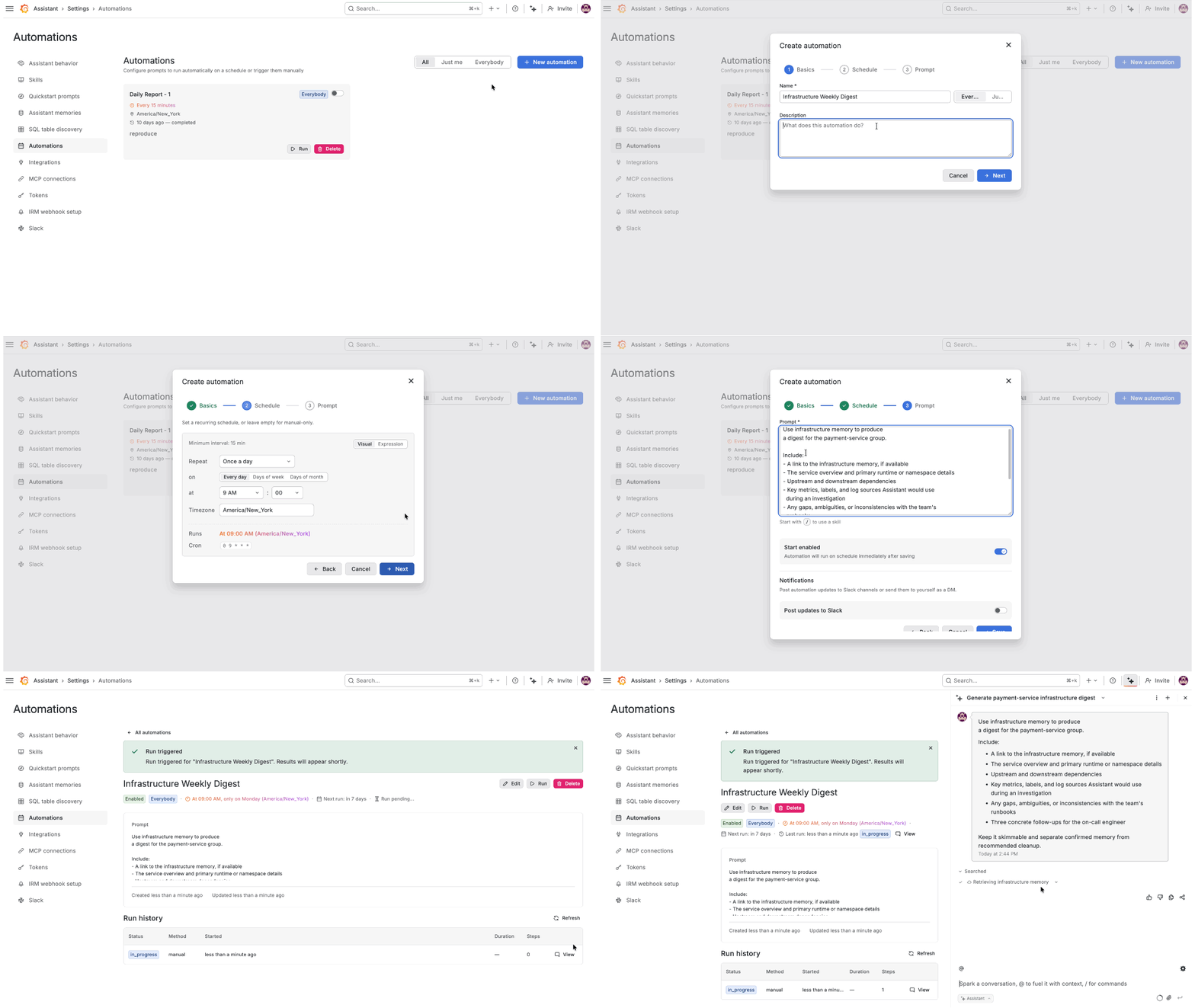
That context is useful during an incident, but it is also worth reviewing before you need it. A weekly automation can turn the current memory for a service into a short digest your team can scan, discuss, and use to improve your systems.
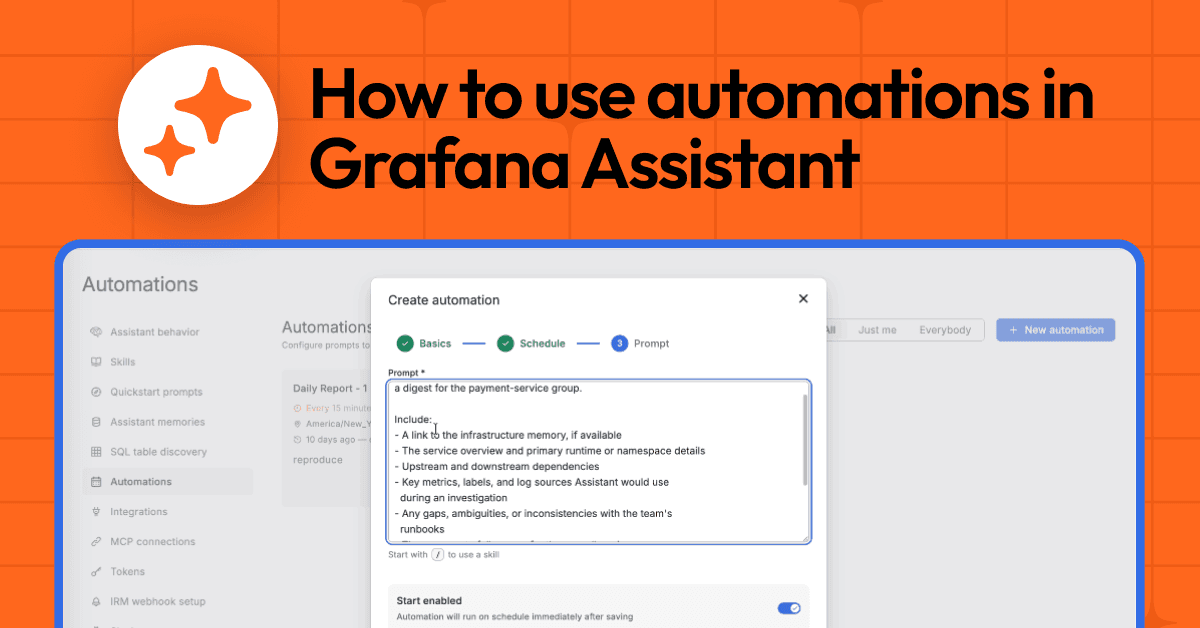
Use infrastructure memory to produce
a digest for the payment-service group.

Include:
- A link to the infrastructure memory, if available
- The service overview and primary runtime or namespace details
- Upstream and downstream dependencies
- Key metrics, labels, and log sources Assistant would use
  during an investigation
- Any gaps, ambiguities, or inconsistencies with the team's
  runbooks
- Three concrete follow-ups for the on-call engineer

Keep it skimmable and separate confirmed memory from
recommended cleanup.
Configuring your automation
To create one, open Grafana Assistant, go to Settings → Automations → New automation. Then provide:
- A name
- A prompt and/or skill
- A schedule, or leave it manual-only
- A visibility setting
- A timezone
If you have an active Assistant chat you can ask it to create an automation for you and it will prompt you for the same information above.
Start with the questions your team already asks on a rhythm: before standup, after a deployment, after the weekend, or during a weekly reliability review. After a few cycles, you will know whether it should stay as an automation, become a skill, or graduate into a better dashboard, alert, or runbook.
Best practices for automation success
Use self-contained prompts. The Assistant starts each automation run as a fresh conversation, so write the prompt as if a new teammate were reading it cold. Name the dashboard, service, SLO scope, time range, and output format.
Validate manually. Click “Run” a few times, read the resulting conversations, and tighten any ambiguous prompt input before enabling the schedule.
Start with the slowest useful cadence. Near-real-time detection belongs in an alert. Automations are best for recurring analysis, summaries, reviews, audits, and workflow checks.
Separate the schedule from the skill. If the process is reusable, put it in a skill. If the timing is reusable, put it in an automation. That separation makes both easier to maintain.
Grafana Cloud is the easiest way to get started with metrics, logs, traces, dashboards, and more. We have a generous forever-free tier and plans for every use case. Sign up for free now!