
%3Aquality(90)%2F&w=3840&q=75)
%3Aquality(90)%2F&w=3840&q=75)
%3Aquality(90)%2F&w=3840&q=75)
Grafana Assistant: Why you can trust our agent—and yourself—in an era of AI hallucinations


Let’s be real: AI can hallucinate. And in observability, that feels risky. No one wants an assistant that sends your SREs chasing ghosts.
At best, that burns expensive engineering time. At worst, it slows incident response in production and pushes teams toward the wrong remediation path.
So here’s the big question: What makes Grafana Assistant different, and why should you trust it?
Let’s start by acknowledging the fear. AI hallucinations are a real issue. We’ve all seen examples where a model gives a confident, detailed answer that turns out to be completely wrong. Even when trained on great data, large language models (LLMs) can still make mistakes. That’s not a flaw unique to Grafana Cloud, it’s a reality across the entire AI ecosystem.
The important thing isn’t whether hallucinations happen, it's what happens next. How does the system handle that uncertainty? And how much visibility does it give you into what it’s doing?
That’s where Grafana Assistant takes a different path. This isn’t just a chatbot layered onto an observability tool. It’s a purpose-built agent designed for real environments, where trust and traceability matter.
What makes Grafana Assistant different
With Assistant, we've built something that understands the stakes of production systems and gives users the control and clarity they need. It's a guided assistant that knows what you’re looking at and shows you how it got to its answers.
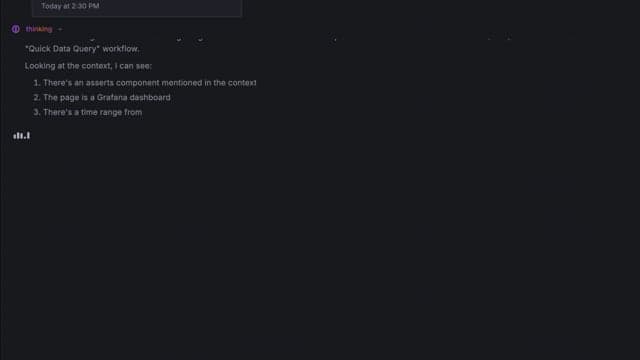
One of the ways Grafana Assistant can help your team is by freeing senior engineers from routine data drilling so they can focus their skills elsewhere. In the example above, we ask which services are receiving the most HTTP traffic. Assistant exposes the queries and reasoning behind the answer, replacing a black box with a transparent partner your team can trust and validate in seconds.
Next, let's take a closer look at some of the benefits of this approach, so you can confidently make it part of your workflows.
It’s grounded in your actual telemetry
Grafana Assistant doesn’t invent answers. It pulls live data directly from your dashboards, metrics, logs, and traces in Grafana Cloud. That means it’s responding to what’s really happening in your environment, not just guessing based on a generic model.
It shows its work
Every response from Grafana Assistant includes the query it ran, the source of the data, and how it arrived at the answer. It’s like showing your math in school. You can follow the logic, verify it, and even course-correct if needed. No black box. Just visibility.
It investigates conflicting signals
When signals disagree, Grafana Assistant doesn’t make assumptions. It digs deeper, querying additional data sources, correlating multiple signals, and clearly presenting both patterns and contradictions, even when the outcome is inconclusive.
For example: If metrics show a pod is down but logs show it's responding, Grafana Assistant will:
- Query both signals
- Present both findings: "Metrics show X, but logs show Y"
- Suggest next steps: "I can check Z if you want to dig deeper"
- Let you decide whether to continue
When metrics seem to contradict each other, Grafana Assistant doesn’t just guess. It spins up additional agents to gather more evidence, like cross-checking other telemetry or pulling in memory data, to either confirm or rule out a potential issue.
Don’t trust AI blindly
Trust isn’t a switch you flip; it’s a standard you maintain. We don’t want you to take Grafana Assistant’s word for it. Use it as an expert-shield that protects your team’s most valuable resource: time.
Here are the best practices to help your team move from prompts into clear, actionable insight:
Turn every Grafana Assistant conversation into shared team knowledge
The Assistant is designed to institutionalize knowledge. When it generates a PromQL query or an investigation summary, don't just look at the result. Look at the query it generated.
Pro-tip: Use the Assistant to "explain this query" or "show me the underlying PromQL." This turns a troubleshooting session into a mentorship moment, allowing junior engineers to learn the environment's nuances while senior experts are shielded from repetitive "how-to" interruptions.
Collapse silo data hunting into a simple step
Instead of manually hunting across different silos (logs, then metrics, then traces), let Grafana Assistant do the heavy lifting of correlation.
- Workflow: When an alert fires, ask the assistant: "Summarize the last 15 minutes of activity across logs and metrics for [service name]."
- Verification: Grafana Assistant links to the raw data sources. Use them to validate the hypothesis. You aren't replacing your expertise; you’re using Grafana Assistant to build the paper trail so you can make the final, informed decision faster.
Share findings the whole team can validate
We’ve seen that the most successful teams don't just use Grafana Assistant in isolation; they use it to communicate.
Pro-tip: When sharing a finding with the team, include Grafana Assistant’s reasoning. By saying, "Grafana Assistant identified this CPU spike and correlated it with these three traces," you are providing a verifiable audit trail that the whole team can inspect, rather than a "trust me" opinion.
Accountability is a shared journey
Is Grafana Assistant perfect? No. But by showing its work, escalating when it’s unsure, and providing direct links to your telemetry, it acts as a guided partner that reduces the manual toil of observability.
This isn’t about magic. It’s about unblocking engineering velocity by giving your team an expert-on-demand that they can trace, verify, and ultimately, rely on to keep production stable.
Put it to the test and try it in your Grafana Cloud environment today. Don't just ask it for answers—ask it to show you the way.
Grafana Cloud is the easiest way to get started with metrics, logs, traces, dashboards, and more. We have a generous forever-free tier and plans for every use case. Sign up for free now!
%3Aquality(90)%2F&w=3840&q=75)
%3Aquality(90)%2F&w=3840&q=75)


