
%3Aquality(90)%2F&w=3840&q=75)
%3Aquality(90)%2F&w=3840&q=75)
Troubleshoot performance issues faster with the new Grafana Assistant integration for Database Observability


So your database is slow. Now what?
Grafana Cloud Database Observability already gives you visibility into your SQL queries with RED metrics, individual execution samples, wait event breakdowns, table schemas, and visual explain plans. But visibility is just the starting point.
You can see that a query's P99 latency spiked, but what should you do about it? You can see wait events like wait/synch/mutex/innodb firing, but what does that actually mean?
Thankfully, you can now use the new Grafana Assistant integration for Database Observability to find those answers easier and faster than ever. You get the power of AI, coupled with the depth of Grafana Cloud’s observability capability, available every time you investigate a query.
The best part: you don't have to worry about assembling context, explaining schema, or describing time ranges. The assistant isn't working from a copy of your SQL pasted into a separate AI tool. Instead, it runs queries against your actual Prometheus and Loki data sources, in the time window you're looking at, with your real table schemas, indexes, and execution plans already loaded.
Each tab has purpose-built analysis actions designed by database engineers rather than generic prompts. Every analysis is based on real data from your database and provides specific advice. Your query text and schema metadata are used only for the current analysis, and are not stored or used for model training.
Prompts for tackling common database issues
To illustrate how effective this integration is, let's walk through some examples of how the assistant helps you quickly solve some common problems.
Yes, you can still freely prompt directly in the assistant chat box the same way you normally would, but we've built out-of-the-box AI buttons to provide a guided experience for tackling slow or degraded queries, or for getting recommendations on changes.
Why is this query slow?
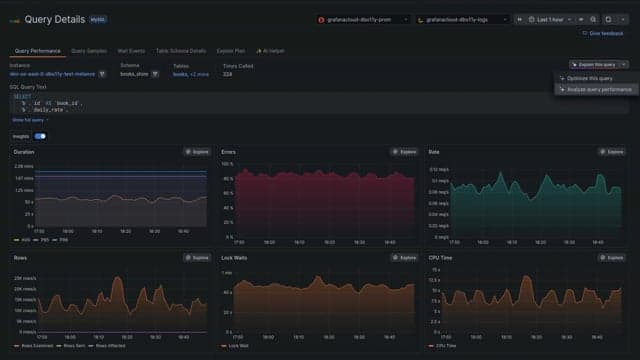
You've found the offending query. It's in the overview and the duration is spiking and the error rate is climbing. You click into it and see specific time-series performance data.
The data is all there, but the diagnosis isn't obvious. Is it a bad join or lock contention? A table scan that wasn't a problem until the data grew?
Open the assistant with the pre-defined prompt with the click of a button.
It goes to work, using both Loki and Prometheus to query the selected time window and synthesizes them into a single health assessment. Duration is spiking because the number of rows examined is 50 times the number rows returned, which means most of the work is wasted on filtering. The P99 is 12x the median, which means the problem is intermittent, not constant. CPU time is healthy, but wait events are eating 40% of execution time.
The last point is crucial. Wait events have names like wait/synch/mutex/innodb or io/table/sql/handler. These names aren’t self-explanatory, but the assistant is still able to understand them and lets you know:
"During this wait, the database is physically reading data from disk because the requested rows aren't in the buffer pool. This is happening because the query performs a sequential scan on the
orderstable, which has 1.2 million rows and no index onorder_date."
It connects the metric (40% wait time) to the cause (sequential scan, missing index) to the table (orders) to the column (order_date) all in one response, using your actual schema and execution plan. You’ve saved yourself a lot of time and avoided going down a rabbit hole.
In the video below, you'll see another example of this in practice.
What should I actually change?
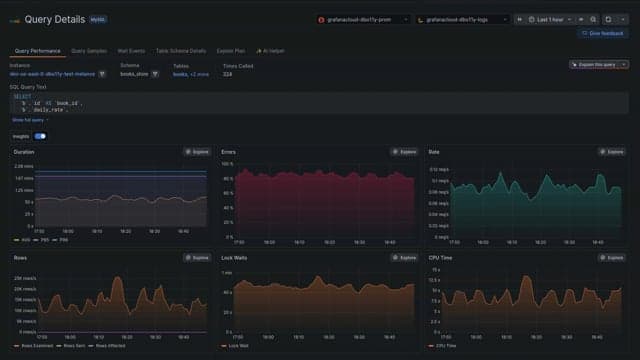
Sometimes you aren't sure what to ask. To help in those situations, Assistant produces specific, testable SQL like a CREATE INDEX statement with:
- The columns in the right order
- An explanation of why that column order matters for your query's
WHEREclause andJOINconditions - A note about the write-performance trade-off
These recommendations are dialect-specific. For a PostgreSQL query, the assistant might suggest a partial index on a filtered subset; for the same pattern in MySQL, a prefix index with appropriate key length. Plus, documentation links point to the right vendor docs, not generic SQL references.
Note: We recommend reviewing the suggested changes in a staging environment before applying them to production.
When the fix is a query rewrite rather than an index modification, the assistant analyzes the step-by-step breakdown of how the database processes your query (the EXPLAIN plan) and identifies the operations consuming the most cost.
For example, it might spot a nested loop join that should be a hash join, a sort operation that could be eliminated with a composite index, or a subquery that would be faster as a CTE. Each bottleneck comes with a fix, and each fix comes with a verification step: an EXPLAIN command you can run afterward to confirm the plan actually changed.
The recommendations are based on your schema. The assistant knows which indexes already exist on your tables, which foreign key relationships are defined (and which are missing), and how the database's execution plan currently uses that infrastructure. If your indexes are already well-designed, it says so and doesn't invent problems.
Is this getting worse?
Some queries aren't broken; they're degrading. The P50 duration is fine today, but it's 20% slower than it was last week. No one noticed because there was no single incident, just a slow creep.
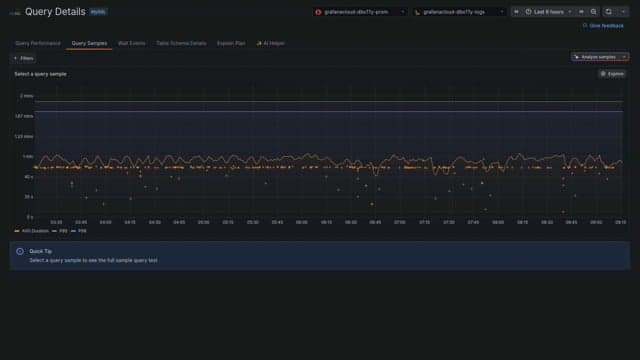
The assistant analyzes individual execution samples and surfaces the patterns. It compares extremes directly: in one investigation, the fastest execution took 12 ms and examined 200 rows, while the slowest took 3.4 seconds and examined 180,000 rows. Same query, same schema, taking 280x longer.
The assistant highlights the difference between fast and slow executions: rows examined, wait event breakdown, and timing. From there, it can identify likely causes.
For example, it can identify a parameter value that hits a larger data partition, lock contention that only appears under load, or a plan change triggered by stale statistics. The result is a full diagnosis based on factual data rather than a guess based on the query text alone.
All your context, for your entire team, in one place
The assistant is also positioned to help entire teams. Every conversation can be shared with team members, so a developer can send the assistant's analysis to a DBA for review before applying an index change, or attach it to a pull request or incident ticket as supporting evidence.
And it's right there when you need it. Click the button on any tab. Get a diagnosis grounded in your live metrics, a fix tailored to your schema, and the ability to share the conversation with team members.
Get started today
The AI Assistant is now generally available in Grafana Cloud Database Observability. For those of you who used the previous AI Helper during the preview phase, we think you'll find this new Assistant integration more comprehensive. Beyond query assistance, the new Assistant integration also helps you understand explain plans, table schemas, and supports follow-on conversations and sharing conversations with your team.
To get started, navigate to a queries detail view and look for the Assistant button on the query performance, query samples, wait events, table schema, or explain plan tabs.
%3Aquality(90)%2F&w=3840&q=75)
For setup instructions and supported databases, check out the Database Observability documentation.
Grafana Assistant is the easiest way to get started with metrics, logs, traces, dashboards, and more in Grafana Cloud. We have a generous forever-free tier and plans for every use case. Sign up for free now!
%3Aquality(90)%2F&w=3840&q=75)
%3Aquality(90)%2F&w=3840&q=75)


