
%3Aquality(90)%2F&w=3840&q=75)
%3Aquality(90)%2F&w=3840&q=75)
Quickly go from exploration to action with new one-click integrations in Grafana Drilldown


The Grafana Drilldown apps gives you a queryless, point-and-click way to explore your metrics, logs, traces, and profiles. But finding an insight is only half the job—you still need to act on it.
Previously, that meant leaving Drilldown, manually copying queries, and navigating through Grafana's dashboards, Alerting, and "Explore" interfaces to pick up where you left off. But we're happy to tell you that we've changed that: the Drilldown apps now integrate directly with Grafana's core features, so you can go from exploration to action in a single click.
By eliminating context switching and manual query copying, you spend less time navigating Grafana and more time solving problems. There's a lot to dig into, so let's take each new feature one-by-one, recapping what's changed before providing a bit more context on how to get the most from these updates.
Why these new Drilldown integrations matter
These integrations are designed to make Drilldown apps the connective tissue of your Grafana observability workflow. At a high level, they help:
- Reduce time from insight to action
- Eliminate context switching and manual query copying
- Lower barrier for teams new to PromQL/LogQL/TraceQL
- Improve cross-team collaboration
- Reduce setup time, allowing users to focus on what matters instead of having to customize the experience every time
Whether you are new to PromQL or a seasoned SRE, these one-click actions lower the barrier to acting on what you find. And with features like shared saved searches and pre-configured log columns, your whole team benefits from a more consistent, collaborative experience from the moment they open the app.
Add panels to dashboards
- What it is: "Add to dashboard" feature in Metrics Drilldown and Logs Drilldown
- What it does: Add panels directly to dashboards from Drilldown apps
- The old way: Navigate to Explore → Add to dashboard → Save
- The new way: Click Add to dashboard → select dashboard (new or existing) → Save
- Why it matters: Turn exploratory views into permanent dashboard panels in seconds, no context switching needed
When you spot a metric or log pattern worth tracking long-term, you want it on a dashboard. Previously that required a lot of manual inputs, but now Metrics Drilldown and Logs Drilldown both have an "Add to dashboard" button directly in the panel header. Click it, select a new or existing dashboard, and the panel is added with your query and time range already configured.
For example, imagine you're investigating a spike in request latency and you want to keep an eye on it going forward. Instead of rebuilding that view from scratch in a dashboard, you add it in seconds and move on.
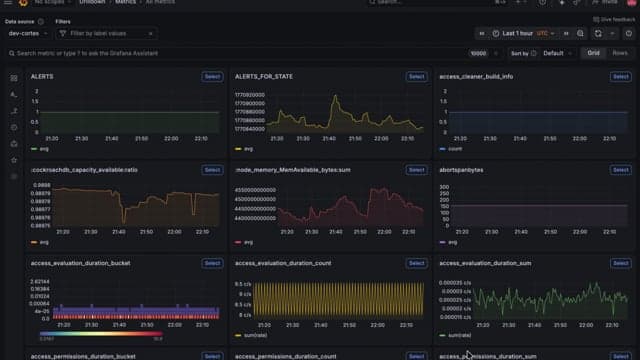
Add to dashboard is currently available in Grafana v12.3.0 while using v1.0.20 for Metrics Drilldown and v1.0.31 for Logs Drilldown.
If you're looking to use this feature in the other Drilldown apps, you can track the are issues here:
Create alerts with one click
- What it is: Create alerts with Metrics Drilldown
- What it does: Create alert rules directly from metric panels
- The old way: Navigate to Alerts & IRM → Alerting → Alert rules → New alert rule → “select data source” → “write query” → “configure alert settings” → Save
- The new way: Click the bell icon in panel header → an alert modal opens with query and time range pre-filled → configure alert settings → Save
- Why it matters: Set up monitoring on metrics you're investigating without leaving Drilldown or recreating queries
When you find a metric that needs monitoring, setting up an alert should be the easy part. But as you can see from the "old way" steps outlined above, it was anything but easy. On top of that, none of your context from Drilldown came with you.
Now, Metrics Drilldown has a bell icon directly in the metric panel header. Click it and an alert creation modal opens with your query and time range already pre-filled. All you need to do is configure the alert conditions and save.
Picture this: you're investigating an error rate spike at 2 a.m. and you want to make sure you get paged if it happens again. One click and you're done.
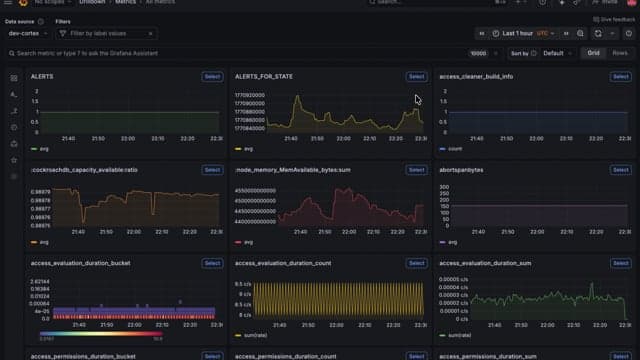
Create alert is currently available in Grafana in v12.4.0 with Metrics Drilldown in v1.0.29. Track the corresponding issues for the other apps here:
Save your searches and queries for future use
- What it is: Saved searches and saved queries for Logs Drilldown, Metrics Drilldown, and Traces Drilldown
- What it does: Lets you store log, metric, and trace explorations so you can resume them later
- The old way: Before these changes, the only way to store and resume a search was to copy and bookmark the URL
- The new way: From the most recent release, users will now find two new buttons to save and load their searches
- Why it matters: Now you can store relevant log, metric, and trace explorations without having to start from zero—every time
This update, which lets you store relevant log, metric, and trace explorations without having to start from scratch, was one of the most frequently requested features for Drilldown. This makes it faster and easier to revisit common investigations, keep ongoing debugging sessions, or maintain a set of frequently used log or metric views.
It works by storing all the current filters that the user applied in the generated query, which can be identified by a user provided title and an optional description. Once saved, the user can access the stored searches by clicking the open folder icon, to browse and select the search to resume.Grafana Enterprise and Grafana Cloud users will store these searches as saved queries, which can be optionally shared with other users, and can be used in other contexts like Explore.OSS users will store these searches in their browser’s local storage.
Let's look at a brief example of how this could help your day-to-day workflows. Imagine that you’re investigating a spike in API latency for a key service. After refining a PromQL query in Metrics Drilldown—filtering by cluster, narrowing the time range, and grouping by instance—you finally land on the exact query that surfaces the problematic pattern.
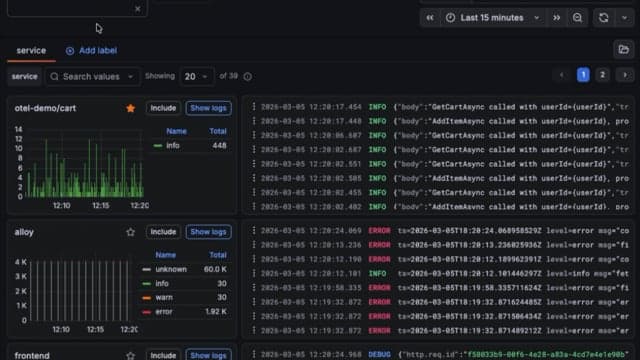
Before saved queries, the only way to preserve that investigation was to copy or bookmark the URL. Now, instead of copying the query into a separate dashboard or document, you can click Save, give it a clear name like “API Latency – Prod by Instance,” and move on. The next time latency flares up, or a teammate asks how you diagnosed it, you simply click Load and instantly return to the exact Drilldown view that helped you find the issue.
Saved queries are currently available in Grafana v12.4.0 while using v1.0.35 for Logs Drilldown, v1.0.32 for Metrics Drilldown, and Traces Drilldown currently has a PR under review.
For Profiles Drilldown, track the issues for this integration work here.
Enhanced display for OpenTelemetry log lines
- What it is: Enhanced display for OpenTelemetry log lines
- What it does: Logs Drilldown now detects OpenTelemetry log lines and surfaces relevant metadata directly in the log view
- The old way: Each user had to select which log fields were relevant for them, which was persisted in local storage, and they had to repeat this process for every new session.
- The new way: Logs Drilldown makes use of a logs visualization feature that identifies OpenTelemetry log lines, adding a new column that displays several important fields inline, along with the corresponding timestamp and a colored level for every log line.
- Why it matters: You'll now have less empty log lines, better signals at a glance, and cleaner defaults
Overall, this change makes OpenTelemetry logs easier to scan, faster to understand, and more useful by default, especially in high-cardinality or highly structured logging environments. And in situations where finer control for the display of logs is required, logs column configuration in Drilldown Logs is the tool to use.
OpenTelemetry log producers send less information in the log body and more data as structured metadata, or key–value pairs for resource attributes, log fields, and log attributes. Previously, much of this information was only visible when expanding a log line, making important context easy to miss.
Now, Logs Drilldown detects OpenTelemetry log lines and surfaces relevant metadata directly in the log view. As a result, Grafana now displays the following fields inline when present:
- Thread name
- Exception type
- Exception message
- Log message (body)
- Log attributes (new)
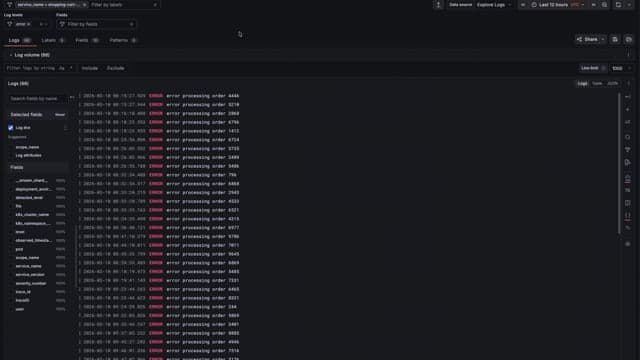
Along with these fields, the logs panel displays, by default, the corresponding timestamp and a colored level, for every log line, OpenTelemetry or not. And the new log attributes field groups together key-value pairs from the log metadata that are likely to be application-specific and relevant for debugging.It includes metadata fields that do not match the following categories:
- OpenTelemetry resource attributes. For example, infrastructure and platform metadata such as
k8s\_\*,cloud\_\*,host\_\*,service\_\* - OpenTelemetry internal log fields such as severity, trace or span IDs, timestamps, and flags
This means infrastructure-level and internal OpenTelemetry fields remain available in log details, while application-level metadata is promoted to the main log line view. These suggestions help you quickly add, remove, or reorder the most relevant OpenTelemetry fields without searching through the full field list. As a result, you get:
- Less empty log lines: As log bodies become smaller, important context no longer disappears into collapsed metadata.
- Better signal at a glance: Exception details and meaningful attributes are visible without expanding every log entry.
- Cleaner defaults: High-volume, low-value metadata stays out of the way while still being accessible when needed.
The enhanced display for OpenTelemetry log lines is available in Public Preview Grafana 12.4.0 while using v1.0.34+ for Logs Drilldown, under the feature flag otelLogsFormatting.
Get started with these Drilldown updates today
All of these integrations are available now in Grafana Cloud. For self-hosted Grafana, check the feature availability matrix above for the specific Grafana and Drilldown app versions you'll need.
These integrations are open source and actively developed. If you run into issues or have ideas for improvements, open an issue in the Metrics Drilldown, Logs Drilldown, or Traces Drilldown repositories, or join the conversation in the Grafana community forums.
Feature availability matrix
Feature | Grafana version | Metrics Drilldown | Logs Drilldown | Traces Drilldown | Profiles Drilldown |
|---|---|---|---|---|---|
Add to dashboard | 12.3.0+ | v1.0.20+ | v1.0.31+ | Coming soon | Coming soon |
Create alert | 12.4.0+ | v1.0.29+ | Coming soon | Coming soon | Coming soon |
Saved queries | 12.4.0+ | v1.0.32+ | v1.0.35+ | TBD | Coming soon |
Log columns config | 12.4.0+ | N/A | v1.0.34+ | N/A | N/A |
OpenTelemetry log display | 12.4.0+ (preview) | N/A | v1.0.34+ | N/A | N/A |
Grafana Assistant is the easiest way to get started with metrics, logs, traces, dashboards, and more in Grafana Cloud. We have a generous forever-free tier and plans for every use case. Sign up for free now!
%3Aquality(90)%2F&w=3840&q=75)
%3Aquality(90)%2F&w=3840&q=75)


