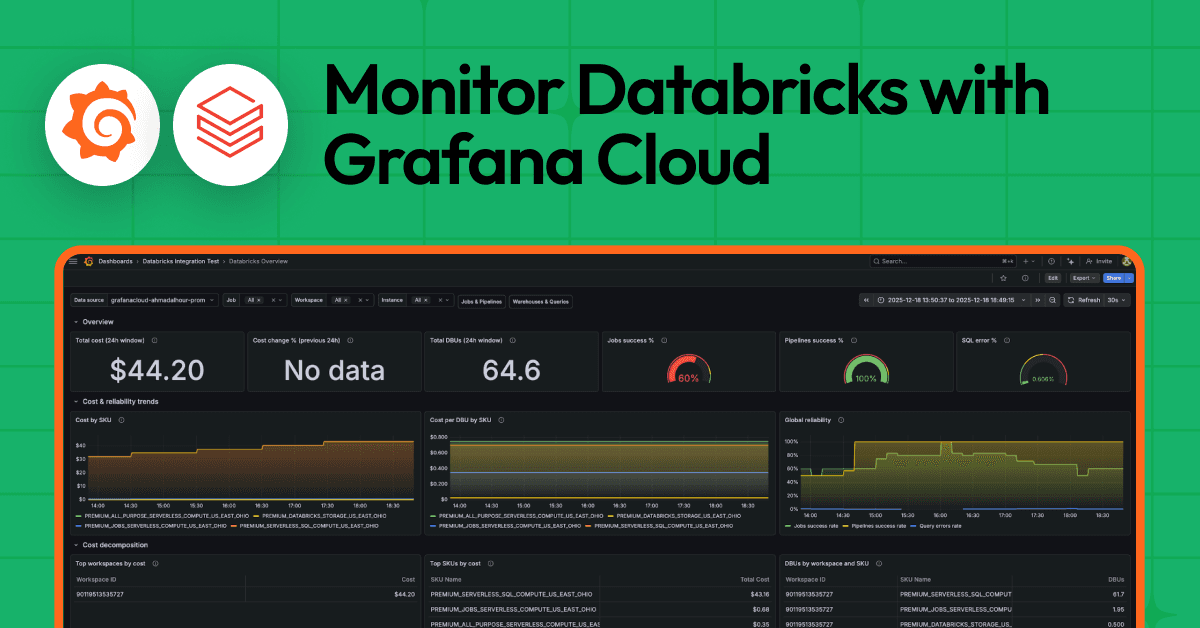
Monitor Databricks with Grafana Cloud for instant visibility into your workloads


If you're running Databricks workloads, you've probably asked yourself these types of questions: How much is this costing me? Why did that job fail last night? Why are my dashboard queries suddenly slow?
We've been there, too. Databricks is fantastic for data engineering, ML, and analytics. But once you start running jobs, pipelines, and SQL queries at scale, you need a way to keep tabs on what's happening. That's why we built the Databricks integration for Grafana Cloud.
With this integration, you can pull metrics from your Databricks workspaces directly into Grafana Cloud—no custom exporters to manage, no dashboards to build from scratch. You get visibility into billing, job reliability, and SQL warehouse performance all in one place.
Who should use the Databricks integration for Grafana Cloud
Different teams care about different things when it comes to Databricks:
- FinOps teams want to know where the money is going; DBU consumption, cost trends, surprise spikes—the usual suspects.
- Platform and SRE teams need to know if jobs and pipelines are healthy. Are they succeeding? How long are they taking? Are we meeting SLAs?
- Analytics and BI teams care about SQL warehouse performance. If query latency spikes or error rates climb, their dashboards break, and they hear about it.
We designed this integration with all three groups in mind.
What you get: dashboards
This integration comes with three prebuilt dashboards you'll see in your Grafana instance once you've installed it.
Databricks overview
This is essentially your executive summary: costs, DBU consumption, and high-level reliability metrics. It's intended to serve as a high-level snapshot so you can quickly spot anomalies and track overall platform health.
At the top, you'll see stat panels with the numbers that matter: total cost over the past 24 hours, day-over-day cost change, total DBUs consumed, and aggregate success rates for jobs and pipelines. Below that, time series panels show trends over time, and tables break down costs by SKU and workspace.
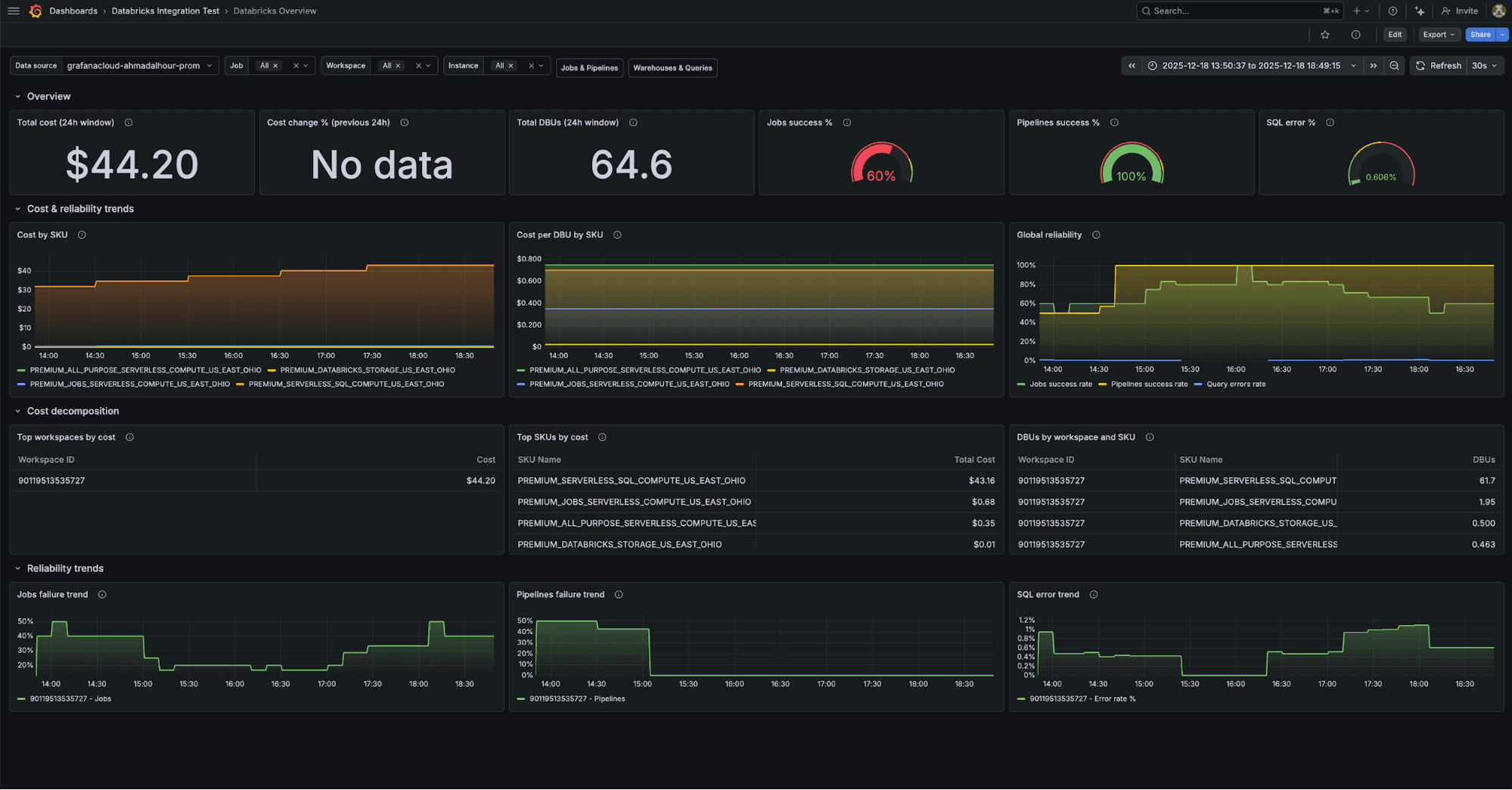
Key metrics:
databricks_billing_cost_estimate_usd_slidingdatabricks_billing_dbus_slidingdatabricks_job_run_status_slidingdatabricks_pipeline_run_status_sliding
Databricks jobs and pipelines
This is for platform and SRE teams, providing visibility into performance for your jobs and pipelines so you can quickly identify issues and ensure data workloads run reliably.
You'll see job and pipeline throughput, success rates, and duration trends. There are drill-down panels so you can filter by workspace, job name, or pipeline name when you're investigating a specific workload. The collapsed rows at the bottom give you detailed views for individual jobs and pipelines.
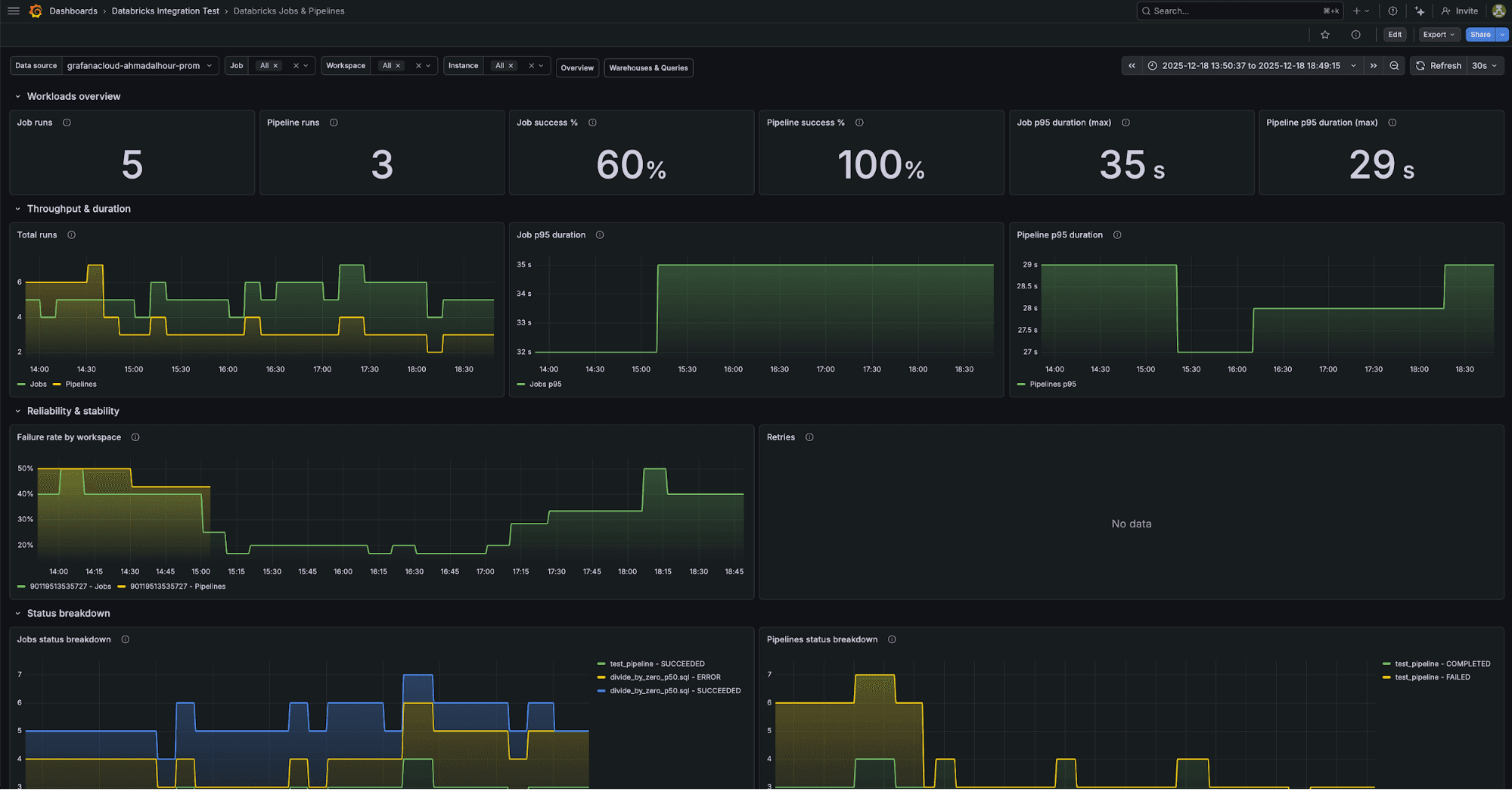
Key metrics:
databricks_job_runs_slidingdatabricks_job_run_duration_seconds_sliding(p50, p95, p99)databricks_pipeline_runs_slidingdatabricks_pipeline_freshness_lag_seconds_sliding
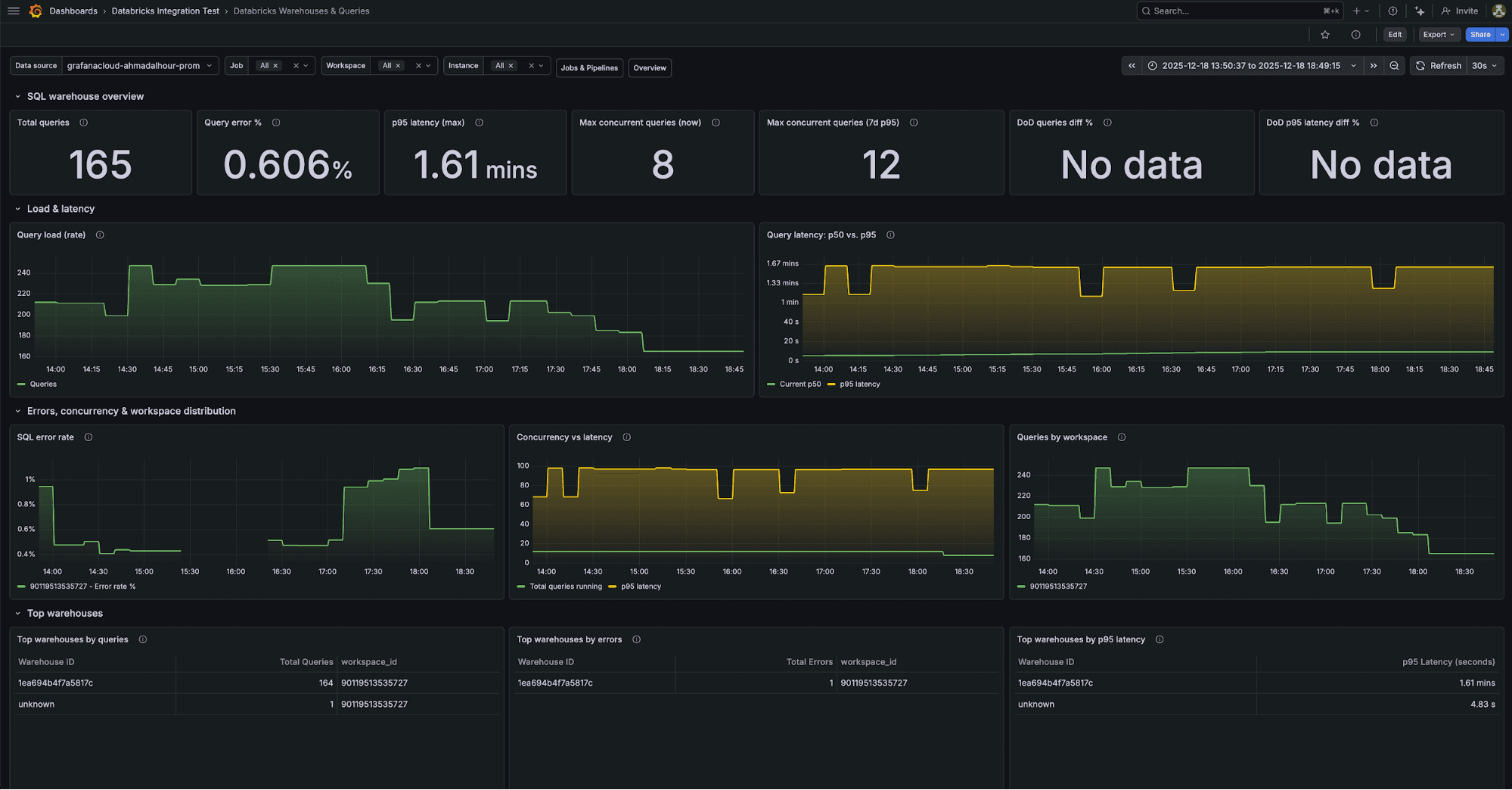
Databricks warehouses and queries
This is for analytics and BI teams, providing visibility into warehouse and query performance so you can quickly identify bottlenecks and keep SQL workloads running smoothly.
You get query throughput, latency percentiles, error rates, and concurrency metrics. Tables at the bottom show the top warehouses by query volume, errors, and latency—useful for spotting which warehouse is giving you trouble. You can filter by workspace or warehouse ID to narrow things down.
Key metrics:
databricks_queries_slidingdatabricks_query_duration_seconds_sliding(p50, p95, p99)databricks_query_errors_slidingdatabricks_queries_running_sliding
What you get: alerts
The integration comes with 14 alerting rules out of the box. They're organized by persona, so you can route them to the right teams.
For FinOps
- DatabricksWarnSpendSpike: Fires when day-over-day cost jumps more than 25%
- DatabricksCriticalSpendSpike: Fires when it jumps more than 50%
- DatabricksWarnNoBillingData: Fires if no billing data comes in for two hours
- DatabricksCriticalNoBillingData: Fires if it's been four hours
For platform and SRE teams
- DatabricksWarnJobFailureRate: Fires when job failure rate exceeds 10%
- DatabricksCriticalJobFailureRate: Fires at 20%
- DatabricksWarnJobDurationRegression: Fires when job duration is 30% above the seven-day median
- DatabricksCriticalJobDurationRegression: Fires at 60% above
Similar alerts exist for pipelines.
For analytics and BI teams
- DatabricksWarnSqlQueryErrorRate: Fires when SQL error rate exceeds 5%
- DatabricksCriticalSqlQueryErrorRate: Fires at 10%
- DatabricksWarnSqlQueryLatencyRegression: Fires when p95 latency is 30% above the seven-day median
- DatabricksCritQueryLatencyHigh: Fires at 60% above
All the thresholds are configurable; these are just sensible defaults to get you started.
How the integration works under the hood
The integration uses an open source exporter we built called databricks-prometheus-exporter. It connects to your Databricks workspace through a SQL Warehouse and queries Databricks System Tables—the same tables Databricks uses internally for billing, audit logs, and operational data.
We've embedded the exporter into Alloy, so you don't need to run it separately. Just configure Alloy with your Databricks credentials and it handles the rest.
Here's what gets collected:
Domain | System tables queried | What you get |
|---|---|---|
Billing |
| DBU consumption, cost estimates by workspace and SKU |
Jobs |
| Run counts, success/failure rates, duration percentiles |
Pipelines |
| Pipeline status, duration, data freshness lag |
SQL queries |
| Query throughput, latency percentiles, error rates |
Getting started
Here's how to set it up:
- You'll need a Grafana Cloud account. If you don't have one, you can sign up for the forever-free tier, no credit card required.
- In your Grafana instance, go to Connections > Add new connection and search for Databricks.
- Follow the setup wizard to configure Alloy. You'll need four things from your Databricks workspace:
- Server hostname - your workspace URL (something like
dbc-abc123.cloud.databricks.com) - Warehouse HTTP path: The SQL warehouse that'll run the queries
- Client ID: The OAuth2 client ID for your service principal
- Client secret: The corresponding secret
- Grant your service principal access to the system tables. The setup instructions include the exact SQL
GRANTstatements you need. - Click Install dashboards and alerts, and you're done.
The whole thing takes about 10 minutes if you already have a service principal set up.
A few things to keep in mind
Billing data has lag
Databricks billing data in system tables has an inherent lag of 24 to 48 hours. This is a Databricks limitation, not something we can work around. The cost numbers you see in the dashboards are great for trend analysis, but don't expect real-time billing.
Scrape interval and timeouts
The integration uses a 10-minute scrape interval by default. The exporter queries can take 90 to 120 seconds to run (it's querying a lot of data), so the scrape timeout is set to nine minutes. If you're seeing gaps in your data, check that your SQL Warehouse isn't auto-suspending between scrapes.
Pipeline table permissions
The system.lakeflow.pipeline_update_timeline table sometimes needs explicit SELECT permissions beyond the standard System Tables grants. If you're not seeing pipeline metrics, double-check that your service principal has access to this table.
Try it out
We think this integration makes it a lot easier to keep an eye on your Databricks workspaces - whether you care about costs, job reliability, or SQL performance. The dashboards and alerts give you a solid starting point, and you can customize from there.
Give it a try and let us know what you think. We hang out in the Grafana Community Slack. Drop by the #integrations channel if you have questions or feedback.
And if you're monitoring other data platforms, you might also be interested in our Snowflake integration, which offers similar capabilities.
The Grafana Cloud integrations team contributed to this blog post.
Grafana Cloud is the easiest way to get started with metrics, logs, traces, dashboards, and more. We have a generous forever-free tier and plans for every use case. Sign up for free now!