

Secure performance testing at scale: Introducing secrets management for Grafana Cloud k6


To simulate real user behavior, performance tests often rely on API keys, tokens, or credentials to interact with real systems. But as your testing suite grows, this sensitive data can start to sprawl across scripts, configs, and environments, increasing the risk of exposure and making tests harder to manage and maintain.
To address this challenge, we’re rolling out secrets management for Grafana Cloud k6, the fully managed performance testing platform powered by k6 OSS. Secrets management allows you to securely store and use sensitive values in your load tests. This means if your tests rely on API tokens, credentials, or any other confidential data, you no longer need to hardcode them into your scripts or pass them around manually.
With secrets management, secrets are stored centrally in Grafana Cloud and injected into your tests at runtime. This keeps your scripts clean, avoids accidental leaks in version control, and makes it easier to reuse the same test across environments.
Here’s a look at how to get started.
Getting started: How to manage secrets from the Grafana Cloud UI
Secrets can be created and managed directly from the Grafana Cloud web UI. To access them, navigate to Testing & synthetics > Performance > Settings, and open the Secrets tab from the menu.
From this interface, you can perform all the basic lifecycle operations:
- Create secrets by providing a name, description, and value. The name is how the secret will be referenced in your tests, and the value is the sensitive data itself. Once saved, the secret becomes immediately available to your tests. For each secret, you can also write a description (e.g., to explain the secret’s purpose) and use labels to help with organization.
- Edit secrets to modify their values, descriptions, or labels. Note that editing a secret does not reveal its current value; instead, you provide a new value that replaces the previous one. This ensures that secrets are never exposed through the UI after they are initially set. If you need to rotate credentials, you can simply overwrite the existing secret with a new value.
- Delete secrets that are no longer needed.
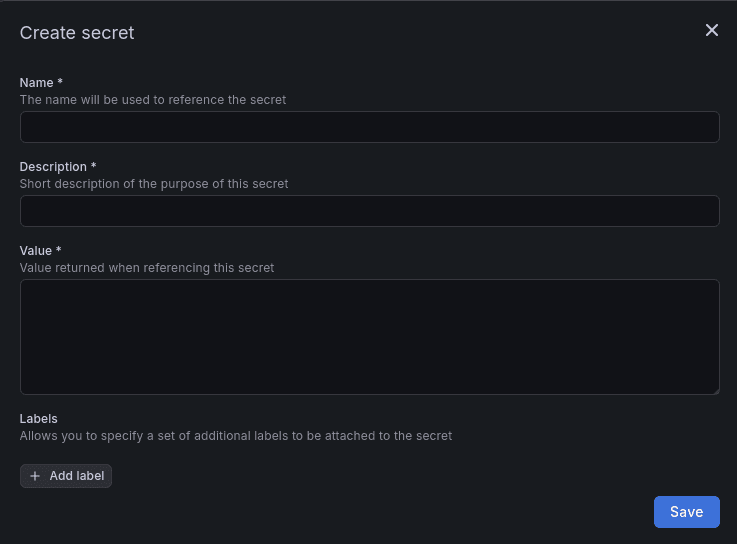
A key design principle here is that secret values are write-only in the UI. After creation, they cannot be read back or displayed. This prevents accidental exposure through screenshots, screen sharing, or casual inspection, and aligns with common security practices.
Using secrets in your Grafana Cloud k6 tests
Once your secrets are defined, using them in your tests is simple. Grafana Cloud k6 provides a dedicated module, k6/secrets, which allows you to retrieve secret values at runtime.
You can import the module and access a secret by its name:
import check from "k6";
import http from 'k6/http';
import secrets from 'k6/secrets';

export default async function main () {
    const apiToken = await secrets.get('api-token');
    const headers = {
        Authorization: `Bearer ${apiToken}`,
    };
    console.log("Headers: " + JSON.stringify(headers))

     let res = http.get('https://example.com/api', {headers: headers});
     check(res, { "get executions status is 200": (res) => res.status === 200 });
}
In this example, the secret "api-token" is fetched when the test runs and used as part of an HTTP request. From the script's perspective, the returned value behaves like a regular string, so you can use it anywhere you would normally use a variable.
This makes it easy to integrate secrets into existing scripts without major refactoring. You can gradually replace hardcoded values or environment variables with secrets managed in Grafana Cloud.
Secrets are also protected during test execution. If a secret is accidentally logged, its value will not be exposed in the logs. Instead, it will be redacted automatically. This reduces the risk of leaking sensitive data through debugging output or test results. Combined with write-only storage in the UI, this ensures that secrets remain protected throughout their lifecycle: from creation, to usage in tests, to observability outputs.
Learn more
Secrets management in Grafana Cloud k6 is available now in public preview. The feature is also generally available in Grafana Cloud Synthetic Monitoring, a black box monitoring solution powered by k6 that lets you proactively assess system reliability and performance.
To learn more, please visit our documentation.
Grafana Cloud is the easiest way to get started with k6 and performance testing. We have a generous forever-free tier and plans for every use case. Sign up for free now!