

%3Aquality(90)%2F&w=3840&q=75)
%3Aquality(90)%2F&w=3840&q=75)
Better context, smarter testing: How to give your AI coding agent direct access to k6 docs


As testing workflows become more AI-assisted, fast access to accurate documentation matters more than ever. Whether you're writing a new load test, troubleshooting an issue, or having an AI agent generate a script for you, you need reliable guidance that keeps pace with the way you work.
But most documentation still lives in a browser. Every time you or your agent needs to verify an API or look up a best practice, you're forced to leave your terminal or editor and interrupt your workflow.
That’s why, in k6 2.0, we introduced k6 x docs, an official k6 command that puts the entire k6 documentation library, including API references, guides, best practices, and examples, directly in your terminal. It works offline after first use, matches the docs to your exact k6 version, and includes a built-in agent skill, so AI coding assistants can look up k6 docs faster and most cost-effectively.
The problem: documentation lives in the wrong place
Most developers know the feeling. You're writing a k6 script, you need to check the signature for http.post or remember how thresholds work, and suddenly you're in a browser tab, searching, scrolling, clicking through navigation, and losing the context you had in your editor.
For AI agents, the problem is worse. When they need to reference k6 APIs, best practices, or examples, they either rely on stale training data, hallucinate a function signature, or burn expensive tokens on a web search that may not return the right version of the docs.
k6 x docs solves both problems by making documentation a first-class part of the k6 CLI. It gives agents CLI access to k6 docs that automatically detect the k6 version in use and deliver accurate content without leaving the session or performing web searches.
How k6 x docs works
The use is simple: type k6 x docs, optionally followed by the topic you want to look up.
k6 x docs                              # See all available topics
k6 x docs http                         # Learn about the k6/http module
k6 x docs http get                     # Look up a specific function
k6 x docs browser page click           # Dig into nested topics
k6 x docs using-k6 scenarios           # Explore k6 concepts
k6 x docs search threshold             # Find docs by keyword
k6 x docs search "close context"       # Don't worry about exact names
k6 x docs best-practices               # Get best practices guidance
Topics follow the same hierarchy as the official k6 documentation site, so if you know the concept name, you can navigate directly to it. If you don't, search does a keyword lookup. It matches by documentation section and ends with an example you can copy and run.
Here's k6 x docs in action:
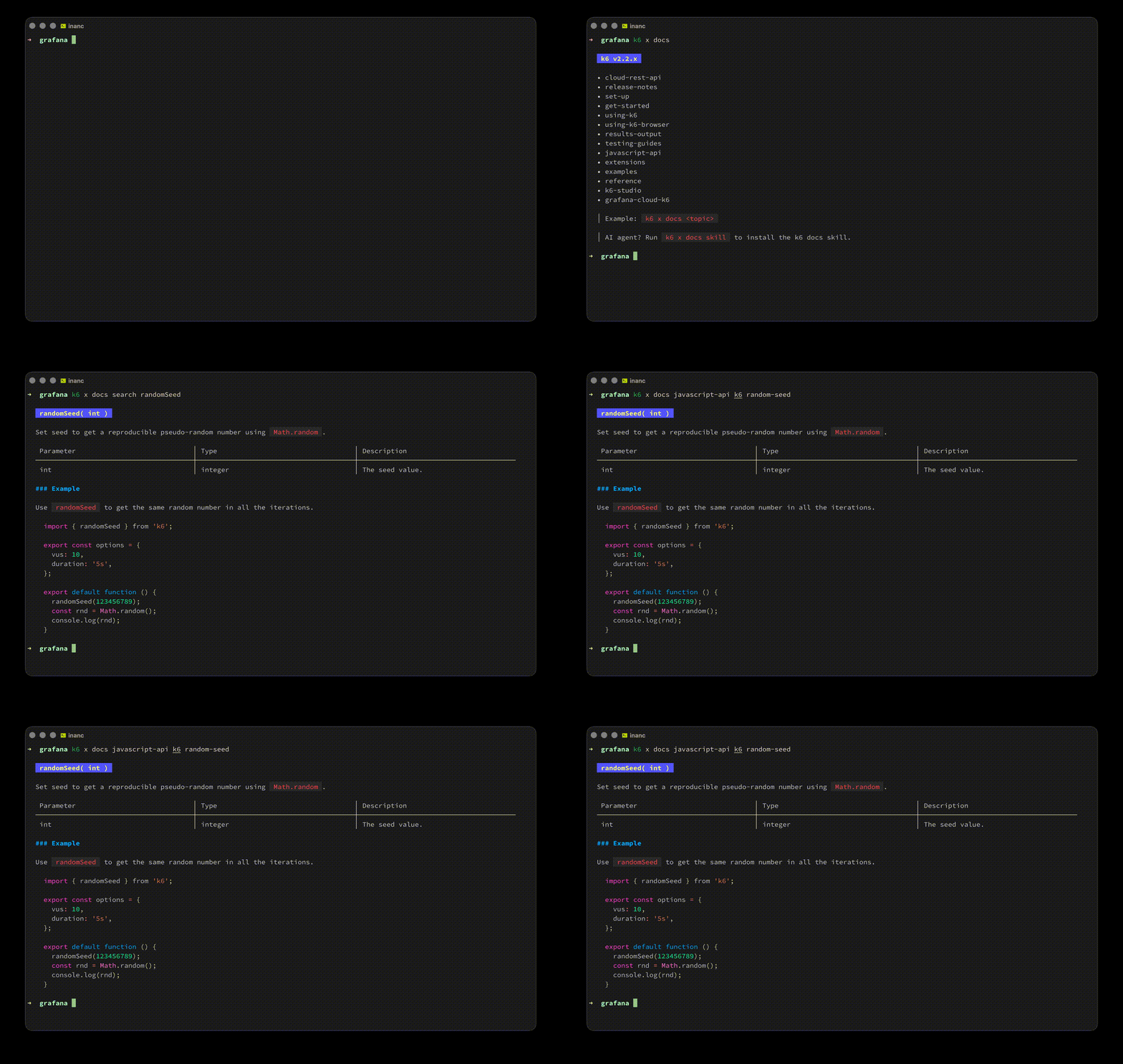
Offline and version-aware
After the first lookup, k6 x docs caches the documentation bundle locally. Every subsequent lookup works entirely offline, with no network required. More importantly, the documentation always matches your k6 version. If you're running k6 2.0, you get k6 2.0 docs. If you're running v1.5.x on a different project, the docs match that version. No more landing on the "latest" docs page and wondering whether a feature exists in the version you're actually using.
Built for the terminal
k6 x docs supports shell completions for zsh, bash, fish, and PowerShell, so you can Tab-complete topic names as you type. It renders Markdown natively in your terminal with syntax highlighting and formatting. For longer pages, use the --pager flag (or -p) to scroll through content in your preferred pager; it defaults to less -r or honors $PAGER. You can also control line width with --width (or -w) if your terminal is wider than you'd like your docs to be.
Built for AI agents
k6 x docs goes beyond a typical man page or --help flag. The docs command ships with a built-in agent skill that tells your agent how to look up k6 documentation, what commands to run, and how to interpret the results. Instead of guessing paths, hallucinating APIs, or wasting tokens on web searches, the agent calls k6 x docs and gets the authoritative answer.
Install the skill directly from your k6 binary:
k6 x docs skill ~/.claude/skills    # Claude Code
k6 x docs skill ~/.agents/skills    # Cursor, Codex, Gemini CLI, etc.
Run k6 x docs skill without arguments to see the supported agents and their skill directories. Most agents read their skills from the shared ~/.agents/skills directory, so a single installation covers Cursor, Codex, Gemini CLI, GitHub Copilot, and more.
Once installed, your agent can look up any k6 API, find examples, and check best practices as part of its normal workflow. When it's generating a load test and needs to know the correct way to set thresholds, it can refer to the docs rather than guess.
This matters because AI-assisted testing is becoming a real part of how teams write and maintain performance tests. k6 x docs is one of four new k6 x commands in k6 2.0 (alongside k6 x agent, k6 x mcp, and k6 x explore) that enable deeper integration with AI workflows and help teams use k6 programmatically.
A Go package for other tools
If you're building tooling around k6, the docs package gives you the same documentation access that k6 x docs has—cached, version-aware, and ready to serve. Under the hood, k6 x docs exposes a docs package that any Go project can import to fetch and serve k6 documentation programmatically. Today, two consumers use it: k6 x docs itself and mcp-k6 (the k6 MCP server). Both serve docs from the same package without duplicating logic.
Getting started
k6 2.0 (or 1.7.0+): k6 x docs is automatically available. You can run it without any additional installation required:
k6 x docsEarlier k6 versions: Download a pre-built binary from the releases page. It's a drop-in replacement for k6 with k6 x docs included. Or build it yourself:
xk6 build --with github.com/grafana/xk6-docsSet up the agent skill: If you use an AI coding assistant, install the skill so it can reference k6 docs automatically:
k6 x docs skillWhat's next
k6 x docs is open source and actively maintained. To report bugs, suggest features, or contribute, visit the GitHub repository.
To learn more about the full suite of AI-assisted testing features in k6 2.0, including k6 x agent, k6 x mcp, and k6 x explore, check out the k6 2.0 release blog post.
Grafana Cloud is the easiest way to get started with Grafana k6 and performance testing. We have a generous forever-free tier and plans for every use case. Sign up for free now!
%3Aquality(90)%2F&w=3840&q=75)
%3Aquality(90)%2F&w=3840&q=75)


