Observe your AI agents: End‑to‑end tracing with OpenLIT and Grafana Cloud


Note: The world is changing all around us thanks to AI. Today, anyone and everyone can be a developer, using LLMs to create LLM-powered applications, which users can then interact with by using even more LLMs.
Observability practitioners need to adapt and they need the right tools for the job. In this series, we'll show you how to use Grafana Cloud to monitor AI applications, including workloads in production, AI agents (this post), MCP servers, and zero-code LLMs.
In another post in this series, we discussed how to instrument large language model (LLM) calls. This can be a good starting point, but generative AI workloads increasingly rely on agents, which are systems that plan, call tools, reason, and act autonomously.
And their non‑deterministic behavior makes incidents harder to diagnose, in part, because the same prompt can trigger different tool sequences and costs.
AI agents combine LLM reasoning with external tools and dynamic workflows, and observability data must serve as a feedback loop for continuous improvement. Without proper tracing, you end up guessing why an agent took a particular path.
In this guide, you'll learn how to use the OpenLIT SDK to capture agent‑level telemetry and how to use Grafana Cloud to visualize every step.
Why observability matters for agents
Traditional APM covers infrastructure metrics and latency, but that's not enough to get a holistic view of your agents. AI Observability in Grafana Cloud uses the OpenLIT SDK to automatically generate distributed traces and metrics to provide insights into each agentic event.
AI Observability provides five prebuilt dashboards that analyze response times, error rates, throughput, token usage, and costs across your AI stack. Beyond raw metrics, OpenLIT captures agent names, actions, tool calls, token usage, and errors. This enables:
- Full sequence visibility: Follow a request from the user query through planning, tool invocations, LLM calls, and final responses. Each span in the trace shows the prompt, selected tool, and reasoning chain.
- Cost and token tracking: For each step, you see token counts and API costs, so you can optimize tool choices and model selection.
- Behavioral troubleshooting: Agent traces reveal reasoning paths and tool usage. If the agent produces an incorrect answer, you can reconstruct the chain to find where it went wrong.
- Unified dashboards and alerting: Grafana Cloud combines fully managed versions of Prometheus, Tempo, and Loki to present metrics, traces, and logs in one place, with optional alerts on cost thresholds or latency spikes.
Benefits of agent observability in Grafana Cloud
Agent observability is more than just infrastructure monitoring. With OpenLIT and Grafana Cloud, you gain:
- Predictable costs: Identify which agent step or tool call accounts for most of your spending and reroute simple queries to cheaper models.
- Performance optimization: Detect latency spikes at specific stages (e.g., search API vs. LLM) and adjust concurrency or caching accordingly.
- Quality assurance: Traces can be replayed to understand reasoning mistakes, while integrated evaluation tools in OpenLIT (such as hallucination detection and toxicity analysis) provide safety metrics.
- Faster debugging: When an agent fails, you have a single trace that links user input, internal reasoning, external calls, and the error, making root‑cause analysis straightforward.
- Future‑proof instrumentation: OpenTelemetry semantic conventions for AI agents are evolving; by using OpenLIT, you adopt these standards and avoid vendor lock‑in. Grafana Cloud’s integration ensures your telemetry remains compatible as conventions mature.
How to monitor your AI agents with Grafana Cloud
Now that you understand some of the nuances of observing AI agents, let's show you how you can use prebuilt capabilities in Grafana Cloud to start collecting and visualizing telemetry from your agents.
And if you get stuck anywhere along the way or need help with your own setup, click on the pulsar icon in the top-right corner of the Grafana Cloud UI to open a chat with Grafana Assistant, our purpose-built LLM that can help troubleshoot incidents, manage dashboards, and answer product questions.
Architecture overview
AI agents orchestrate multiple actions: planning, calling external tools or models, and producing a response. OpenLIT instruments each of these steps and emits OpenTelemetry spans and metrics. You can send this data directly to Grafana Cloud or via an OpenTelemetry Collector. The following diagram shows how a user request flows through an agent orchestrator and is monitored:
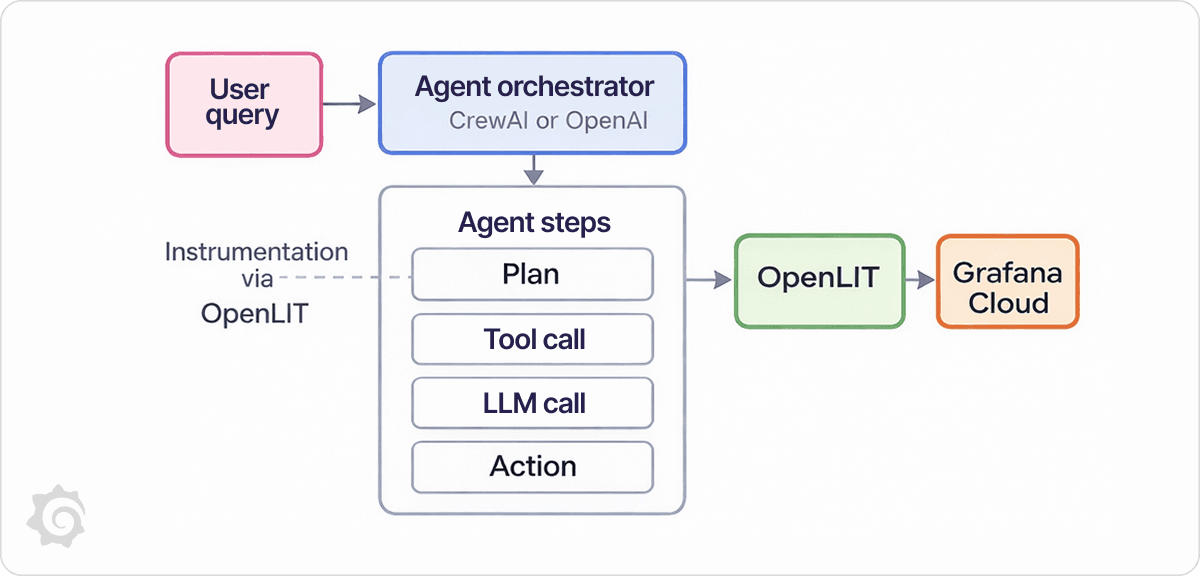
The workflow consists of four key pieces:
- User query: A customer sends a message to your agent.
- Agent orchestrator: Frameworks like CrewAI or the OpenAI Agents SDK break the task into sequential steps: plan, call a tool (e.g., a search API), call an LLM, and generate a result.
- OpenLIT instrumentation: A single
openlit.init()call instruments the entire agent pipeline. Each planning step, tool call, and model completion is captured as an OpenTelemetry span. - Grafana Cloud: Metrics and traces flow into Grafana Cloud’s managed Prometheus and Tempo backends, where pre‑built AI dashboards visualize performance and costs.
Step 1: Install the AI Observability integration
Start by adding AI Observability to your Grafana Cloud stack. This can be done by clicking on Connections in the left-side menu and following the steps outlined in our documentation.
This installs the five dashboards mentioned earlier (GenAI observability, GenAI evaluations, vector DB observability, MCP observability, and GPU monitoring). When metrics arrive, these dashboards automatically populate with latency histograms, token counts, cost summaries, and evaluation results.
Step 2: Install OpenLIT
OpenLIT is an OpenTelemetry‑native SDK for instrumenting GenAI workloads. Install it alongside your agent framework:
pip install openlit crewai
OpenLIT supports dozens of frameworks, including CrewAI, OpenAI Agents, LangChain, AutoGen, and others. The SDK automatically instruments supported libraries; no manual span creation is required.
Step 3: Instrument your agent
OpenLIT can be added with a single line of code. Below is an example that uses CrewAI to build a simple agent with two tools: a search tool and a summarizer.
The agent plans its steps, uses the search tool to fetch content, and then summarizes the result. OpenLIT records each step, tool call, and model completion. You can swap CrewAI with the OpenAI Agents SDK—the instrumentation code remains the same.
import os

import openlit  # Instruments all supported frameworks when initialised
from crewai import Agent, Task, Crew, agent_tools  # CrewAI framework
from your_search_module import SearchTool  # hypothetical search tool
from your_summarise_module import SummariseTool  # hypothetical summariser

openlit.init()  # one line to enable OpenTelemetry tracing and metrics

# Define tools the agent can use
search_tool = SearchTool()
summarise_tool = SummariseTool()

# Compose an agent with a planning function and tool access
assistant = Agent(
    name="research_assistant",
    role="Find relevant sources and summarise them",
    tools=[search_tool, summarise_tool],
    planning=True  # enable internal reasoning and tool selection
)

# Define a task for the agent
task = Task(
    description="Provide a concise summary of the latest developments in battery recycling.",
    expected_output="A two‑paragraph summary highlighting key advances",
)

# Create a crew to execute the task
crew = Crew(
    agents=[assistant],
    tasks=[task],
    verbose=True,
)

if __name__ == "__main__":
    result = crew.execute()
    print(result)
When this script runs, OpenLIT automatically captures:
- LLM prompts and completions: The prompts sent to the LLM and the responses returned
- Token usage and costs: Counts the tokens for each call and estimates API cost
- Agent names and actions: Identifies which agent or sub‑agent executed each step
- Tool usage: Records which tool was invoked and its parameters
- Errors: Surfaces exceptions such as API failures or tool errors
This information becomes distributed spans in Tempo and metrics in Prometheus. If you use the OpenAI Agents SDK, the pattern is the same: Call openlit.init() before constructing your agent, and every agent step will emit telemetry.
Step 4: Forward telemetry to Grafana Cloud
To send traces and metrics directly to Grafana Cloud, set the following environment variables before running your agent. Replace the values with your own service name, environment, and Grafana credentials:
# identify your service and environment
export OTEL_SERVICE_NAME="agent-demo"
export OTEL_DEPLOYMENT_ENVIRONMENT="production"

# Grafana Cloud OTLP endpoint
export OTEL_EXPORTER_OTLP_ENDPOINT="https://otlp-gateway-<region>.grafana.net/otlp"
export OTEL_EXPORTER_OTLP_HEADERS="Authorization=Basic <your-base64-credentials>"

# Set any API keys for your agent framework
export OPENAI_API_KEY="sk-..."

python agent_service.py
Step 5: Explore your agent traces and metrics
With your agent running, open Grafana Cloud. Navigate to AI Observability and select the AI Agents dashboard. Here you can:
- View complete traces: Each user request produces a trace containing spans for planning, tool invocations, LLM calls, and response generation. The traces page in OpenLIT provides detailed span analysis and execution flow, and Grafana Cloud mirrors this via Tempo.
- Monitor metrics and costs: Custom dashboards can display throughput, latency, token usage, and cost metrics stored in Prometheus.
- Filter and investigate errors: The errors page surfaces traces with exceptions and allows filtering by time range or exception type.
- Correlate with infrastructure: Grafana Cloud unifies metrics, logs, and traces, so you can correlate an agent’s slow step with CPU spikes or external API rate limits.
Grafana Cloud’s AI dashboards are purpose-built for GenAI applications and include separate panels for LLM performance, agent performance, vector database operations, and GPU health. Because OpenLIT uses OpenTelemetry standards, you can extend these dashboards or forward the data to other observability tools if required.
Next steps
Want to go further? In the next blog in this series, we’ll show, step by step, how to enable this step by step for an MCP client.
You can also learn more about Grafana Cloud AI Observability in the official docs, including setup instructions and dashboards. These resources will help you move from a basic demo to a production-ready setup for your AI applications.
Grafana Cloud is the easiest way to get started with metrics, logs, traces, dashboards, and more. We have a generous forever-free tier and plans for every use case. Sign up for free now!