
 End-to-End Root cause: Jump from a Synthetic Monitoring check straight to its trace
End-to-End Root cause: Jump from a Synthetic Monitoring check straight to its trace
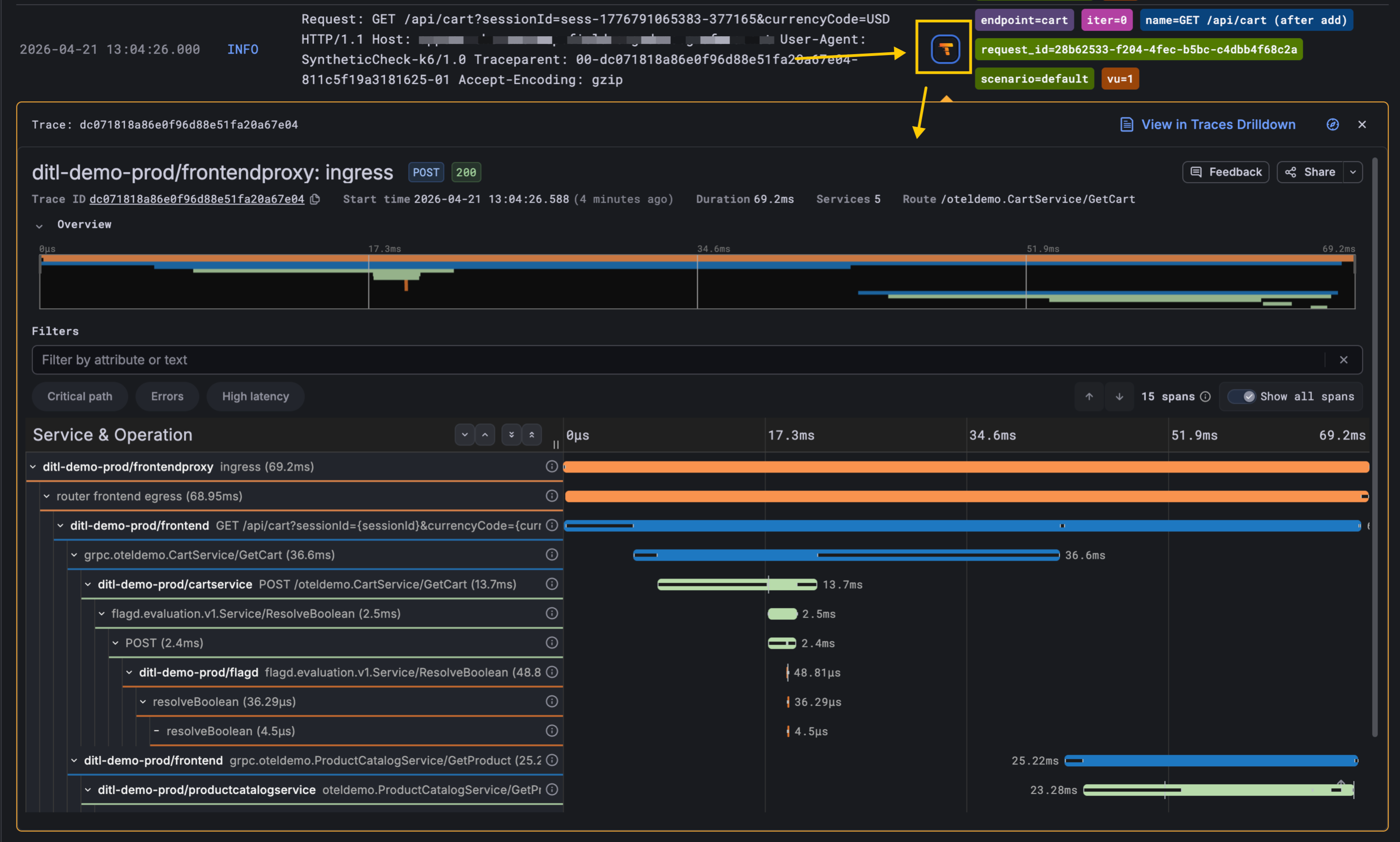
Synthetic Monitoring checks are now linked to distributed traces they generate in Grafana Cloud Traces! When a Scripted check fails or looks slow, you can open the underlying trace with a single click from the check’s logs and see exactly which service, span, and downstream call caused the problem.
This helps to shrink the gap between a poor user experience and the underlying root cause.
How it works
There are two preconditions, and then the link lights up on its own:
Your services send traces to Grafana Cloud Traces. This is the normal OpenTelemetry or Tempo setup — usually owned once by the platform or SRE team.
Your check explicitly propagates a trace header. In scripted checks, you opt in by importing the Tempo instrumentation and wrapping your HTTP calls:
import tempo from 'https://jslib.k6.io/http-instrumentation-tempo/1.0.0/index.js';
import http from 'k6/http';

tempo.instrumentHTTP({
  propagator: 'w3c', // or 'jaeger'
});

export default () => {
  http.get('https://my-service.[yourhostname].com/api/cart');
};
With that in place, k6 generates a trace ID on each iteration and attaches a traceparent header to every outgoing request, so the receiving service picks it up and continues the trace.
Once both pieces are in place, the Synthetic Monitoring app automatically surfaces a Tempo icon next to each log line that carries a trace ID. Clicking it deep-links you into Grafana Cloud Traces (Traces Drilldown) with the correct trace loaded and ready to explore. No new configuration in Synthetic Monitoring itself, and no new data source to wire up.
Why it matters
Synthetic Monitoring, traces, logs, and metrics have always been stronger together than apart, but customers told us the seams were showing. They were running synthetic checks to catch outages from the outside in, and running distributed tracing to debug services from the inside out, without a tight path between the two.
Closing that seam unlocks a much cleaner root cause analysis story:
- A synthetic check detects a failure or latency regression.
- The on-call engineer clicks into the failing check run.
- One click on the Tempo icon opens the full trace.
- The problematic span: a slow DB query, a downstream 500, a misbehaving dependency, is right there.
Getting started
If you’re already sending traces from your services to Grafana Cloud Traces and your checks propagate a trace header, the Tempo links appear automatically — there is no new configuration, no new data to enable.
If you haven’t instrumented your services for tracing yet, this is a good excuse: get started with Application Observability or Grafana Cloud Traces, and your existing Synthetic Monitoring checks will start lighting up with deep-links as soon as the trace data lands.
