
What's new from Grafana Labs SLO - Clamp SLI panels to a max value of 100%
SLO - Clamp SLI panels to a max value of 100%What's new from Grafana Labs

SLO - Clamp SLI panels to a max value of 100%
When users see SLI graphs spike above 100%, it can lead to confusion and concerns about whether the SLO or SLO plugin is functioning correctly.
SLOs can spike above 100% for a few reasons:
- SLO is not in a ratio format that provides a value between 0-1
- Ratio queries that use different metrics in the numerator and the denominator can experience synchronization issues when the numerator and denominator are incremented at different intervals
- Adaptive Telemetry can cause impact on recording rules, which can lead to unexpected irregularities in recorded SLI data
- The ruler executes recording rules with varying latency. SLI series may be inaccurate or report over 100% when the numerator and denominator of the ratio query come from different recording rules
- Counter series that transition from being absent to being present cause discrepancies in the SLI calculation when the series’ initial value is not zero
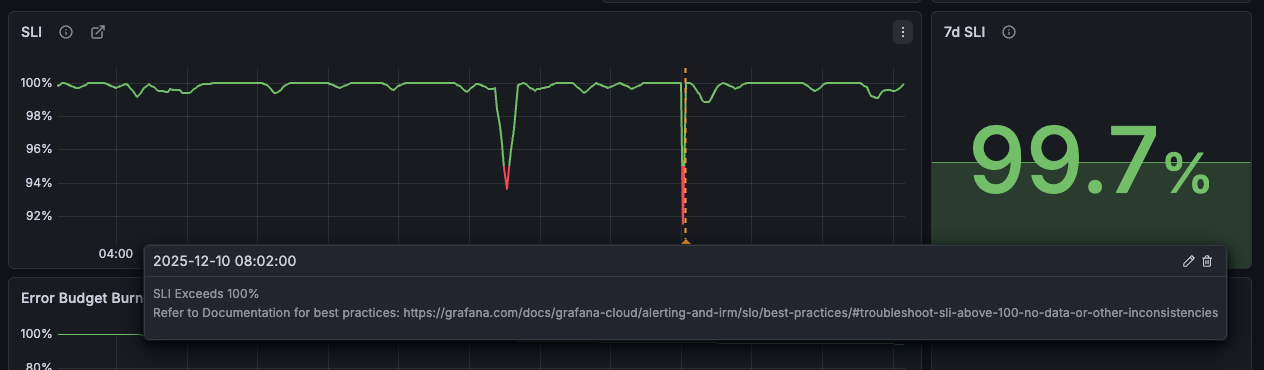
Users can now select to clamp their panels on individual SLO dashboards to prevent spikes over 100% from impacting their view. To help users identify and troubleshoot SLI query issues, an annotation is added to the SLI panel when spikes above 100% occur. The annotation points to documentation that guides users through analysis and troubleshooting steps to identify why the spike is occurring.
Related What's new posts
