
Plugins 〉Mapgl

Mapgl
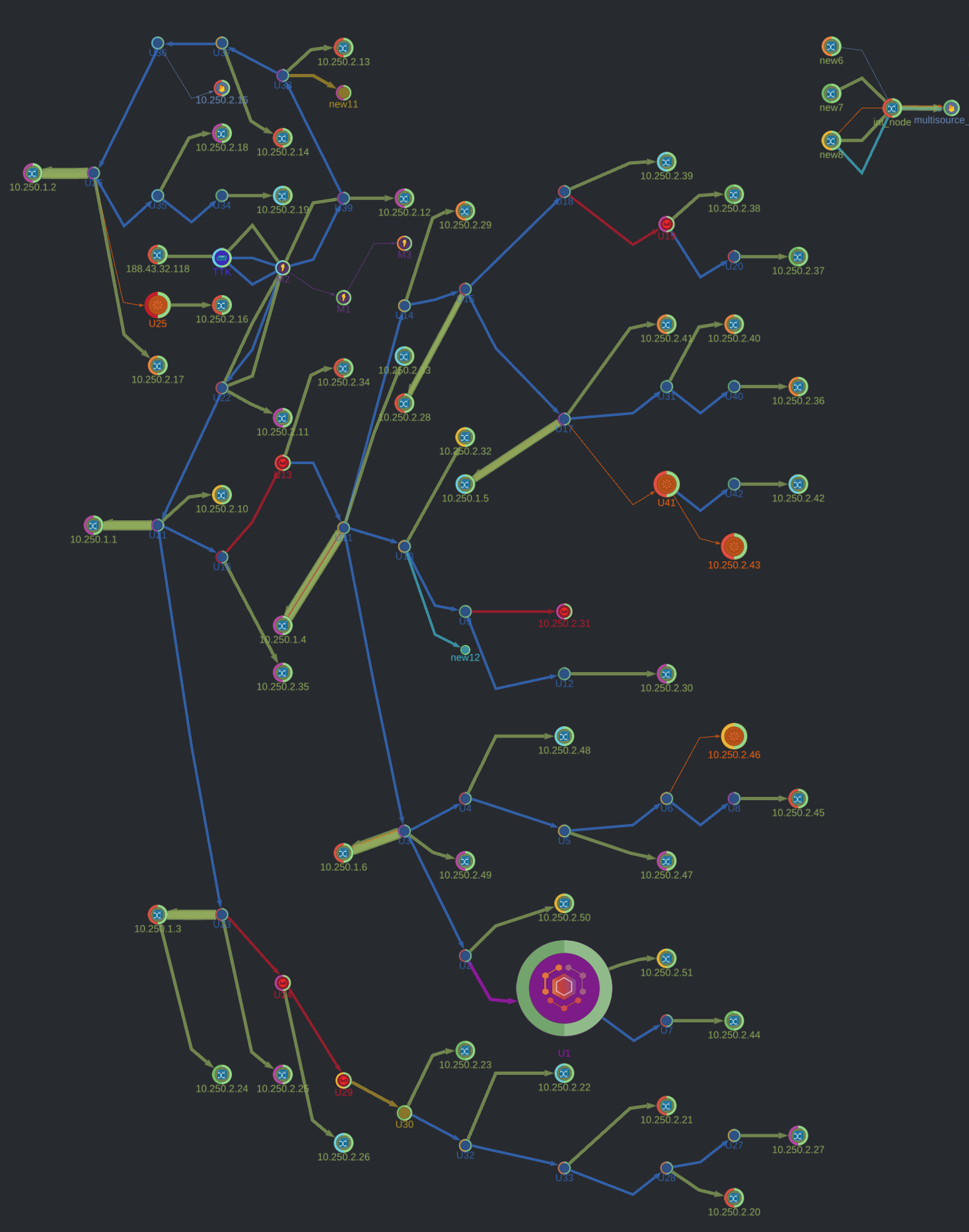
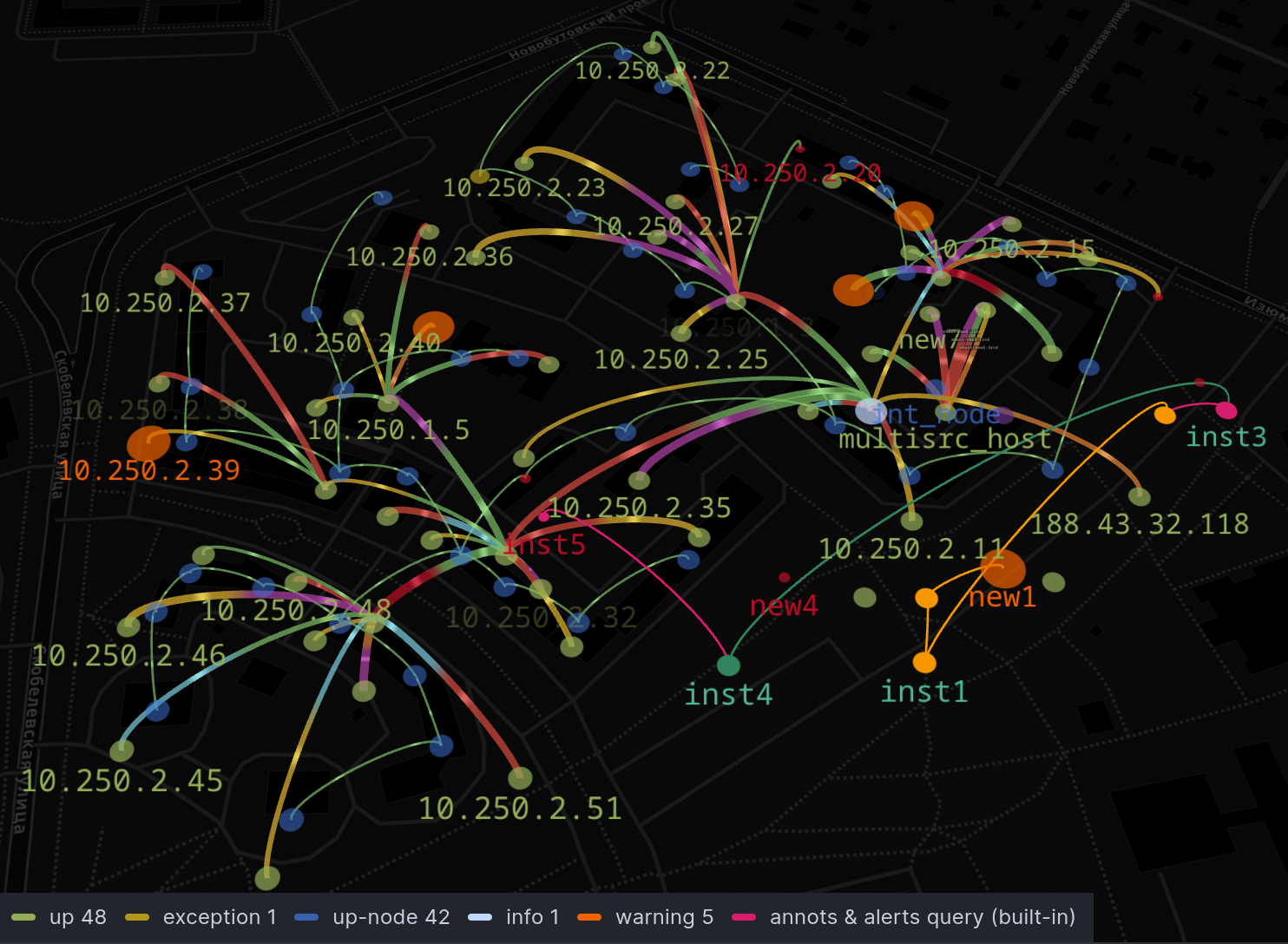





Network Geo map / Node Graph with distributed graph autolayout and spline edge routing.
Start new panel with a sample node graph to test styles and modes.
Full support for native Grafana field config: Thresholds, Mappings, Units, Overrides, Data links.
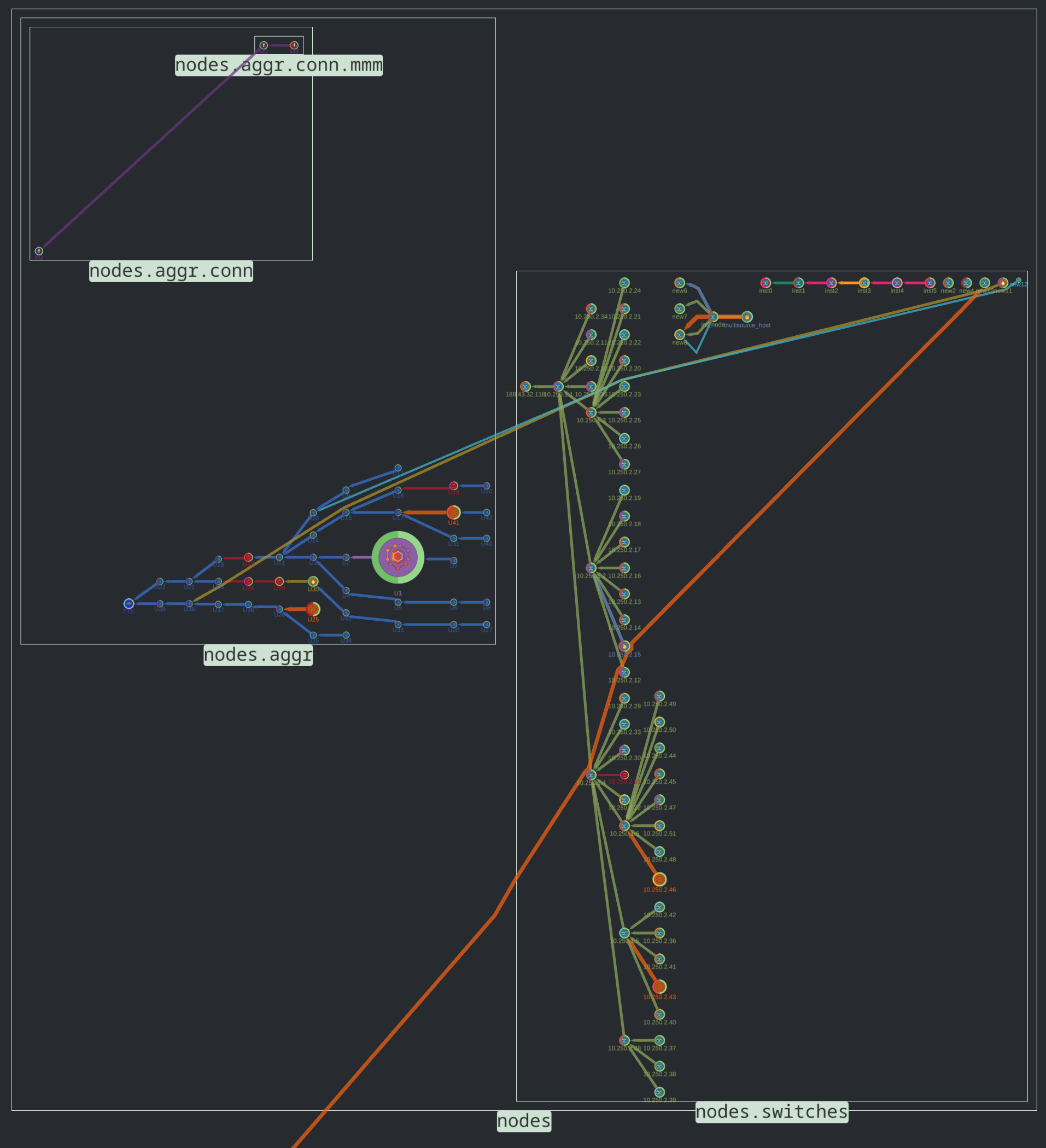
Screenshots
Features
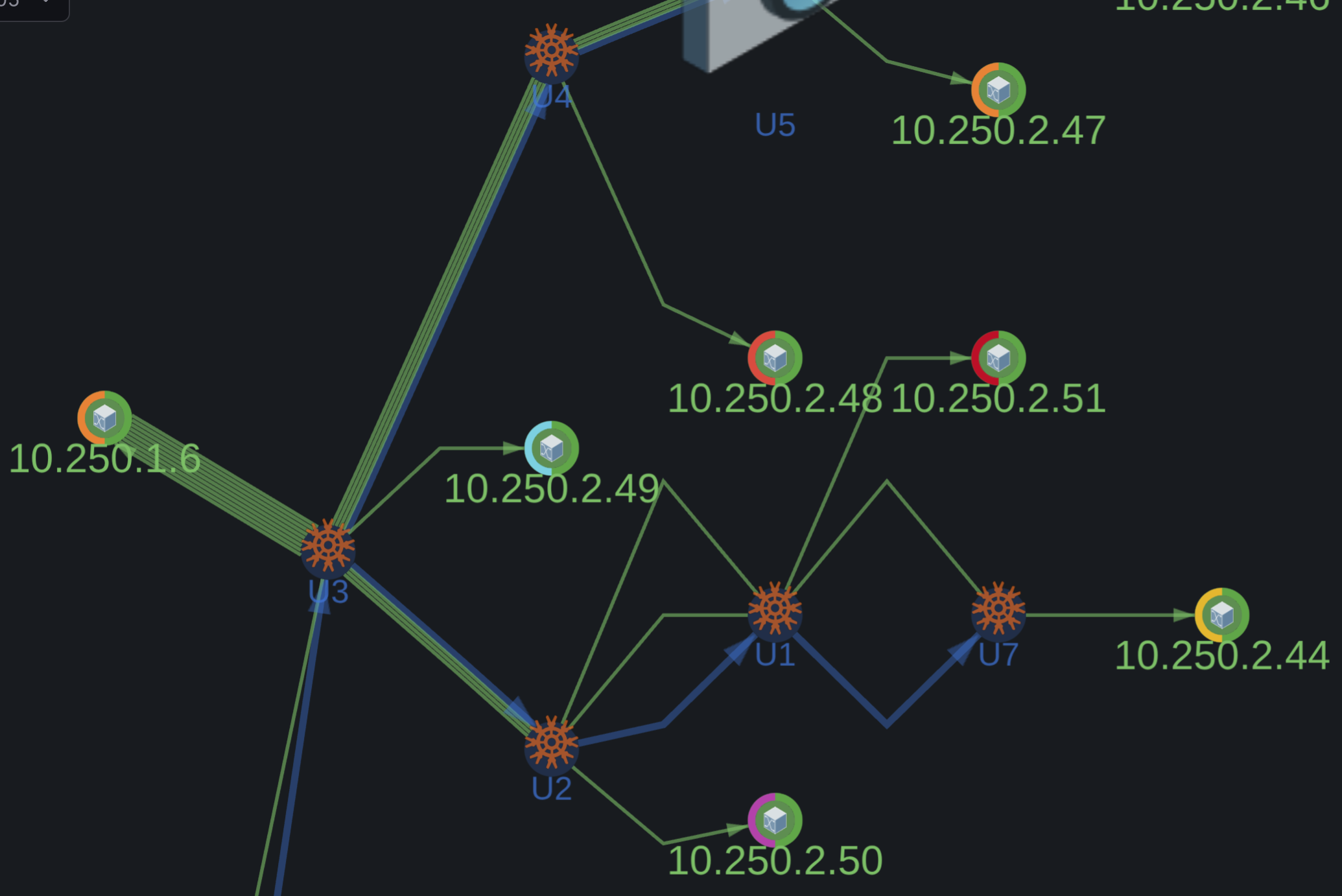
- Node graph with layered auto-layout or Geomap view
- Namespace subgraphs for a distributed graph.
- Webgl GPU-acceleration for rendering large data volumes
- Arc sections on nodes for multiple metrics.
- Multi-segment routes
- Support for parallel routes
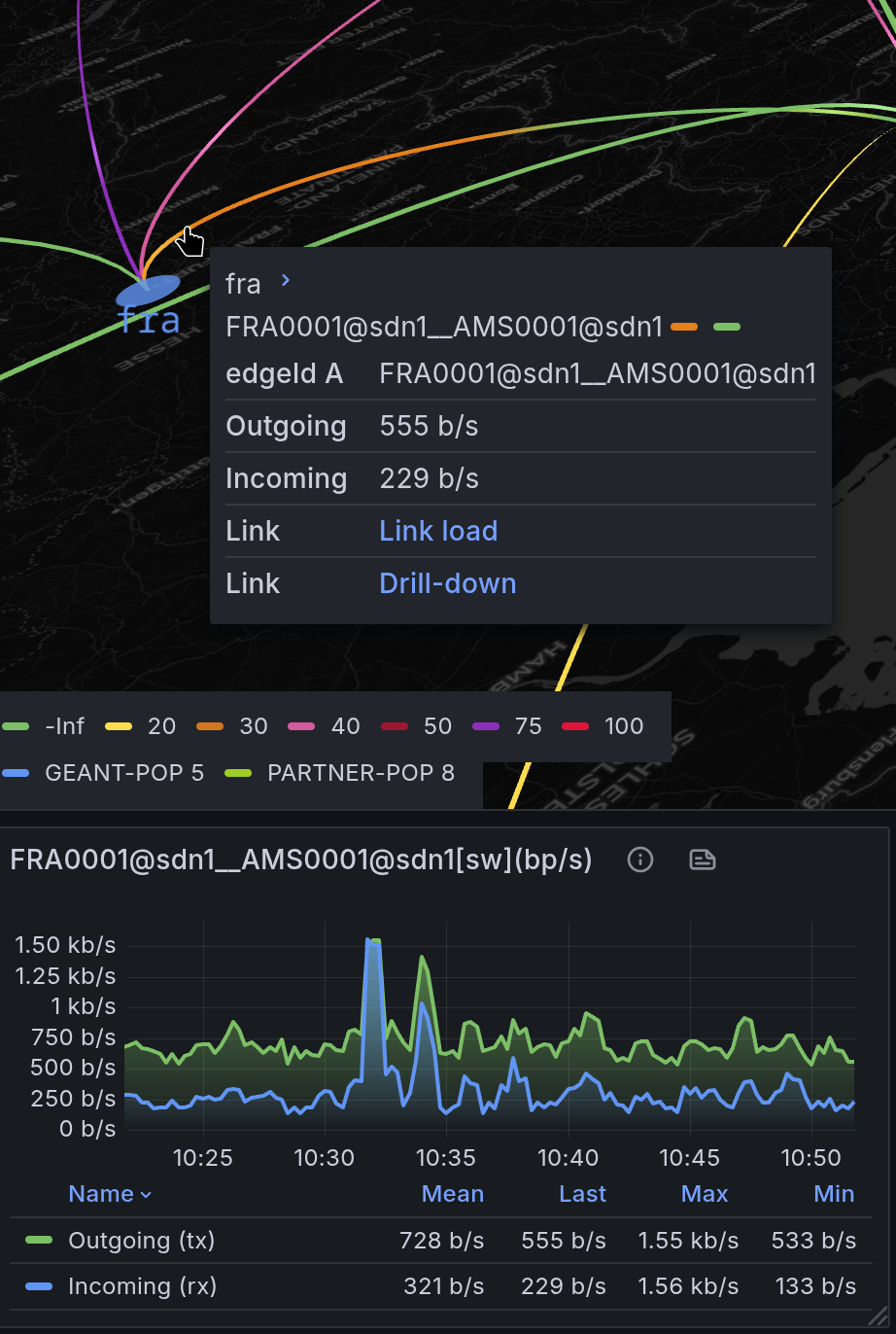
- Network interface TX/RX load visualization using bi-metric arcs
- Ad-hoc filtering by layers, node groups in the legend
- Dynamic drill-down data links to external panels
Data Format
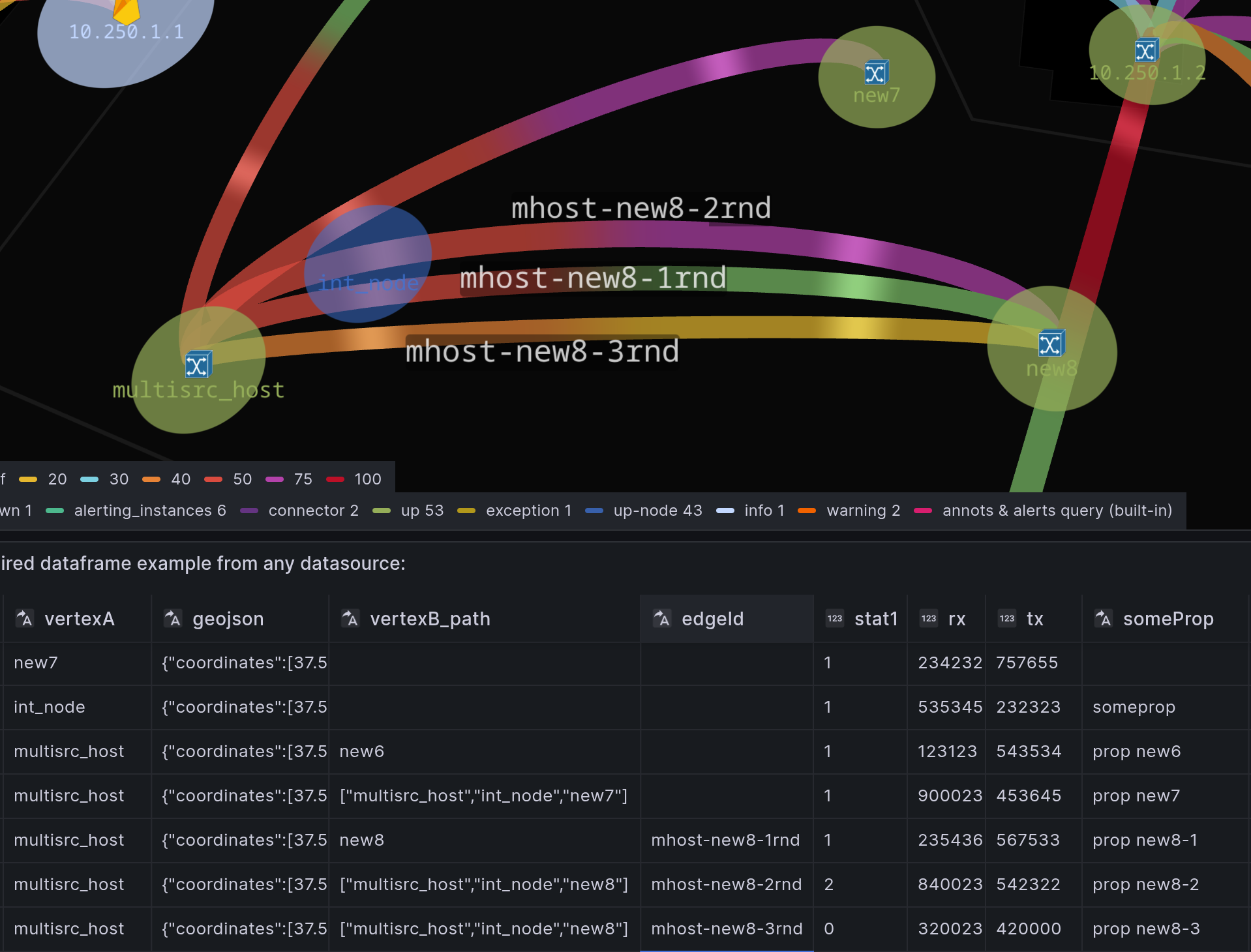
*Field names are examples only. Unified (Graph+Geo) single dataframe for nodes and edges avoids hardcoded dataframe requirements of the native Geomap/NodeGraph.
Each data source record may contain:
node idandcoordinatesfor Geo view (not required for NodeGraph auto-layout)parent idor a full path with intermediate node IDs or raw coordinatesedge id(optional, used to support parallel links)node statusmetrictransmitandreceivemetrics for link load
Data Preparation
Use Grafana’s built-in transformations to prepare and merge data from:
- Zabbix
- Prometheus
- Postgres
- Any other datasource
Tutorial: Zabbix events on geomap
Netbox+Prometheus with drill-down datalinks
🕹️ Demo
Playground with open configuration
Grafana Field Config
Thresholds– value ranges with associated colors to visually indicate statusMapping– rename displayed valuesUnits– measurement unit conversionOverrides– custom settings for specific metricsDataLinks– links to external dashboards or graphsNode Group style rules extend control over node color, icon, size, and line width.
Grafana Cloud Free
- Free tier: Limited to 3 users
- Paid plans: $55 / user / month above included usage
- Access to all Enterprise Plugins
- Fully managed service (not available to self-manage)
Self-hosted Grafana Enterprise
- Access to all Enterprise plugins
- All Grafana Enterprise features
- Self-manage on your own infrastructure
Grafana Cloud Free
- Free tier: Limited to 3 users
- Paid plans: $55 / user / month above included usage
- Access to all Enterprise Plugins
- Fully managed service (not available to self-manage)
Self-hosted Grafana Enterprise
- Access to all Enterprise plugins
- All Grafana Enterprise features
- Self-manage on your own infrastructure
Grafana Cloud Free
- Free tier: Limited to 3 users
- Paid plans: $55 / user / month above included usage
- Access to all Enterprise Plugins
- Fully managed service (not available to self-manage)
Self-hosted Grafana Enterprise
- Access to all Enterprise plugins
- All Grafana Enterprise features
- Self-manage on your own infrastructure
Grafana Cloud Free
- Free tier: Limited to 3 users
- Paid plans: $55 / user / month above included usage
- Access to all Enterprise Plugins
- Fully managed service (not available to self-manage)
Self-hosted Grafana Enterprise
- Access to all Enterprise plugins
- All Grafana Enterprise features
- Self-manage on your own infrastructure
Grafana Cloud Free
- Free tier: Limited to 3 users
- Paid plans: $55 / user / month above included usage
- Access to all Enterprise Plugins
- Fully managed service (not available to self-manage)
Self-hosted Grafana Enterprise
- Access to all Enterprise plugins
- All Grafana Enterprise features
- Self-manage on your own infrastructure
Installing Mapgl on Grafana Cloud:
Installing plugins on a Grafana Cloud instance is a one-click install; same with updates. Cool, right?
Note that it could take up to 1 minute to see the plugin show up in your Grafana.
Warning
Plugin installation from this page will be removed in February 2026. Use the Plugin Catalog in your Grafana instance instead. Refer to Install a plugin in the Grafana documentation for more information.
Installing plugins on a Grafana Cloud instance is a one-click install; same with updates. Cool, right?
Note that it could take up to 1 minute to see the plugin show up in your Grafana.
Warning
Plugin installation from this page will be removed in February 2026. Use the Plugin Catalog in your Grafana instance instead. Refer to Install a plugin in the Grafana documentation for more information.
Installing plugins on a Grafana Cloud instance is a one-click install; same with updates. Cool, right?
Note that it could take up to 1 minute to see the plugin show up in your Grafana.
Warning
Plugin installation from this page will be removed in February 2026. Use the Plugin Catalog in your Grafana instance instead. Refer to Install a plugin in the Grafana documentation for more information.
Installing plugins on a Grafana Cloud instance is a one-click install; same with updates. Cool, right?
Note that it could take up to 1 minute to see the plugin show up in your Grafana.
Warning
Plugin installation from this page will be removed in February 2026. Use the Plugin Catalog in your Grafana instance instead. Refer to Install a plugin in the Grafana documentation for more information.
Installing plugins on a Grafana Cloud instance is a one-click install; same with updates. Cool, right?
Note that it could take up to 1 minute to see the plugin show up in your Grafana.
Warning
Plugin installation from this page will be removed in February 2026. Use the Plugin Catalog in your Grafana instance instead. Refer to Install a plugin in the Grafana documentation for more information.
Installing plugins on a Grafana Cloud instance is a one-click install; same with updates. Cool, right?
Note that it could take up to 1 minute to see the plugin show up in your Grafana.
Installing plugins on a Grafana Cloud instance is a one-click install; same with updates. Cool, right?
Note that it could take up to 1 minute to see the plugin show up in your Grafana.
Warning
Plugin installation from this page will be removed in February 2026. Use the Plugin Catalog in your Grafana instance instead. Refer to Install a plugin in the Grafana documentation for more information.
Installing plugins on a Grafana Cloud instance is a one-click install; same with updates. Cool, right?
Note that it could take up to 1 minute to see the plugin show up in your Grafana.
Marketplace plugins
This is a paid plugin developed by a marketplace partner. To purchase an entitlement, sign in first, then fill out the contact form.
Marketplace plugins
This is a paid for plugin developed by a marketplace partner. To purchase entitlement please fill out the contact us form.
What to expect:
- Grafana Labs will reach out to discuss your needs
- Payment will be taken by Grafana Labs
- Once purchased the plugin will be available for you to install (cloud) or a signed version will be provided (on-premise)
Thank you! We will be in touch.
For more information, visit the docs on plugin installation.
Installing on a local Grafana:
For local instances, plugins are installed and updated via a simple CLI command. Plugins are not updated automatically, however you will be notified when updates are available right within your Grafana.
1. Install the Panel
Use the grafana-cli tool to install Mapgl from the commandline:
grafana-cli plugins install The plugin will be installed into your grafana plugins directory; the default is /var/lib/grafana/plugins. More information on the cli tool.
Alternatively, you can manually download the .zip file for your architecture below and unpack it into your grafana plugins directory.
Alternatively, you can manually download the .zip file and unpack it into your grafana plugins directory.
2. Add the Panel to a Dashboard
Installed panels are available immediately in the Dashboards section in your Grafana main menu, and can be added like any other core panel in Grafana.
To see a list of installed panels, click the Plugins item in the main menu. Both core panels and installed panels will appear.
Changelog Mapgl
2.2.0
- namespace subgraphs support. Make your graph more branchy.
- revamped Group rules section #6
- fix: group rules threshold options sync with node metric field #5
- fix: scale on zoom for arrows and arc labels. Better arrow tips positioning.
2.1.0
- align styles with Grafana theme tokens. Theme support for widget buttons.
- hot patch for upstream FolderPickerTab Grafana 12.4.0. (No portal popups #119187)
- robust svg loading for edge arrows under stricter Grafana environments (v11.2.0)
- update field pickers and matchers from Grafana core
2.0.1
- arrows config for edges in 'routed' view mode
- parallel edges support for arcs/hyperedges in nodegraph view
- cut edges at node boundary ports to prevent overlapping with semi-transparent nodes.
- show head node id in edge tooltip
- enlarge picked arc, edge
2.0.0
- Node Graph with autolayout and spline edge routing that respects node boundary curves. In addition to Geo mode.
- Arc sections on nodes for any metrics.
- Style config extends Grafana Geomap styles-from-dimensions concept with overrides for user-defined node groups
- Native Grafana Field config support: Thresholds, Mappings, Units, Overrides, Data links.
- Bi-metric Arcs (ex., for TX/RX)
- Ad-hoc filters by layers, node groups in the legend
- Unified (Graph+Geo) single dataframe for nodes and edges (same as in v.1) avoids hardcoded dataframe requirements of the native Geomap/NodeGraph.
- v1 -> v2 data migration is not required
1.6.1
- fix cluster labels edit in thresholds to comply with braking < Tooltip > component since Grafana 10.3.0
- fix tooltip css classes for pointerEvents:all
- ncu u: bump deck.gl & luma.gl versions
1.6.0
- cluster legend-filter
- fullscreen and compass widgets
- migrate to deck.gl 9 (with WebGPU support in the near future)
1.5.0
- point circle and text label dimensions
- svg icon rules collapsible + resource picker
- bugfix: cluster hull polygon onHover doesn't lag on large datasets
1.4.0
- alerting states from built-in Grafana annotations query. State colors for nodes and clusters
- see-through convex hull polygon for cluster area
1.3.0
- cluster max zoom menu select to control clusterization
- convex hull polygon shows cluster boundaries, cluster expansion zoom on click
- restore Grafana >=9.2.5 support
- fix performance issues that occured on large datasets because of composite cluster+circles+icons+text layer with sublayers constantly recalculating. Now that IconGeoJsonLayer (circles+icons+text) is separated from IconClusterLayer, deck.gl has less to render
1.2.0
- svg icons for nodes
- text labels with collision filter.
- bug fixes: allow lineWidth custom size, no min/max
1.1.0
- Multi-source, multi-target support
- Switch path direction by declaring dashboard variable 'locRole'.
- Data-links: icon in tooltip to sets values for 'target' and 'source' dashboard variables. This lets you show charts dynamically in other panels.
- Comment icons for intermediate locations from text and color inlined in coordinates (ex.: [37.560447,55.550818, 0, "comment", "green"])
- Aggregation nodes and offset for overlapping lines.
- stat1/stat2 switch to disable offset and show secondary metric
- edge labels in stat2 mode , aggregation nodes labels.
1.0.2
- New: support for parent path as an array of coordinates or location names
- New: aggregation nodes and offset for overlapping lines in parent path.
- Parent line style improvements: -Extended path to root as a separate dotted line.
- Bug fixes:
- isolate config options for different layers;
1.0.1
- Multi layers support
- PolygonsLayer, Path (LineStrings) layer from frames datasource
- Static GeoJson layer with FeatureCollection support from GeoJson file (url)
- Advanced thresholds processor for metrics. Set specific color for any set of parameters describing group of features.
- Points show toggle
1.0.0
Initial release. Repository has a demo provisioned dashboard with mock datasource

