
OpenClaw
OpenClaw gateway activity, model requests, tokens, tool failures, messaging outcomes, and liveness. Compatible with classic and native OTLP Application Insights via their resource-scoped query views. All queries are restricted to openclaw-gateway. Request token totals exclude aggregate usage reports and harness turns; coverage shows missing usage.
OpenClaw
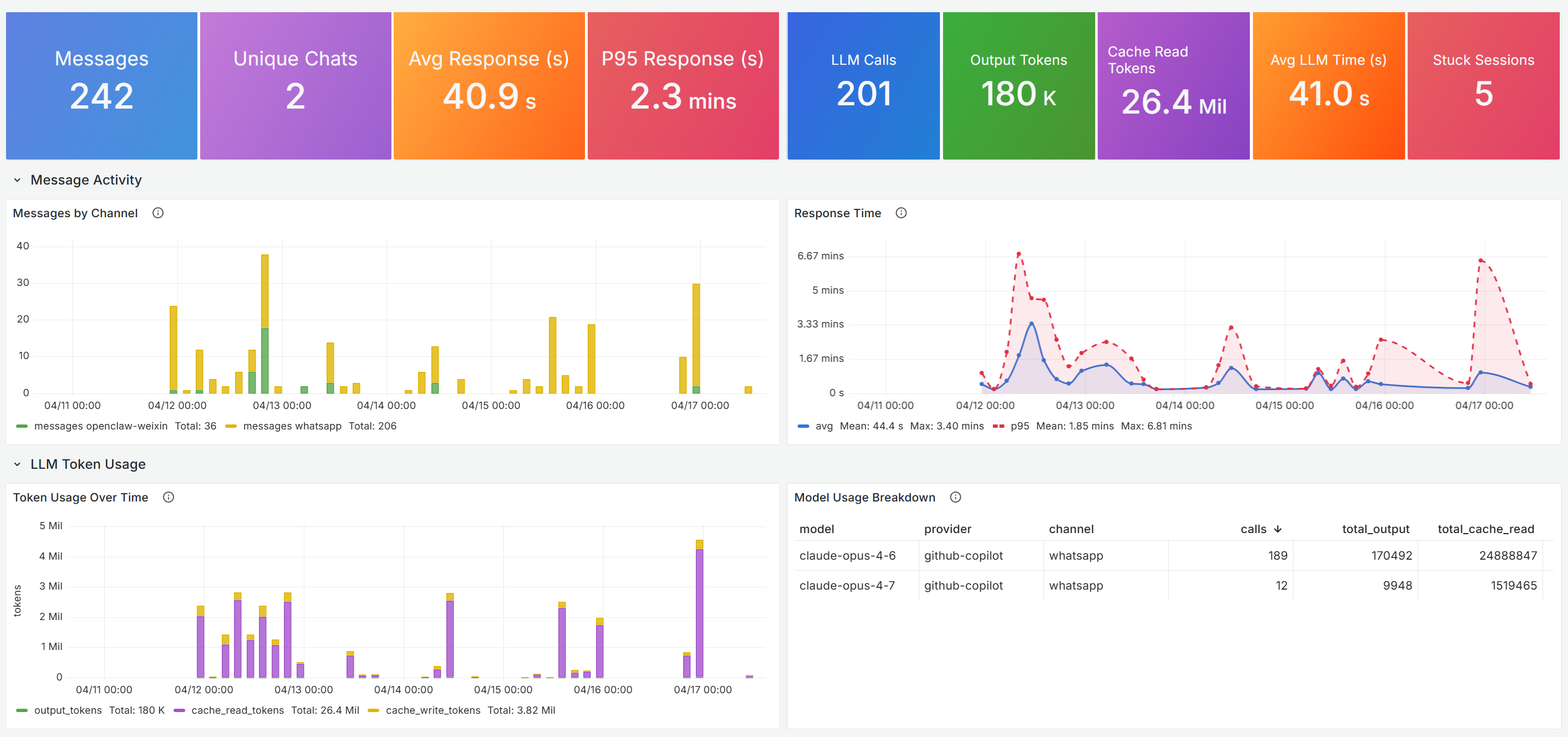
Monitoring dashboard for OpenClaw gateway usage via Application Insights OpenTelemetry data. Tracks message processing across channels (WhatsApp, WeChat), LLM token consumption and cost, response latency, stuck sessions, and gateway errors. Includes a recent-messages table with trace drill-down for debugging individual interactions.
Screenshots

Issues and feedback
https://github.com/1w2w3y/grafana-dashboards/issues
Features
- Summary
- Message Summary (Messages, Unique Chats, Avg Response, P95 Response)
- LLM & Health Summary (LLM Calls, Output Tokens, Cache Read Tokens, Avg LLM Time, Stuck Sessions)
- Message Activity
- Messages by Channel
- Response Time (avg / p95)
- LLM Token Usage
- Token Usage Over Time (output / cache read / cache write)
- Model Usage Breakdown (per model / provider / channel)
- Health & Errors
- Stuck Sessions Over Time
- Errors & Warnings
- Channel Details
- Messages by Channel (distribution)
- Recent Messages (with trace drill-down)
How it works
- Grafana queries Application Insights via the Azure Monitor data source using Log Analytics (KQL) queries against the
dependenciestable, filtered bycloud_RoleName == "openclaw-gateway". Metrics are grouped byopenclaw.*custom dimensions (channel, outcome, model, provider, chatId). - Variables:
am_ds— Azure Monitor data sourcesub— Azure subscriptionrg— Resource group (resolved via Azure Resource Graph formicrosoft.insights/components)res— Application Insights resource
- Default time range is 7 days; default refresh 30 minutes.
Requirements
- Grafana 11.6+ with the Azure Monitor data source configured with access to the subscription containing your Application Insights resource.
- OpenClaw gateway telemetry flowing into Application Insights via OpenTelemetry with
cloud_RoleName = "openclaw-gateway"andopenclaw.*custom dimensions. See Ingest data into Application Insights via OpenTelemetry Collector for the end-to-end setup — running the OTel Collector with the Azure Monitor Exporter, the OpenClaw gateway telemetry config (serviceName: "openclaw-gateway"), and KQL verification queries.
Change history
- 5/1/2026 Point data-ingestion link to the published Microsoft Learn guide (aka.ms/amg/dash-doc/otlp-appinsights)
- 4/17/2026 Initial version
Data source config
Collector config:
Upload an updated version of an exported dashboard.json file from Grafana
| Revision | Description | Created | |
|---|---|---|---|
| Download |