
Bambulab Metrics
Real-time monitoring dashboard for BambuLab 3D printers. Tracks printer health, print progress, temperatures, fan speeds, AMS filament inventory, and queue status via Prometheus metrics. Supports multiple printers and AMS units automatically.
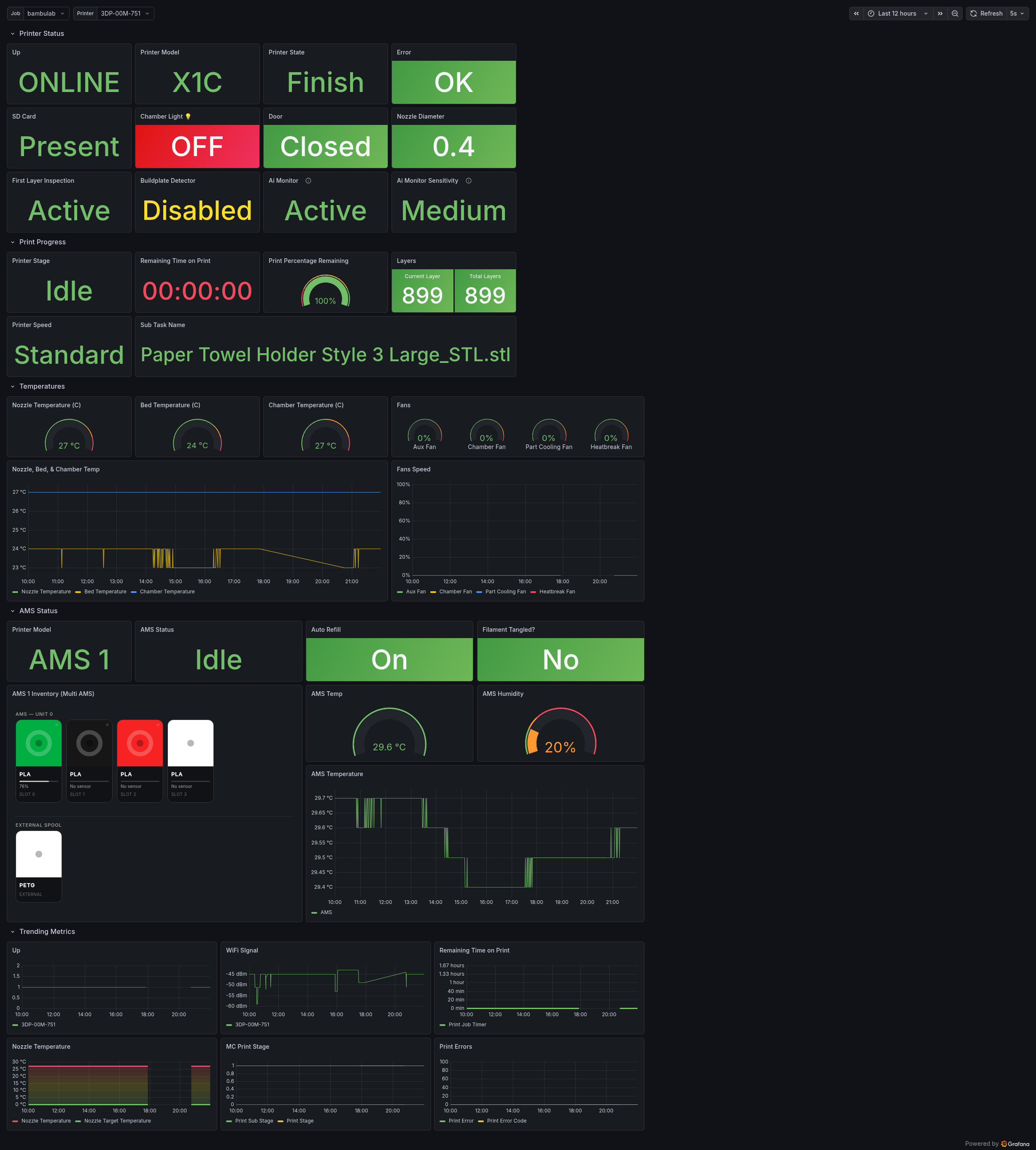
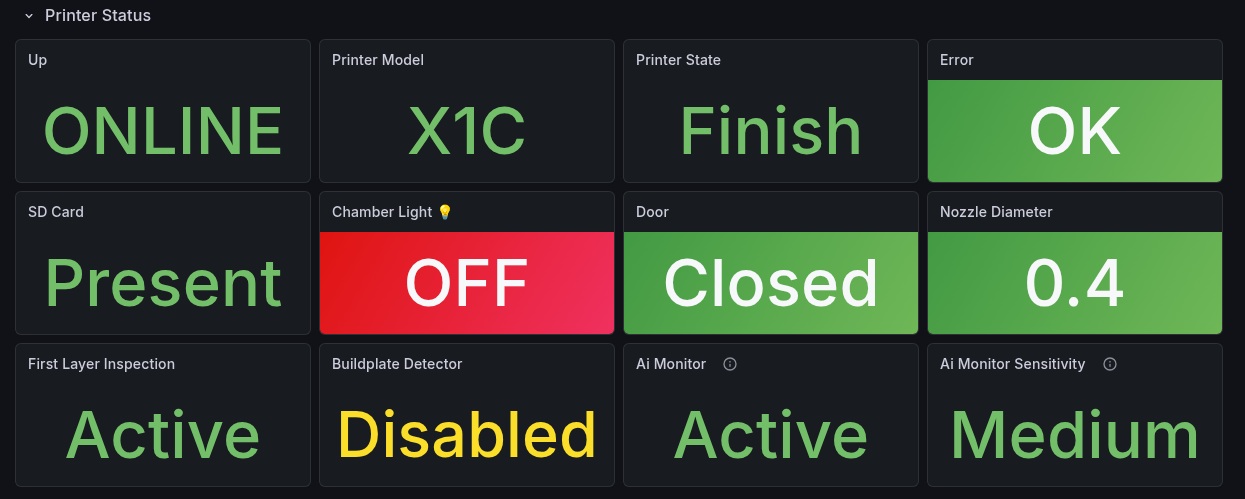
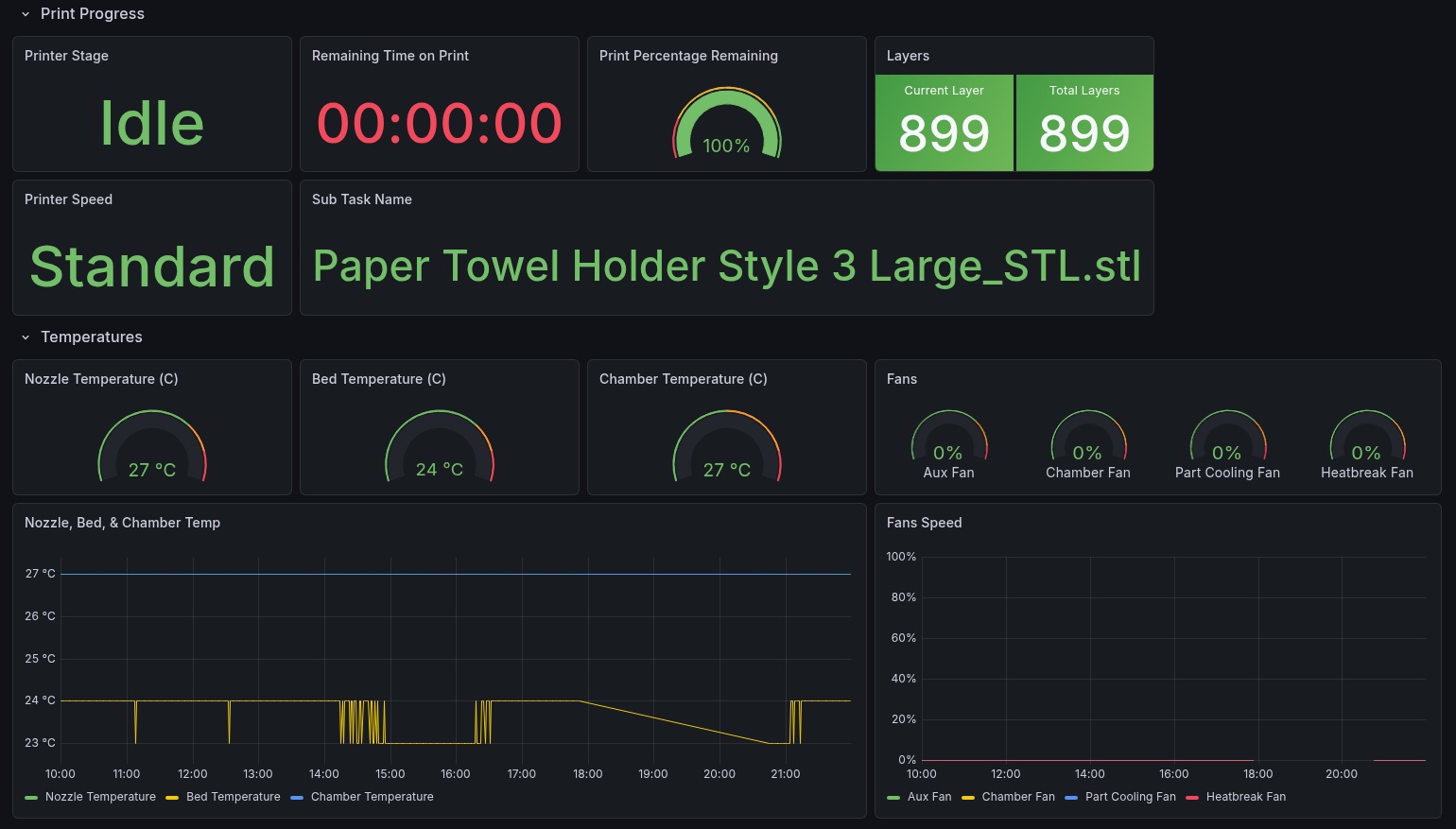
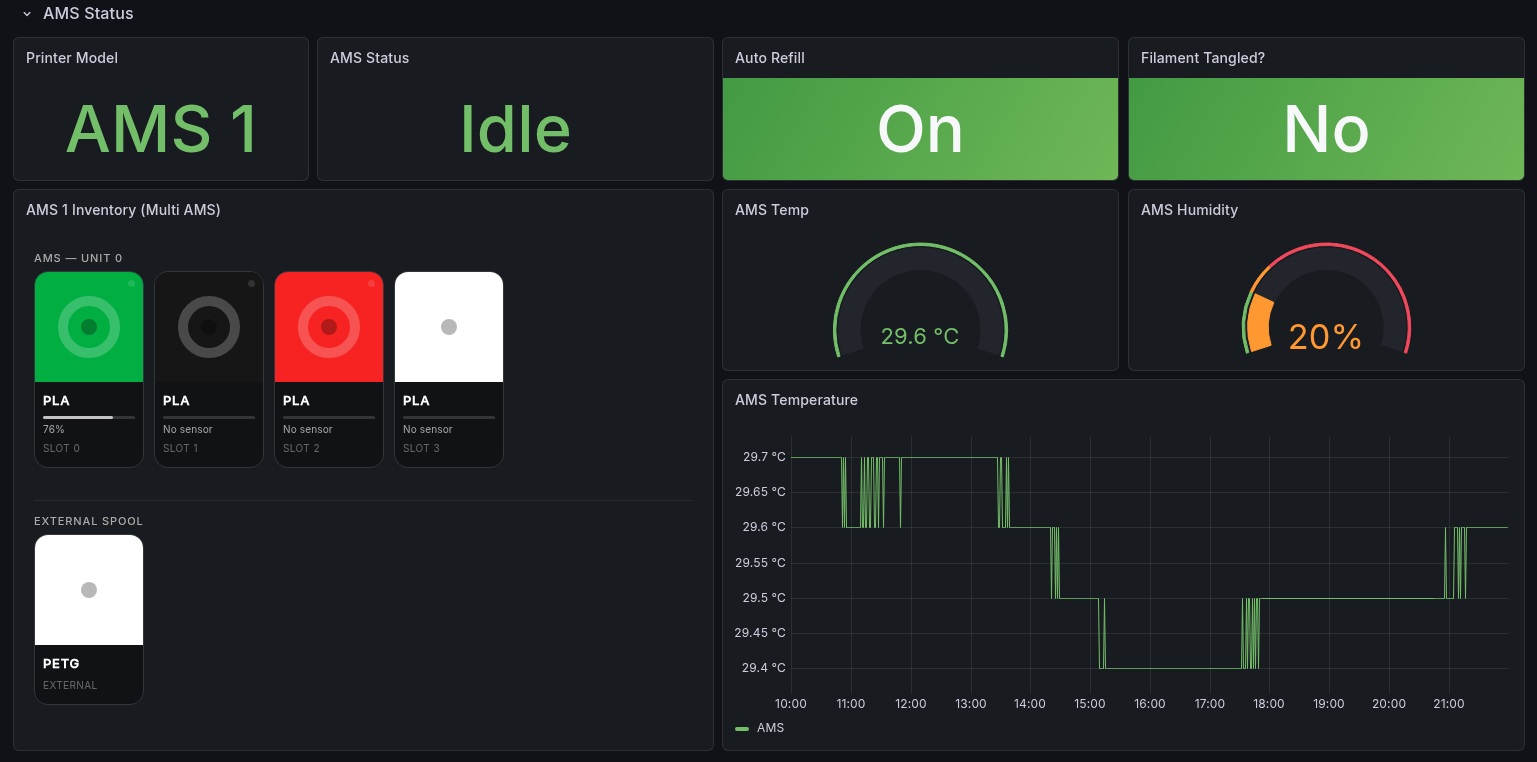
BambuLab 3D Printer — Grafana Dashboard
Real-time monitoring dashboard for BambuLab 3D printers. Tracks printer health, live print progress, temperatures, fan speeds, AMS filament inventory, and job queue status. Supports multiple printers and multiple AMS units automatically via Prometheus label-based discovery.
Requirements
| Component | Version |
|---|---|
| Grafana | 10.0+ |
| Prometheus | 2.40+ |
| bambulab_metrics_exporter | Latest |
| Grafana Business Text plugin | 5.0+ |
Grafana plugins required
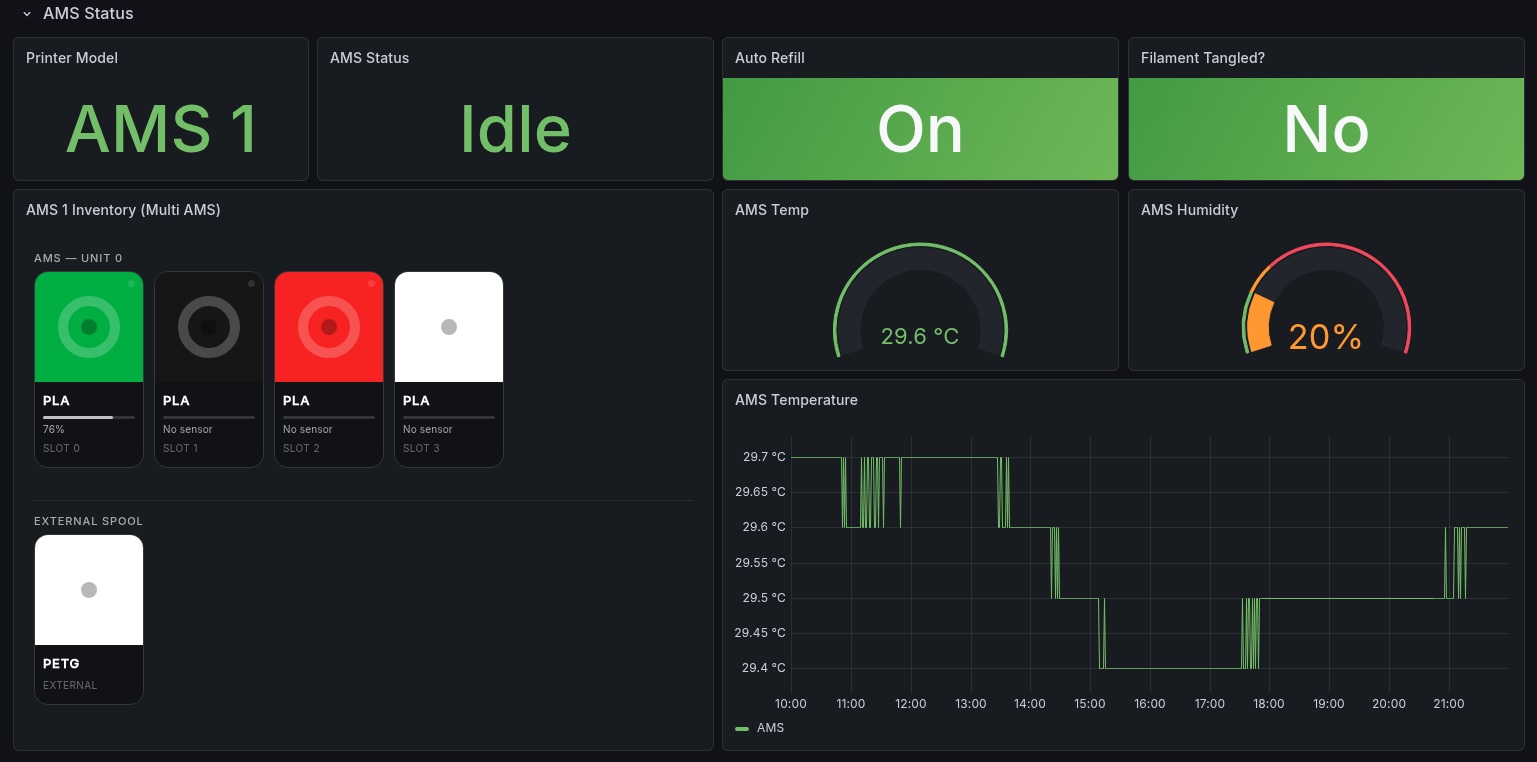
This dashboard uses the Business Text panel (formerly Dynamic Text) by Volkov Labs for the AMS filament inventory visualization. The AMS panel renders filament spool cards with real colors, type labels, remaining % progress bars, and active slot indicators using a Handlebars HTML template. It cannot be replicated with native Grafana panel types because Canvas does not support dynamic color binding from label values, and Stat/Table panels cannot loop over rows to render per-slot cards.
1. Install the Business Text plugin
Via Grafana CLI:
grafana-cli plugins install marcusolsson-dynamictext-panel
Via Docker — add to your docker-compose.yml:
environment:
  - GF_INSTALL_PLUGINS=marcusolsson-dynamictext-panel
Via Grafana UI: Administration → Plugins → Search "Business Text" → Install.
Restart Grafana after installing.
2. Enable HTML rendering
The Business Text panel renders HTML templates. By default Grafana sanitizes HTML for security, which strips all styling and layout. You must disable sanitization for the AMS panel to render correctly.
Option A — grafana.ini:
[panels]
disable_sanitize_html = true
Option B — environment variable (recommended for Docker):
GF_PANELS_DISABLE_SANITIZE_HTML=true
Docker Compose example:
services:
  grafana:
    image: grafana/grafana:latest
    environment:
      - GF_PANELS_DISABLE_SANITIZE_HTML=true
      - GF_INSTALL_PLUGINS=marcusolsson-dynamictext-panel
Restart Grafana after making this change. Without it the AMS panel will display plain unstyled text instead of the visual spool cards.
3. Set Content mode to HTML
After creating the Business Text panel, in the panel editor make sure to set Content mode → HTML in the panel options on the right side. The default mode is Markdown which will not render the template correctly.
Data collection
Metrics are collected from BambuLab printers via MQTT using the bambulab_metrics_exporter Prometheus exporter. The exporter connects to the printer's local MQTT broker and exposes all telemetry as Prometheus gauges on a /metrics endpoint.
How it works
BambuLab Printer (MQTT)
        │
        ▼
bambulab_metrics_exporter (Prometheus exporter)
        │
        ▼
Prometheus (scrapes /metrics every 15s)
        │
        ▼
Grafana (queries Prometheus)
For exporter installation and configuration see the bambulab_metrics_exporter README.
Prometheus scrape config
Add this to your prometheus.yml:
scrape_configs:
  - job_name: bambulab
    scrape_interval: 15s
    scrape_timeout: 10s
    static_configs:
      - targets:
          - localhost:9101        # Replace with your exporter host/port
        labels:
          environment: home
Reload Prometheus after adding:
curl -X POST http://localhost:9090/-/reload
Verify metrics are flowing by visiting:
http://localhost:9101/metrics
You should see metrics prefixed with bambulab_.
Dashboard panels
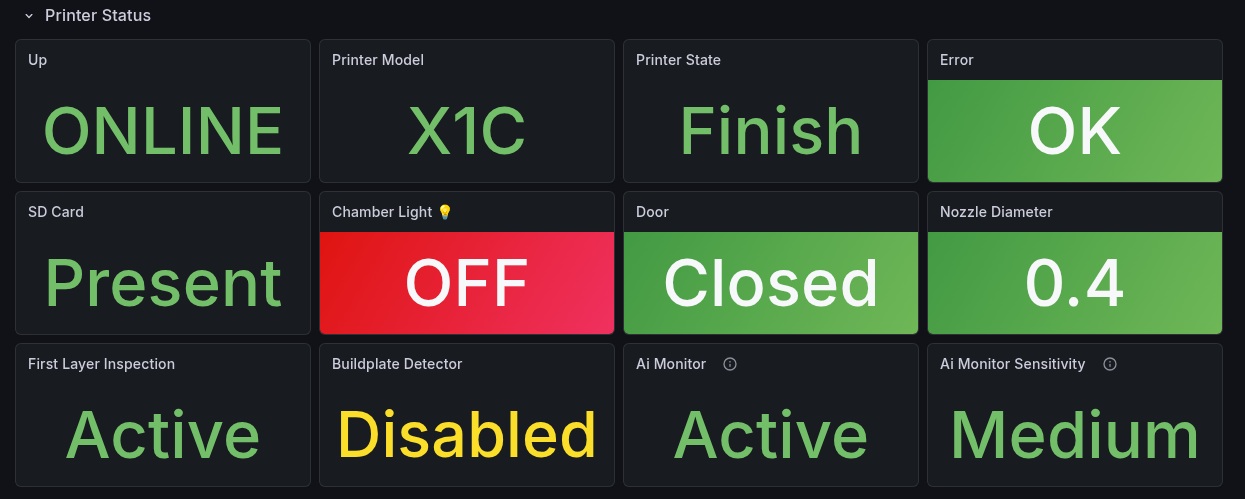
Printer status row
| Panel | Type | Description |
|---|---|---|
| Printer health | Stat | Shows polling status, MQTT connection, error flag, and SD card presence as green/red indicators |
| Gcode state | Stat | Current gcode state — IDLE, RUNNING, FINISH, PAUSED, FAILED etc. |
| Print stage | Stat | Current print stage, MC stage code, and active sub-stage activity (bed heating, calibrating, etc.) |
| Current job | Stat | Filename of the currently printing or last printed job |
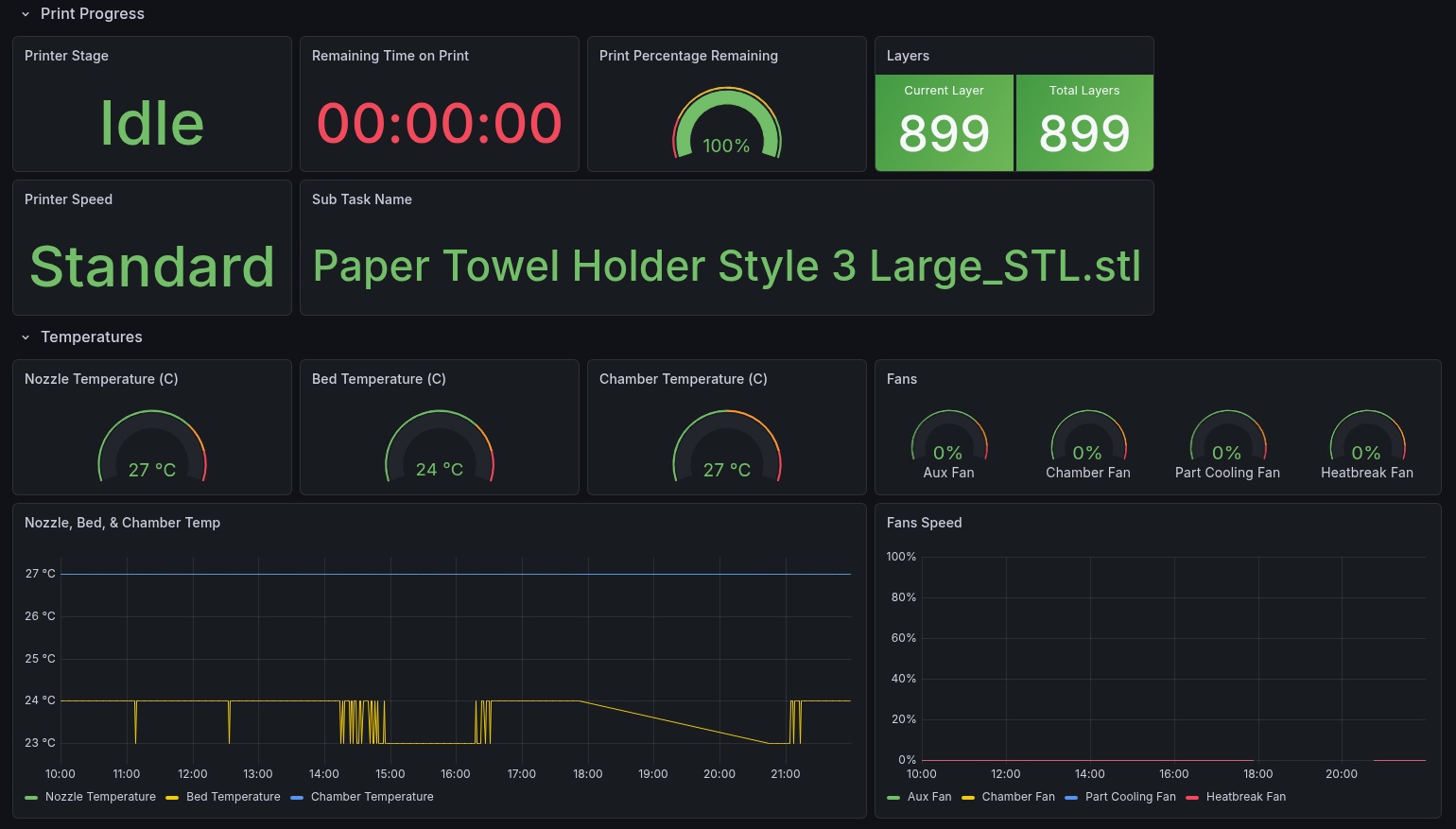
Print progress row
| Panel | Type | Description |
|---|---|---|
| Progress % | Gauge | Overall print completion percentage |
| Layer counter | Stat | Current layer vs total layers (e.g. 423 / 899) |
| Time remaining | Stat | Estimated time remaining formatted as HH:MM |
| Progress over time | Time series | Progress % and layer progress % plotted over time, with remaining minutes on a second Y axis |
Temperatures row
| Panel | Type | Description |
|---|---|---|
| Nozzle temperature | Gauge | Current nozzle temp with target overlay |
| Bed temperature | Gauge | Current bed temp with target overlay |
| Chamber temperature | Gauge | Chamber ambient temperature |
| All temperatures | Time series | Nozzle, bed, and chamber temperatures on one graph with dashed target lines |
Fans row
| Panel | Type | Description |
|---|---|---|
| Fan speeds | Bar gauge | All 5 fans (big fan 1 & 2, cooling, heatbreak, auxiliary) shown as horizontal bar gauges 0–100% |
AMS row
| Panel | Type | Description |
|---|---|---|
| AMS filament inventory | Business Text | Visual spool cards per slot showing filament color, type, remaining %, and active indicator. Supports multiple AMS units side by side, responsive layout, with external spool shown separately at the bottom |
| AMS humidity & temperature | Stat + Time series | Per-AMS-unit humidity %, humidity index, and internal temperature |
| AMS status | Stat | AMS system status, RFID status, and auto-switch flag |
Speed & network row
| Panel | Type | Description |
|---|---|---|
| Speed mode | Stat | Current speed profile — Silent, Standard, Sport, or Ludicrous |
| Speed % | Stat | Speed magnitude as percentage relative to standard |
| WiFi signal | Gauge | WiFi signal strength in dBm |
| Queue | Stat | Number of queued jobs, current queue position, and estimated queue time |
Errors & safety row
| Panel | Type | Description |
|---|---|---|
| Error state | Stat | Printer error flag, print error code, AP error code, filament tangle detection |
| XCam features | Stat | Status of all XCam AI features — spaghetti detector, first layer inspector, print halt, printing monitor, buildplate marker detector |
| Door & lights | Stat | Door open/closed, chamber light, work light |
Exporter health row
| Panel | Type | Description |
|---|---|---|
| Scrape health | Stat | Exporter scrape success flag, scrape duration, and timestamp of last successful poll |
Key metrics reference
| Metric | Description |
|---|---|
bambulab_printer_up | 1 if last poll had a valid payload |
bambulab_printer_connected | 1 if MQTT connection is active |
bambulab_print_progress_percent | Overall print progress 0–100 |
bambulab_print_remaining_seconds | Estimated seconds remaining |
bambulab_print_layer_current | Current layer number |
bambulab_print_layer_total | Total layer count |
bambulab_nozzle_temperature_celsius | Nozzle current temperature |
bambulab_nozzle_target_temperature_celsius | Nozzle target temperature |
bambulab_bed_temperature_celsius | Bed current temperature |
bambulab_chamber_temperature_celsius | Chamber temperature |
bambulab_ams_slot_tray_info | Filament color and type per AMS slot |
bambulab_ams_slot_remaining_percent | Remaining filament % per slot (-1 = no sensor) |
bambulab_ams_unit_humidity | AMS internal humidity % |
bambulab_ams_unit_temperature_celsius | AMS internal temperature |
bambulab_printer_gcode_state | One-hot gcode state label |
bambulab_wifi_signal | WiFi signal in dBm |
bambulab_printer_error | 1 when printer reports an error |
bambulab_xcam_feature_enabled | Per-feature XCam enabled flags |
bambulab_external_spool_info | External spool color, type, and filament code |
Full metric list available at your exporter's /metrics endpoint.
Multiple printers
The dashboard uses printer_name as a label on all metrics. To support multiple printers, add a Dashboard variable:
- Dashboard Settings → Variables → Add variable
- Type: Query
- Name:
printer - Query:
label_values(bambulab_printer_up, printer_name)
- Then update all panel queries to use
{printer_name="$printer"}instead of a hardcoded name.
Alerting suggestions
| Alert | Condition |
|---|---|
| Printer offline | bambulab_printer_up == 0 for > 2 minutes |
| MQTT disconnected | bambulab_printer_connected == 0 for > 1 minute |
| Printer error | bambulab_printer_error == 1 |
| Filament tangle | bambulab_filament_tangle_detected == 1 |
| High chamber temp | bambulab_chamber_temperature_celsius > 60 |
| AMS high humidity | bambulab_ams_unit_humidity_index >= 4 |
| Print stalled | bambulab_print_progress_percent unchanged for > 30 minutes while gcode_state == RUNNING |
License
MIT — free to use, modify, and share.
Data source config
Collector config:
Upload an updated version of an exported dashboard.json file from Grafana
| Revision | Description | Created | |
|---|---|---|---|
| Download |