
AWS Carbon Report
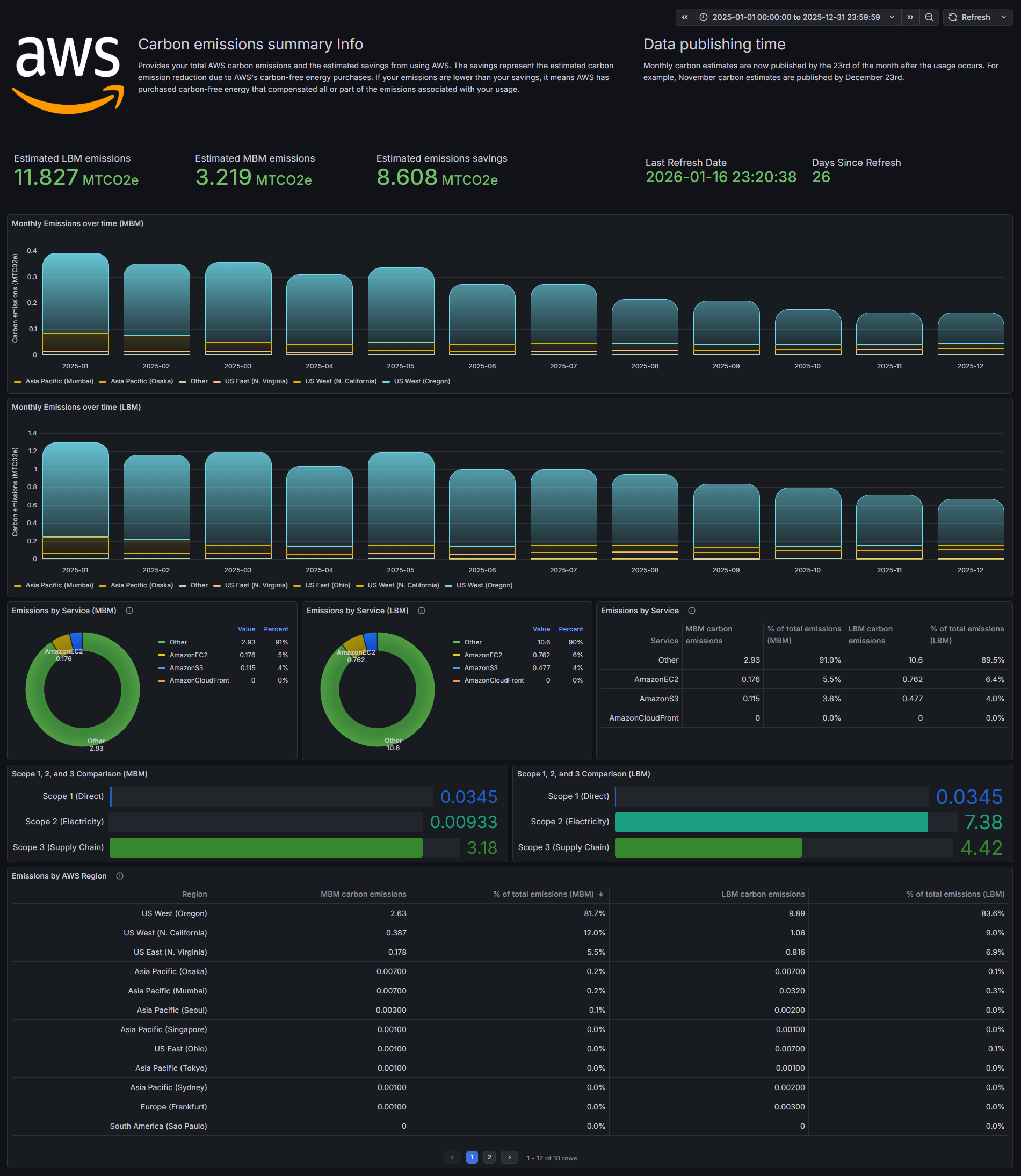
AWS carbon dashboard using billing exports to Athena.
Bugs, suggestions and feedback
Bug reports, suggestions and feedback to GitHub please!
1. Enable Carbon Data Exports to S3
- Navigate to the Billing and Cost Management console.
- In the left sidebar, select Data Exports.
- Click Create and choose Carbon emissions as the data table.
- Configure the Export:
- Export name: e.g., carbon_emissions_monthly.
- S3 bucket: Choose an existing bucket or create a new one.
- Format: Select Parquet. (It’s much faster and cheaper to query in Athena than CSV).
- Compression: Snappy.
- Versioning: Select "Overwrite existing data export file" if you want a clean "latest" state, or "Create new export version" for historical tracking.
[!IMPORTANT] The 3-Month Lag: AWS carbon data is updated monthly but typically has a 3-month delay (e.g., in June, you'll see data for March). Your Grafana dashboard will look empty if you filter for "Last 7 days."
2. Set Up the Athena Table Once the first export lands in S3 (this can take up to 24 hours), you need to tell Athena how to read it.
AWS provides a schema for this, but the easiest way is to use an AWS Glue Crawler pointed at your S3 export path. Alternatively, you can run a manual CREATE TABLE script in the Athena console.
Pro-Tip: If you use the Glue Crawler, it will automatically handle the partitions (like usage_period=2025-01) that AWS creates.
3. Connect Grafana to Athena Use the Athena Datasource Plugin for Grafana, the setup is straightforward:
- IAM Permissions: Ensure the IAM role/user Grafana is using has:
athena:StartQueryExecution
s3:GetObject(on your Carbon export bucket)
glue:GetTable/glue:GetPartitions
- Configure Datasource: In Grafana, point to your Athena workgroup and the database where you created the carbon table.
Data source config
Collector config:
Upload an updated version of an exported dashboard.json file from Grafana
| Revision | Description | Created | |
|---|---|---|---|
| Download |

AWS

Easily visualize and alert on more than 60 Amazon Web Services (AWS) resources using the fully managed Grafana Cloud platform.
Learn more