
z/VM Overview
The dashboard provides a high level performance overview of the z/VM® hypervisor as collected by the z/VM Performance Data Pump using the default configuration.
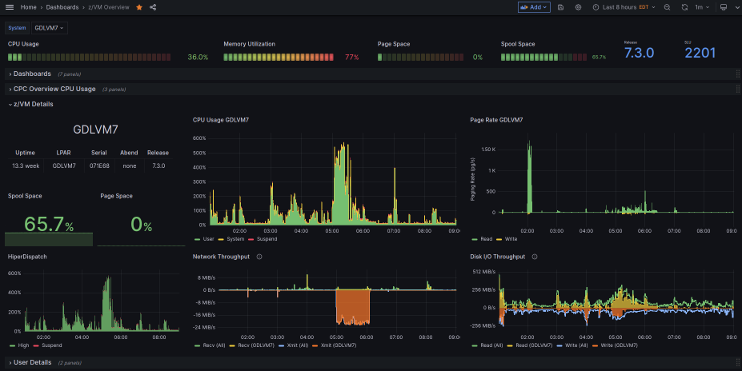
The dashboard provides a high level performance overview of the z/VM® hypervisor as collected by the z/VM Performance Data Pump using the default configuration. The focus of the dashboard is a single z/VM system; the pull-down selection can be used to show data from another z/VM system. The dashboard shows overall CPU- and memory usage, and network and disk I/O throughput. Additional rows of panels provide metrics on the other partitions on the same machine to better understand CPU contention on LPAR-level. A usage break-down by user class is provided to analyze CPU contention within the z/VM system. A row with dashboard lists contains the pointers to other installed dashboards, making it a good home dashboard.
For those who prefer a diverging (positive/negative) axis view, you can invert one metric—such as transmit traffic—by adding a negative sign in the query (for example, multiply the value by -1). This allows receive and transmit values to appear on opposite sides of the axis, recreating the traditional split-visualization style.
This dashboard is licensed by IBM under the Apache 2.0 License and is provided ‘as is’ without warranty, representation, support, maintenance or an obligation to issue updates.
Data source config
Collector config:
Upload an updated version of an exported dashboard.json file from Grafana
| Revision | Description | Created | |
|---|---|---|---|
| Download |