Slide 4 of 8

The log exploration workflow

The log exploration workflow

Logs Drilldown follows a four-step pattern for investigating log data.
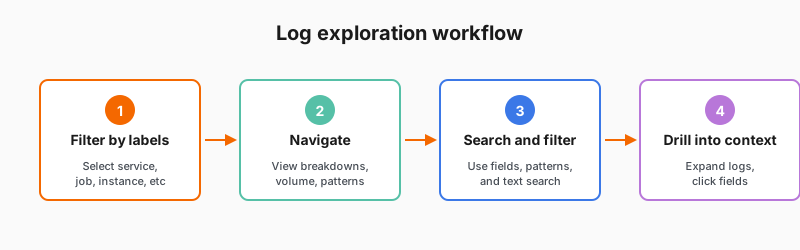
Log exploration workflow showing four steps

The workflow

StepWhat you doWhat you get
Filter by labelsSelect service, job, instance, etc.Logs from specific sources
Navigate to detailed breakdownsView log list, logs volume, labels, fields, patternsMultiple perspectives on log data
Search and filterUse fields, patterns, and text searchRelevant logs matching criteria
Drill into contextExpand log lines and click field valuesRelated logs and context

Exploratory investigation

This workflow supports investigation when you don’t know exactly what you’re looking for:

  • Start broad (all logs from a service)
  • Narrow progressively (errors only, then specific text)
  • Follow interesting findings (click fields to filter further)
  • Build context (expand log lines to see before/after)

Script

The log exploration workflow has four main steps. This is the pattern you’ll follow when investigating logs.

First, filter by labels to find the source of the logs. Select service, job, instance, or other labels to narrow down where the logs are coming from.

Second, navigate to the detailed breakdowns of the logs. You’ll see the log list, logs volume over time, and breakdowns by labels, fields, and patterns. This gives you multiple views into your log data.

Third, search and filter using fields, patterns, and text search. Use field filters to focus on specific log levels or status codes. Apply pattern filters to group similar logs. Search for specific text in the log messages.

Finally, drill into context. When you find an interesting log line, expand it to see the full details, or click on field values to filter further. This helps you trace a problem through multiple log entries.

Unlike writing LogQL queries, this workflow is exploratory. You’re clicking and filtering based on what you see, not trying to construct the perfect query from scratch.