
This is documentation for the next version of Grafana documentation. For the latest stable release, go to the latest version.

Configure recording rules
Recording rules allow you to periodically pre-compute frequently used or computationally expensive queries, saving the results as a new time series metric.
For instance, you can create a recording rule generating a new metric, error_9001_count, which counts occurrences of a specific log error within one minute. Then, query the error_9001_count metric in dashboards and alert rules.
Recording rules can be helpful in various scenarios, such as:
- Faster queries are needed: Performing heavy aggregations or querying large data sets is quicker with precomputed results than real-time queries.
- Reducing system load: Precomputing specific queries in advance can reduce system overload caused by multiple simultaneous queries.
- Simplifying complex aggregations: Create a new metric from complex aggregations to facilitate alert and dashboard setup.
- Reusing queries to reduce costs: Improve efficiency by reusing the same query across similar alert rules and dashboards.
How recorded metrics work
A recording rule generates a new recorded metric by evaluating its rule definition on a fixed
evaluation interval (for example, every 1m or 5m) and writing a single value as a new data point in the recorded metric.
The rule definition must return that single value, either from an instant query or a range query combined with a Reduce expression.
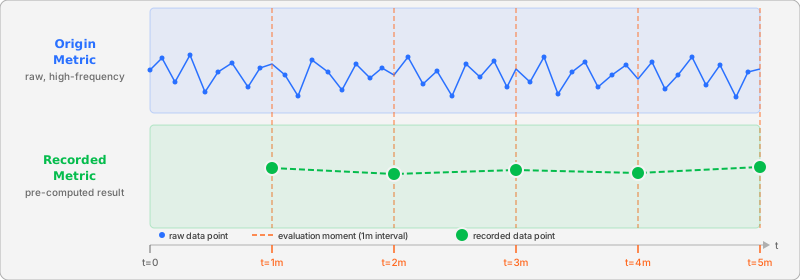
Recorded metrics are not guaranteed to exactly match the original raw data.
Aggregations in the recording rule query and evaluation lags can produce results that differ from the original raw data. Shorter evaluation intervals can reduce this gap by improving resolution.
For PromQL recommendations in recording rules, refer to Prometheus recording rules best practices.
Alerting on recorded metrics
When alert rules query recorded metrics, consider the following recommendations:
- Use frequent evaluation intervals. Set frequent evaluation intervals for recording rules. Long intervals, such as an hour, can cause the recorded metric to be stale and lead to misaligned alert rule evaluations, especially when combined with a long pending period.
- Align alert evaluation with recording frequency. The evaluation interval of an alert rule that depends on a recorded metric should be aligned with the recording rule’s interval. If a recording rule runs every 3 minutes, the alert rule should also be evaluated at a similar frequency to ensure it acts on fresh data. For details about the evaluation sequence, refer to how rules are evaluated within a group.
- Use
_over_timefunctions for instant queries. Since all alert rules are ultimately executed as an instant query, you can use functions likemax_over_time(my_metric[5m])as an instant query. This allows you to get an aggregated value over a period without using a range query and a reduce expression.
Types of recording rules
Similar to alert rules, Grafana supports two types of recording rules:
- Grafana-managed recording rules, which can query any Grafana data source supported by alerting. It’s the recommended option.
- Data source-managed recording rules, which can query Prometheus-based data sources like Mimir or Loki.
Was this page helpful?
Related resources from Grafana Labs



