

When SLOs reduce alert noise
As your alerting setup grows in production, not every alert works as expected. Sometimes they fire too often, or they resolve immediately before anyone responds. You start wondering if the problem is the alert.
When this happens, your instinct may be to tune the query or threshold, or maybe just delete it. Sometimes the alert is telling you that you’re measuring reliability wrong, and implementing service level objectives (SLOs) could be the right answer.
This guide covers the three most common patterns where SLOs can help reduce alert noise and improve reliability coverage, and shows how to recognize the need for SLOs in your alerting setup.
How SLOs differ from threshold alerts
Threshold alerts evaluate a condition on its evaluation interval, for example, every 5m, 30m, 1h.
If the query result crosses the threshold at that moment, the alert fires. It continues in a firing state on the next evaluation if the condition still holds, or returns to normal once resolved.
In this sense, the alert state is binary: firing or not firing.

SLOs don’t focus primarily on whether the service is healthy right now. They measure whether your service is reliable over a long period, for a week or several weeks, not at a point in time. For instance:
An alert asks: over the past 10 minutes, did 50% of requests respond in under 3s?
An SLO asks a similar question over a longer window: over the past 4 weeks, did 95% of requests respond in under 3 seconds?
Alerts can also use long evaluation periods, but they reset when the service recovers.
SLOs track failures against the error budget even when the service recovers. They record how much degradation has accumulated, and report how much failure is still allowed.

Another key difference is how SLO alerts work. Rather than firing when the error budget is consumed and the objective is breached, they fire when the objective is at risk.
SLO alerts page you when the system is degrading quickly, so you have time to act before breaching the SLO.
SLOs and threshold-based alerts are complementary. In some cases, tracking the same reliability signal in both alerts and SLOs makes sense: alerts for immediate response and SLOs for long-term visibility. In others, graduating alerts to SLOs is the right call. The following cases are the most common situations where teams start adopting SLOs from existing alerts.
The alert has no actionable response
Alerts should be actionable. An alert nobody acts on is operational noise. If the alert consistently triggers no response, but the metric still matters to your team, this is a reliability concern.
This reliability metric could indicate service health over time. It’s worth tracking in operational dashboards, but it’s not designed to trigger immediate action.
Ask the team: will we commit to an objective on the health of this service and act if performance degrades? If the answer is yes, an SLO is the right fit.
In practice, this question often surfaces whether the metric is actually measurable as a service level indicator (SLI).
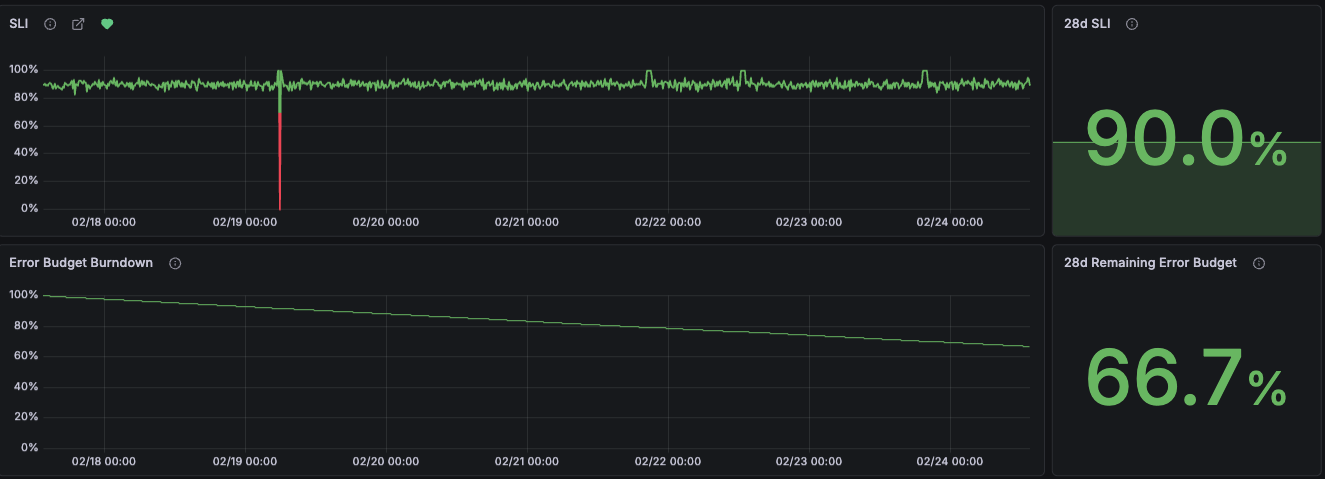
Defining the SLO objective aligns the team around a shared target and determines when accumulated degradation is severe enough to require action. This is frequently the hardest part. Expect a few iterations before the objective reflects reality.
Sometimes deleting the alert is the right call if there’s no commitment or SLI to anchor to a valid SLO. But if the same metric keeps surfacing in post-mortems across teams, that’s a different signal that points to a shared reliability concern.
The alert reflects a shared reliability concern
Sometimes, multiple teams maintain alerts for the same user-facing metric such as service response times, each applying their own thresholds and internal metrics for their services, but lacking an objective to evaluate the end-to-end user experience.
This sometimes results in overlapping alerts covering the same signal.
When distinct teams define their own thresholds for service performance or user-experience metrics, this reveals a shared user-experience concern that hasn’t been made explicit.
In other cases, the SLO is driven by the business, such as a customer commitment or service level agreement (SLA). An SLO formalizes it as a shared objective tracked against what customers expect.
Before creating a shared SLO, teams need to agree on clear ownership.
In both cases, the shift is often from internal metrics to user-facing reliability metrics, as recommended in the best practice to prioritize symptoms over causes.
Creating a shared SLO should not eliminate existing related alerts. This is a good moment to evaluate whether existing alerts trigger immediate action. If you notice these alerts are less actionable, and that the underlying reliability metric is better measured as an SLO, then migrate the existing alert to a team-scoped SLO.
A team-scoped SLO is the safer default. Move to a shared SLO only once teams agree on ownership.
The alert fires on transient conditions
The alert fires and resolves without human intervention, a pattern commonly referred to as flapping.

Alerting best practices recommend tuning away flapping alerts by tweaking alert rule settings to avoid detecting short spikes and transient issues. Tuning reduces noise, but can remove the signal entirely.

In this case, the flapping alert has surfaced a reliability issue. Individual firings look harmless, but the accumulated degradation over time impacts users. A threshold-based alert can mask these errors.
The SLO error budget captures this pattern. Each transient failure consumes a fraction of the budget, making cumulative impact visible over the SLO window.
This pattern isn’t limited to flapping alerts. Any alert with acceptable transient failures faces the same tradeoff: tune for less noise and lose visibility, or keep the alert and learn to ignore it.
Tracking reliability signals in dashboards and alerting on long evaluation periods can be the solution. SLOs are the better fit: the error budget doesn’t reset and tracks every failure within the SLO window.
Conclusion
Not every alert needs to be tuned or silenced when it’s not effective. Some are measuring something worth tracking differently.
Three common patterns signal an alert is ready for an SLO:
- No actionable response: the signal indicates service reliability, but doesn’t trigger immediate action.
- Shared reliability concern: teams track similar user-facing metrics, but lack a shared objective.
- Transient conditions: short-lived failures are often ignored, but still impact users.
In all three cases, the shift is from evaluating a threshold over a recent period to evaluating a reliability objective tracked over a long period. This reduces operational noise and focuses alerting on whether your service meets its reliability goals. SLOs don’t replace your existing alerts; they bring a distinct method for measuring service reliability.
To get started, refer to introduction to SLOs in Grafana Cloud.
Was this page helpful?
Related resources from Grafana Labs



