
 Grafana Cloud
Monitor infrastructure
Kubernetes Monitoring
Optimize resource usage and efficiency
Cluster health
Risks
Grafana Cloud
Monitor infrastructure
Kubernetes Monitoring
Optimize resource usage and efficiency
Cluster health
RisksRisks
The Risks tab on the Cluster Health page shows the results of twelve checks that have a live count of active reliability problems in your Clusters. These checks are categorized by the following:
- Availability: Workloads that are completely unreachable
- Stability: Workloads that are running but degraded or failing
- Infrastructure: Underlying node-level issues that can cascade into wider outages
Each check is color-coded:
- Green: No issues found. The count is zero.
- Red: One or more active issues that need attention.
- Blue: The check is currently selected and its detail table is displayed below.
Click View detail on any check to jump to the detail table for that issue. You can also switch between tables using the Detail view drop-down menu.
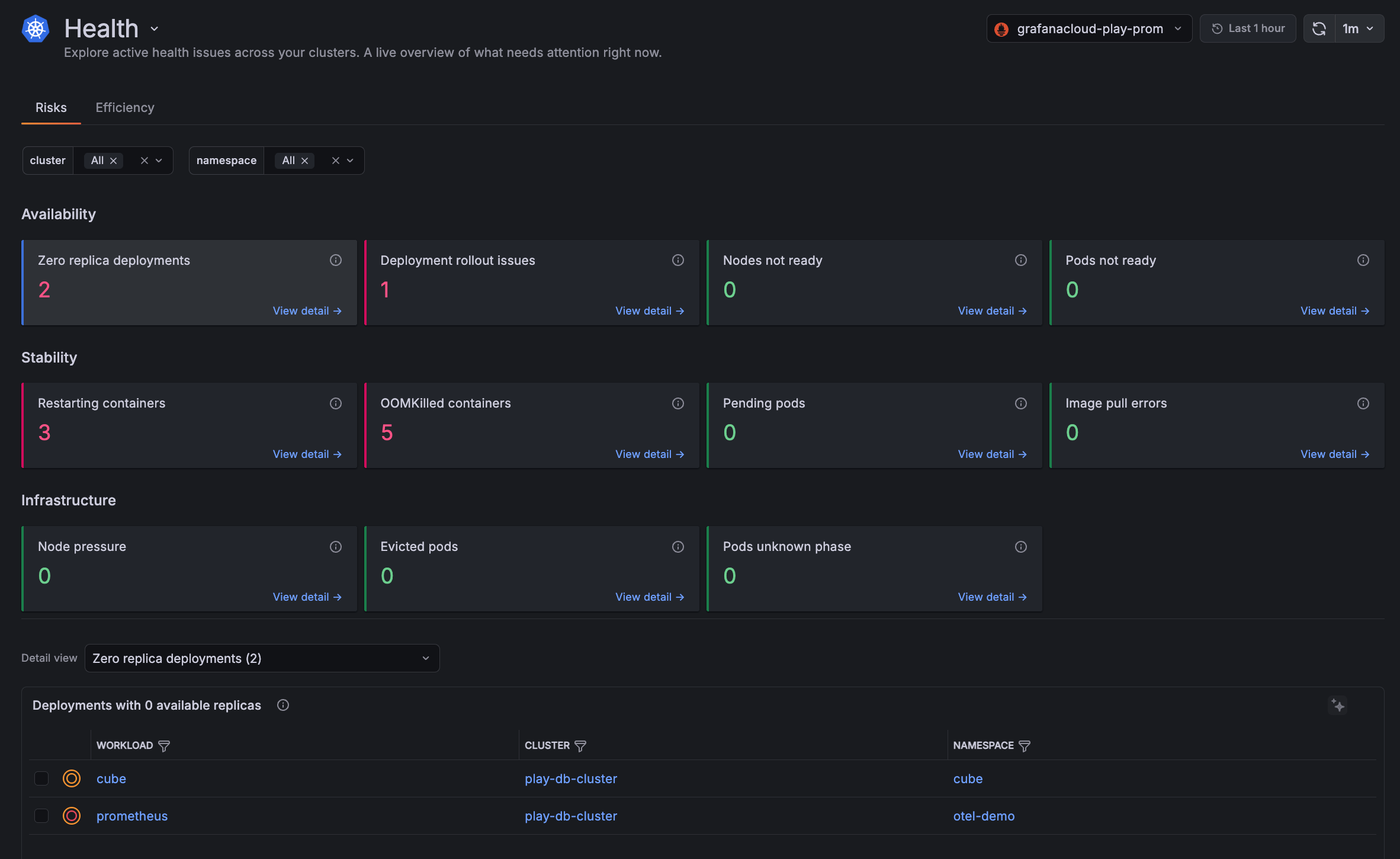
Availability
Availability checks identify workloads and nodes that are down or unable to serve traffic.
Zero replica deployments
These are deployments that are configured to run at least one replica but have zero available replicas running. The workload is fully down. This excludes deployments intentionally scaled to zero.
Deployment rollout issues
These are deployments whose rollout has one of these conditions:
Not Progressingmeans the deployment controller has not made progress within the deadline.Replica Failuremeans at least one replica Pod could not be created or deleted.
Nodes not ready
These are Nodes where the Ready condition is False or Unknown. A NotReady node prevents new Pods from being scheduled and may disrupt running workloads. The Status column distinguishes a confirmed NotReady state from a transient Unknown state (meaning the node is unreachable).
kubelet crash or failure to report status, Node running out of memory, disk, or PIDs, network connectivity loss between the Node and the control plane, underlying VM or hardware failure, expired Node certificates, kernel or OS-level crash.kubelet logs and Node events. Restart the kubelet, free up Node resources, restore network connectivity, renew certificates, or replace the failed Node.Pods not ready
These are Pods in the Running phase that are failing their readiness probe. They are excluded from Service endpoints and are not receiving traffic.
Stability
A stability check detects containers and Pods that are crashing, restarting, or stuck.
Restarting containers
Containers that have restarted more than twice in the last hour, sorted by highest restart count.
A high restart count typically signals a crash loop.
OOMKilled containers
These are containers with the most recent termination caused by the kernel OOMKilled event.
Pending Pods
Pods stuck in the Pending phase that cannot be scheduled onto a Node.
Image pull errors
These are containers waiting because their image cannot be pulled. ImagePullBackOff means Kubernetes is retrying with exponential backoff. ErrImagePull is the initial failure.
Infrastructure
An infrastructure check identifies:
- Nodes under resource pressure
- Pods that have been evicted or lost contact with the Cluster
Node pressure
These are Nodes with an active MemoryPressure, DiskPressure, or PIDPressure condition. These are early warning signals for Pod evictions or failures.
Evicted Pods
These are Pods evicted by the kubelet due to Node resource pressure or by the scheduler due to priority preemption.
Pods in unknown phase
These are Pods in the Unknown phase. This typically occurs when the Node hosting the Pod becomes unreachable and Kubernetes can no longer determine the Pod’s state.
Unknown Pods transition to Failed or recover once Node connectivity is restored.



