
 Grafana Cloud
Monitor infrastructure
Kubernetes Monitoring
Optimize resource usage and efficiency
Cluster health
Efficiency
Grafana Cloud
Monitor infrastructure
Kubernetes Monitoring
Optimize resource usage and efficiency
Cluster health
EfficiencyEfficiency
Use the Efficiency tab on the Health page to find containers with resource configuration gaps or significant over-provisioning.
Resource configuration gaps
Two live counts show containers with missing resource requests or limits:
- Containers without resource requests: A count of containers with no CPU or memory requests set. The Kubernetes scheduler uses requests to decide which Node to place a Pod on. Without them, Pods are treated as having zero resource needs, leading to poor bin-packing, unexpected evictions under pressure, and inaccurate capacity planning.
- Containers without resource limits: A count of containers that have a request set but no CPU or memory limit. Without limits, a container can consume unbounded Node resources, starving neighboring workloads (noisy-neighbor problem) and destabilizing the Node.
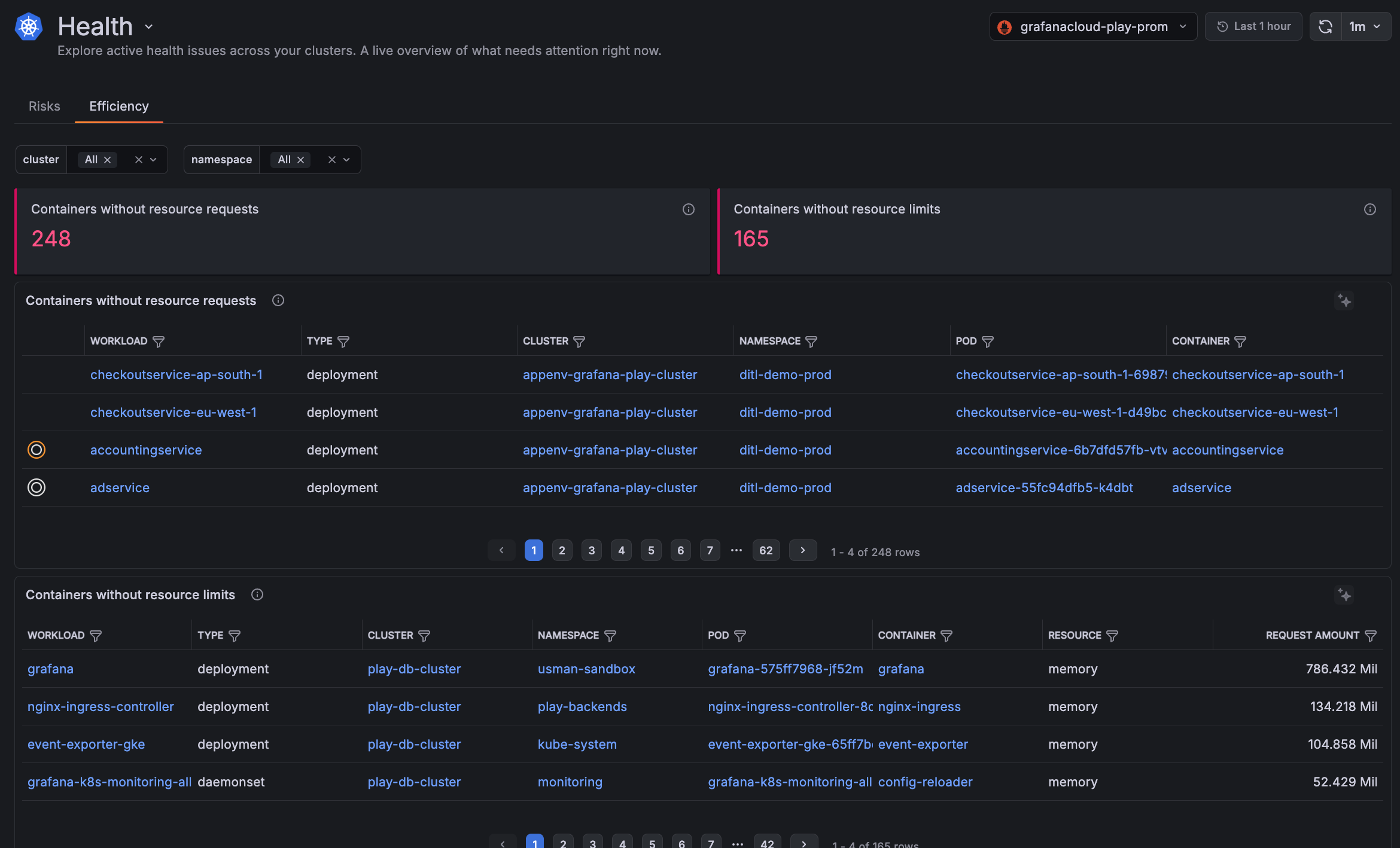
Containers without resource requests
This table lists running containers that have no CPU or memory requests defined.
Without requests, the Kubernetes scheduler treats the container as needing zero resources. This leads to Pods being placed on Nodes that may not have enough capacity. This can cause poor bin-packing, resource contention, and unexpected evictions when the Node comes under pressure.
Containers without resource limits
This table lists running containers that have a CPU or memory request set but no corresponding limit. For example, if the Resource column shows cpu and the Request Amount column shows 0.30, the container is allocated 0.30 CPU cores for scheduling but has no upper bound on how much CPU it can consume.
Without a limit, the container can consume as much CPU as the Node has available. To learn more, refer to CPU requests and limits for containers.
Significant over-provisioning
The over-requested tables list containers that do have requests configured, but those requests are set far higher than actual usage. The gap between request and usage shows wasted capacity that inflates costs and blocks other Pods from being scheduled.
CPU over-requested containers (top 50)
This table lists the top 50 containers where the CPU request is significantly higher than actual usage. The table is automatically sorted by the largest gap. The Wasted CPU (cores) value is the difference between the request and usage.
The wasted CPU column is color-coded:
- Green: Less than 0.5 cores wasted
- Orange: 0.5 to 2 cores wasted
- Red: More than 2 cores wasted
Over-requesting CPU inflates the scheduler’s view of resource consumption, blocks other Pods from being scheduled, and increases infrastructure costs.
Memory over-requested containers (top 50)
This table lists the top 50 containers where the memory request is significantly higher than actual working-set usage. The table is automatically sorted by the largest gap. The Wasted Memory (GiB) value is the difference between the request and usage.
The wasted memory column is color-coded:
- Green: Less than 1 GiB wasted
- Orange: 1 to 4 GiB wasted
- Red: More than 4 GiB wasted
Over-requesting memory reserves capacity on the Node that is never used, reducing bin-packing efficiency and increasing infrastructure costs.




