

Create a service
Create a service to enable the Service Center view and provide a centralized operational view of your team’s services.
A service represents an application, API, or other component that your team owns and operates. Service Center correlates Grafana Cloud resources to a service by matching labels and tags that identify that service.
You can create and manage services directly in Grafana Cloud or import them from Backstage.
Add a service
To create a service in Grafana Cloud, navigate to Alerts & IRM -> Service center and click + New Service.
Set name and attributes
Configure the basic information for the service:
Enter a name for the service.
Optional: Enter a description of the service.
Optional: Assign a team to the service to enable on-call information and respond to service issues from Service Center.
Optional: Enter custom attributes using Add Attribute.
Attributes provide additional context about the service. Common examples include links to Documentation, Repository, and other relevant metadata.
Configure service content
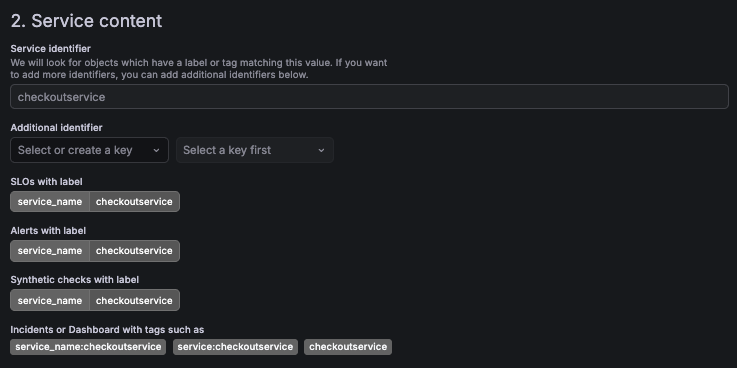
In the Service content section, define how Service Center identifies resources associated with the service.
- Service identifier defines the value of the
service_namelabel used to discover related resources such as incidents, SLOs, dashboards, synthetic checks, and alert rules. - Additional identifier lets you define additional label key-value pairs when resources use another label convention.
Note
The Service identifier value cannot be changed after the service is created.
Configure dependencies
Optionally, define dependencies between services to model relationships within your system architecture. Dependencies help assess potential upstream or downstream impact during incidents.
After you save the service, Service Center discovers matching resources and displays them in the Service Center view.
Import services from Backstage
If you use Backstage, you can import services from your software catalog and keep them synchronized with Service Center.
Imported services are automatically correlated with Grafana Cloud resources such as incidents, SLOs, and other operational data.
To configure the integration, follow the instructions for the backstage-plugin-grafana-catalog.


