
%3Aquality(90)%2F&w=3840&q=75)
%3Aquality(90)%2F&w=3840&q=75)
%3Aquality(90)%2F&w=3840&q=75)
Grafana Assistant everywhere: Customize and connect to the AI agent to fit your specific needs


The ways you and your teams build and observe your systems are changing. It’s no longer just engineers looking at dashboards, or writing queries or config files. More often, it’s an agent interacting with the data, too, helping write code, run applications, investigate incidents, rightsize deployments, and more.
At the same time, AI has enabled even faster software development cycles, making it essential that you have access to the right information and the right workflows right when you need them, without having to worry about context switching or hopping between tools.
As a result, we're making big changes to how we think of Grafana Assistant, our purpose-built LLM agent in Grafana Cloud. We're excited to share new ways you and your agents can connect and customize this powerful tool—including accessing Grafana Assistant from self-managed environments—because where and how you run Grafana shouldn’t determine whether you can benefit from Assistant.
Moving Assistant from cloud agent to anywhere agent
As part of the GrafanaCON 2026 keynote, we announced that access to Assistant now extends to Grafana Enterprise and Grafana OSS users. This makes Assistant available in your self-managed environment to help you analyze telemetry data and code in real time, build dashboards, ask questions, and more.
Self-managed Grafana users can create a Grafana Cloud account and connect it to their Grafana installation via a one-click setup. The assistant is included in the Grafana Cloud forever free plan with generous limits so that you can get started right away. You can also watch the video below to see how easy it is to get started.
Grafana Cloud customers have saved lots of time and effort using Assistant. Working alongside the agent and using natural language, they've used the assistant to help explain concepts, query data, build dashboards, resolve incidents, and even expand adoption.
“There are so many signals and metrics to correlate that it’s a job a computer can do better than humans. With Grafana Assistant, we see fewer incidents, and when they happen the resolution is faster, so the team can stay focused on deploying new features,” said Alessio Paccoia, Head of Technology, Cubbio.io
And now we're excited to extend those same capabilities to our broader community. We still believe Grafana Cloud is the best place to get the full benefits of AI-powered observability, but we also believe in choice and meeting our users where they are. If you're not quite ready to go all-in on cloud, for whatever reason, this can be a great way to try it out and see if it fits your needs.
How it works
Assistant runs as a plugin in your Grafana instance. Your raw observability data stays in your instance, and only processed summaries and results are transmitted using our custom tooling architecture. The assistant also "shows its work" by displaying the full conversation history. Any errors or warnings from tool usage are fed back into the conversation, allowing Assistant to iterate and correct mistakes.
%3Aquality(90)%2F&w=3840&q=75)
For more information, check out our Assistant docs. You can also get important details on our pricing page, including what's available in our generous free tier.
Customize Assistant for your unique needs
Every organization's observability strategy and workflows are different, so we also want to make sure Assistant can be tailored to your needs. That's why we're excited to make Assistant skills generally available.
Skills are documents you create to guide Assistant agents with instructions, context, and specialized knowledge. They essentially help you encode how your team troubleshoots services, handles specific alerts, and manages shared infrastructure.
Skills now include a new auto-approve feature you can use to write your runbooks, connect to other tools (e.g., GitHub, Cloudflare, other observability platforms, etc.), and auto-approve tool calls of your choice.
%3Aquality(90)%2F&w=3840&q=75)
When you pair auto-approve with Assistant Investigations, which helps with multi-step investigations, you can even create your own auto-remediation pipeline that’s triggered from an alert. The result? Pretty much anything you need, from raising a PR in GitHub or GitLab to sending a Slack message to someone to assigning a task in Notion.
Stay on top of everything with automations
Observability teams have a lot to keep track of, and that's only increasing now that agents are becoming central to software development. To help you stay on top of everything, we're introducing Assistant automations, which you can use to get automatic summaries of what's happening in your environment.
By pairing automations with skills, you can trigger Assistant to handle any task at any time, with or without you. Want a daily report of all alerts that fired yesterday? A rundown of incidents that were resolved last week? The error rate in your product catalog or whether the latest deployments changed p99? Simply connect to our available integrations or any API, write a skill, and you can get full analyses about these or any other questions you have about your stack and its performance.
Say 'hello' to Assistant outside of Grafana Cloud
You have your own way of interacting with your systems and your teammates, and odds are that's not done entirely through Grafana Cloud. We want to meet you where you are, so we're expanding the ways you can access Assistant, whether that's through Slack, Microsoft Teams, an API, or the CLI.
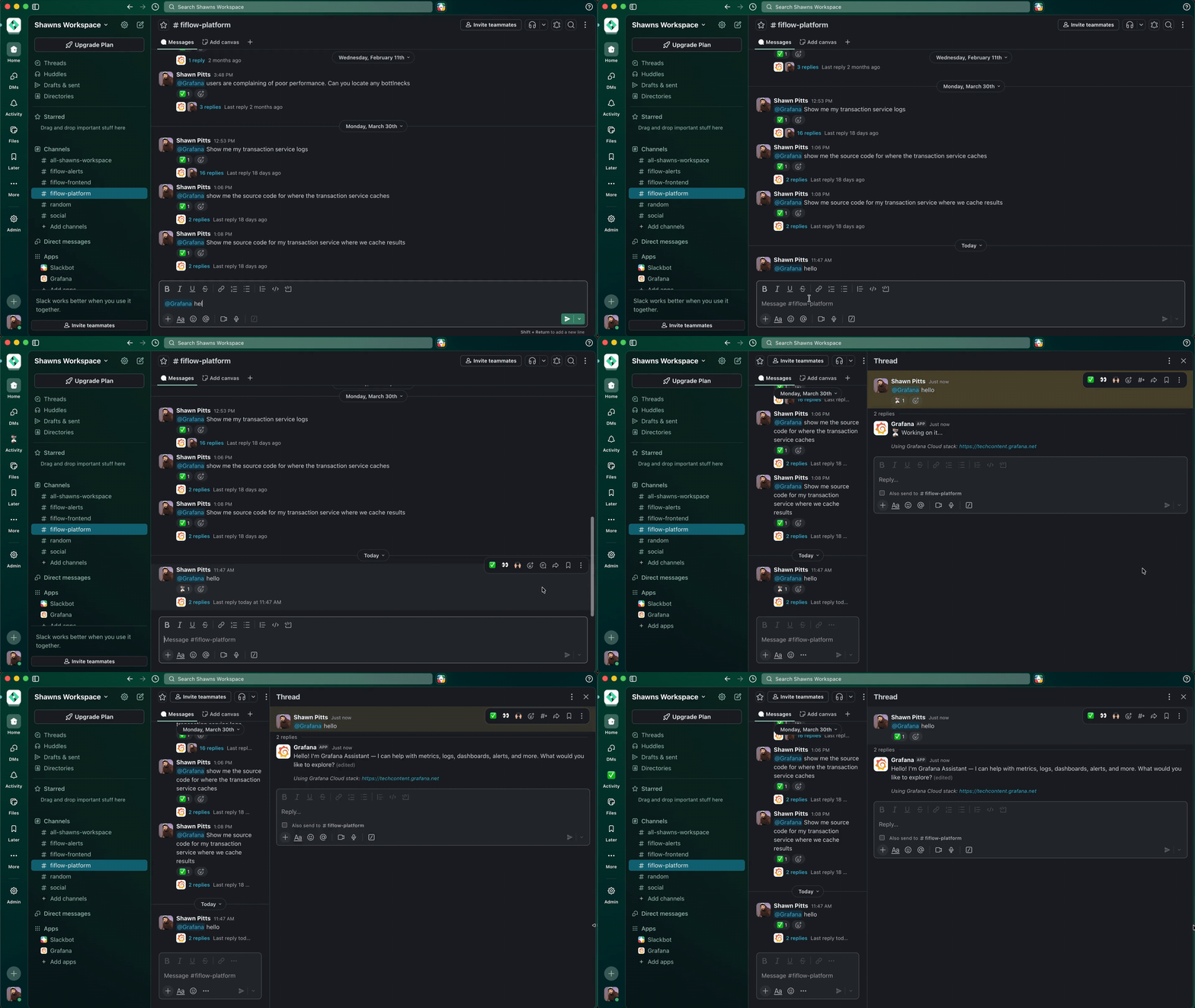
For example, you can now build automations with the Assistant CLI, chat with colleagues and the Assistant in Slack, have Claude Code or Codex collaborate with the Assistant via the CLI, or make requests from a remote machine to the Assistant.
This is all about finding new ways to integrate Assistant into your workflows, rather than forcing you into our UI. Make Assistant work the way that works for you and stop getting slowed down by constant context switching.
Bring your own agent: remote hosted MCP server and our new gcx CLI tool
In addition to bringing Assistant to you, you can now bring more to Assistant. With our new remote hosted MCP server and the new gcx CLI tool, your agents can talk to Assistant, Grafana Cloud, or both.
Use the remote hosted MCP server to connect any agent to the same sophisticated tools that Assistant uses in Grafana Cloud. You don't need to install any dependencies; just point your agent at mcp.grafana.com/mcp to get access to your metrics, logs, traces, dashboards, alerts, incidents, and more. This also allows you to connect other cloud agents to Grafana Cloud if you want to build your own assistant.
%3Aquality(90)%2F&w=3840&q=75)
If you prefer a local-first approach, gcx unifies grafanactl and the Assistant CLI with agent-first, new CLI tools to your command line and your agentic coding environment. It connects your editor to your entire production stack so your agent can write code that's observability-aware from the start. Instrument a new service, investigate a firing alert, or draft a fix informed by real production data—all without leaving your editor.
Connect any API with Assistant
And don't forget that Assistant can use the Infinity data source to send any GET or POST requests to any publicly or privately available API endpoint. This recent upgrade makes Assistant the center of your DevOps lifecycle, helping you connect it to any other tool, correlate any data, and remediate faster than ever. Or use the capability to check if you caught all Pokémon yet.
More ways to take your Assistant experience to the next level
We're excited for you to try these new features that expand the reach of Assistant, but this isn't everything. We're constantly looking for new ways to improve Assistant to help you improve your observability practices. Here are just some of the other updates we recently released:
- The new workspace view, which brings Assistant into full-page mode so you can browse your chats and supporting data in one view
- Learn mode, which helps you quickly get up to speed on Grafana Assistant with tutorials and example tasks that are personalized to your stack
- Reworked context management and infrastructure memories for your stack help so Assistant knows where to look from the start
- EU inference for our European customers
- A Python runtime for Assistant to process large amounts of data
- Integrations with 15 other Grafana Cloud services or features and more than 50 third-party data sources
For more information on this and all the other exciting updates from GrafanaCON 2026, check out our announcement blog for all the news. And for more information on Grafana Cloud AI, including FAQs about Assistant and our other AI capabilities, check out our AI observability page.
Grafana Assistant is the easiest way to get started with metrics, logs, traces, dashboards, and more in Grafana Cloud. We have a generous forever-free tier and plans for every use case. Sign up for free now!
%3Aquality(90)%2F&w=3840&q=75)
%3Aquality(90)%2F&w=3840&q=75)


