






























Plugins 〉Mapgl


Mapgl





A sample node graph is loaded on every new panel to try out styles and modes
v1 -> v2 data migration is not required
Version 2.0 introduces a Node Graph view with autolayout and spline edge routing. In addition to Geo mode.
Data model is compatible with v1 Geo mode, using the unified dataframe for nodes and edges.
Panel config schema and UI for styling has been redesigned to be in line with standard Grafana behaviors.
Mapgl now fully supports native Grafana field config: Thresholds, Mappings, Units, Overrides, Data links.
Screenshots
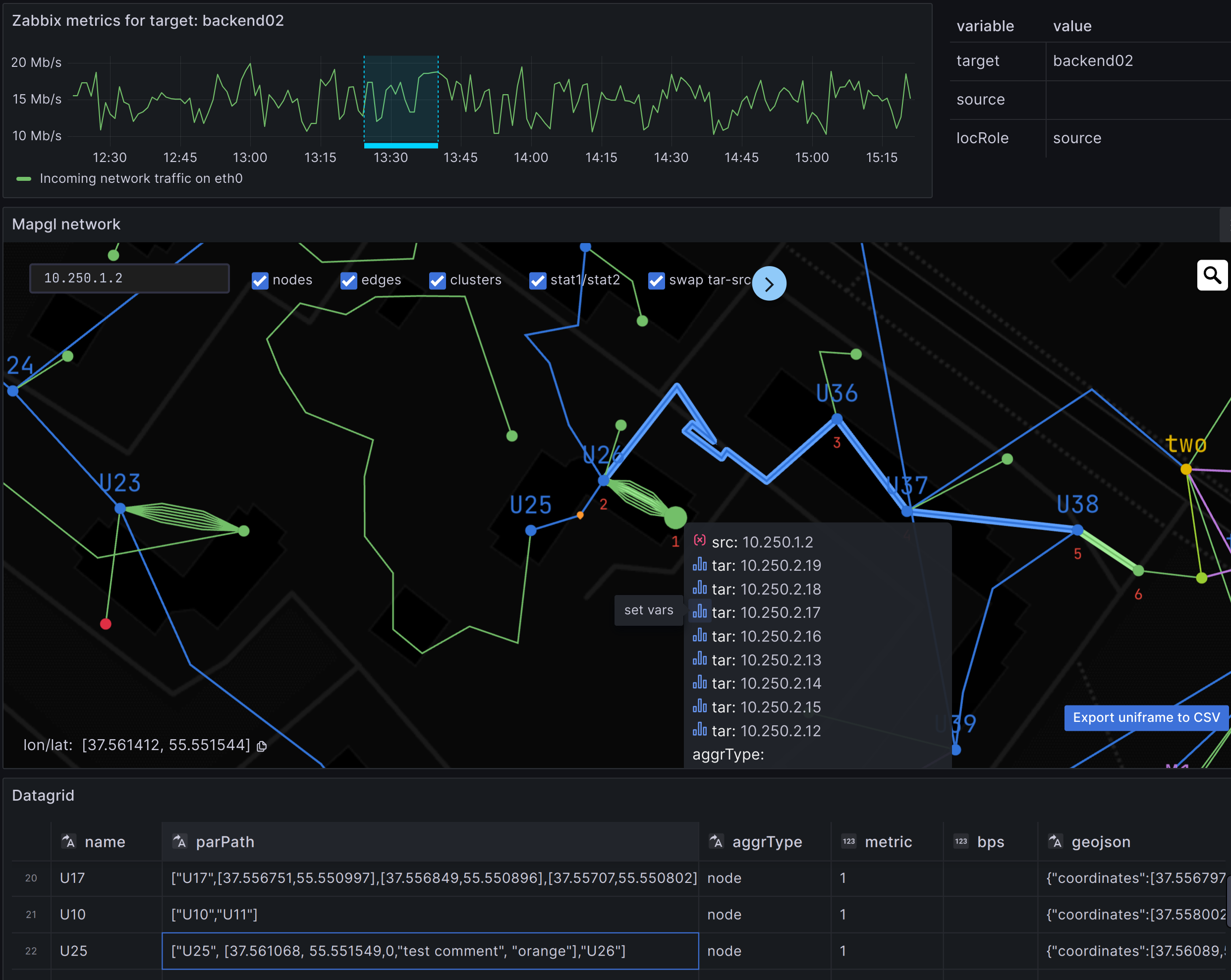
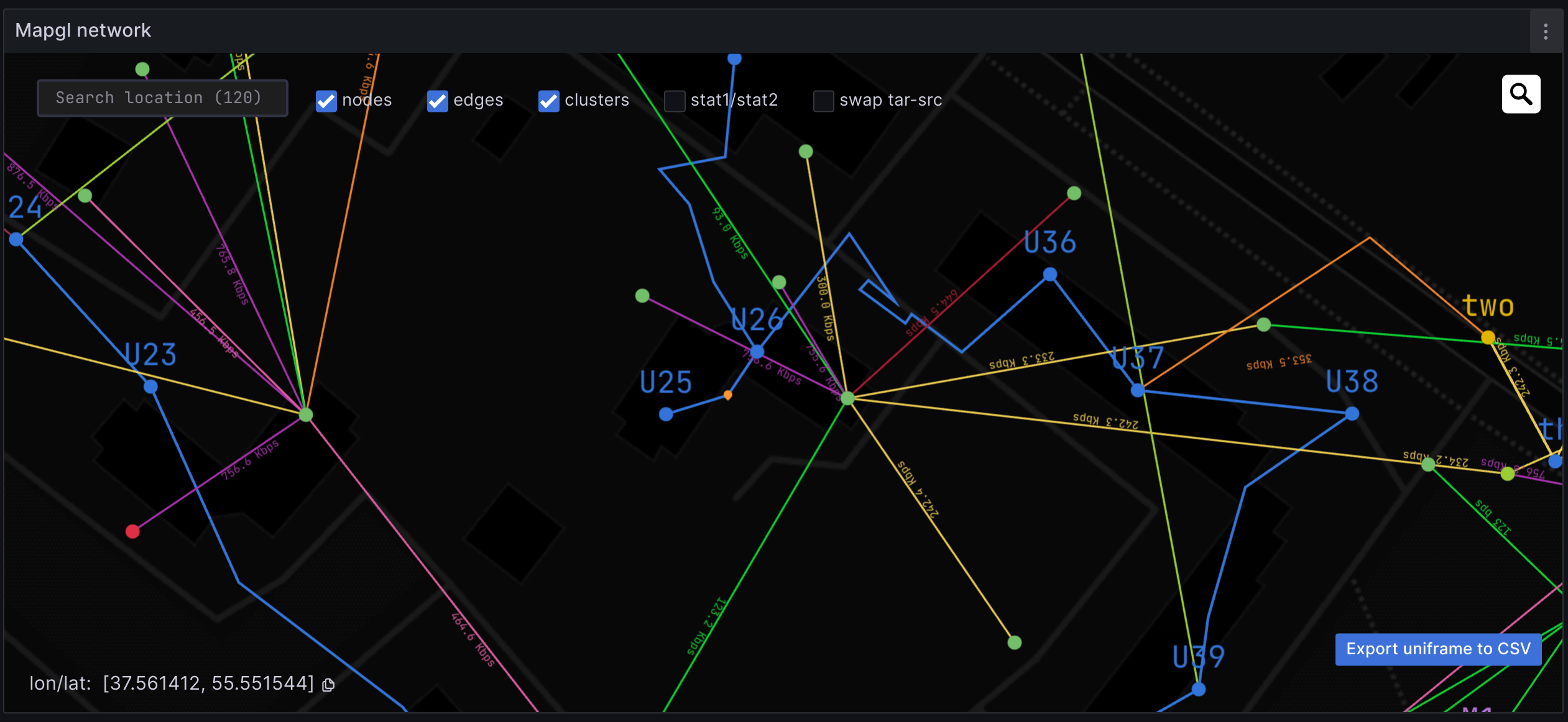
Network Topology
- Node graph with layered auto-layout or Geomap view
- Arc sections on nodes for any metrics.
- Multi-segment routes
- Network interface TX/RX load visualization using bi-metric arcs
- Ad-hoc filters by layers, node groups in the legend
- Dynamic drill-down data links to external panels
Data Format
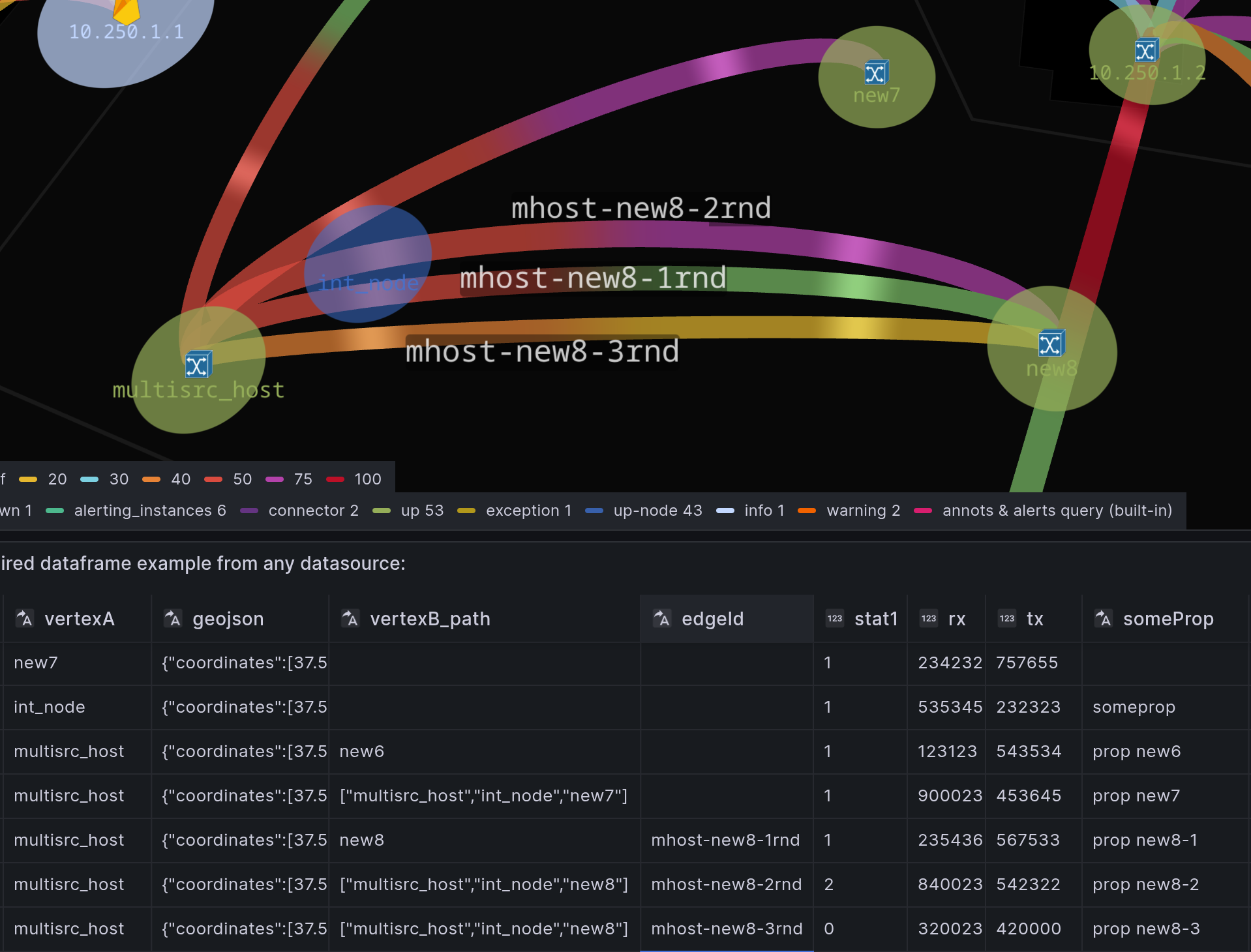
*Field names are examples only. Unified (Graph+Geo) single dataframe for nodes and edges avoids hardcoded dataframe requirements of the native Geomap/NodeGraph.
Each data source record should contain:
node idandcoordinatesfor Geo view (not required for NodeGraph auto-layout)parent idor a full path with intermediate node IDs or raw coordinatesedge id(optional, used to support parallel links)node statusmetrictransmitandreceivemetrics for link load
Data Preparation
Use Grafana’s built-in transformations to prepare and merge data from:
- Zabbix
- Prometheus
- Postgres
- Any other datasource
Tutorial: Zabbix events on geomap
Netbox+Prometheus with drill-down datalinks
🕹️ Demo
Playground with open configuration
Grafana Field Config
Thresholds– value ranges with associated colors to visually indicate statusMapping– rename displayed valuesUnits– measurement unit conversionOverrides– custom settings for specific metricsDataLinks– links to external dashboards or graphsNode Group style rules extend control over node color, icon, size, and line width.
Grafana Cloud Free
- Free tier: Limited to 3 users
- Paid plans: $55 / user / month above included usage
- Access to all Enterprise Plugins
- Fully managed service (not available to self-manage)
Self-hosted Grafana Enterprise
- Access to all Enterprise plugins
- All Grafana Enterprise features
- Self-manage on your own infrastructure
Grafana Cloud Free
- Free tier: Limited to 3 users
- Paid plans: $55 / user / month above included usage
- Access to all Enterprise Plugins
- Fully managed service (not available to self-manage)
Self-hosted Grafana Enterprise
- Access to all Enterprise plugins
- All Grafana Enterprise features
- Self-manage on your own infrastructure
Grafana Cloud Free
- Free tier: Limited to 3 users
- Paid plans: $55 / user / month above included usage
- Access to all Enterprise Plugins
- Fully managed service (not available to self-manage)
Self-hosted Grafana Enterprise
- Access to all Enterprise plugins
- All Grafana Enterprise features
- Self-manage on your own infrastructure
Grafana Cloud Free
- Free tier: Limited to 3 users
- Paid plans: $55 / user / month above included usage
- Access to all Enterprise Plugins
- Fully managed service (not available to self-manage)
Self-hosted Grafana Enterprise
- Access to all Enterprise plugins
- All Grafana Enterprise features
- Self-manage on your own infrastructure
Grafana Cloud Free
- Free tier: Limited to 3 users
- Paid plans: $55 / user / month above included usage
- Access to all Enterprise Plugins
- Fully managed service (not available to self-manage)
Self-hosted Grafana Enterprise
- Access to all Enterprise plugins
- All Grafana Enterprise features
- Self-manage on your own infrastructure
Installing Mapgl on Grafana Cloud:
Installing plugins on a Grafana Cloud instance is a one-click install; same with updates. Cool, right?
Note that it could take up to 1 minute to see the plugin show up in your Grafana.
Warning
Plugin installation from this page will be removed in February 2026. Use the Plugin Catalog in your Grafana instance instead. Refer to Install a plugin in the Grafana documentation for more information.
Installing plugins on a Grafana Cloud instance is a one-click install; same with updates. Cool, right?
Note that it could take up to 1 minute to see the plugin show up in your Grafana.
Warning
Plugin installation from this page will be removed in February 2026. Use the Plugin Catalog in your Grafana instance instead. Refer to Install a plugin in the Grafana documentation for more information.
Installing plugins on a Grafana Cloud instance is a one-click install; same with updates. Cool, right?
Note that it could take up to 1 minute to see the plugin show up in your Grafana.
Warning
Plugin installation from this page will be removed in February 2026. Use the Plugin Catalog in your Grafana instance instead. Refer to Install a plugin in the Grafana documentation for more information.
Installing plugins on a Grafana Cloud instance is a one-click install; same with updates. Cool, right?
Note that it could take up to 1 minute to see the plugin show up in your Grafana.
Warning
Plugin installation from this page will be removed in February 2026. Use the Plugin Catalog in your Grafana instance instead. Refer to Install a plugin in the Grafana documentation for more information.
Installing plugins on a Grafana Cloud instance is a one-click install; same with updates. Cool, right?
Note that it could take up to 1 minute to see the plugin show up in your Grafana.
Warning
Plugin installation from this page will be removed in February 2026. Use the Plugin Catalog in your Grafana instance instead. Refer to Install a plugin in the Grafana documentation for more information.
Installing plugins on a Grafana Cloud instance is a one-click install; same with updates. Cool, right?
Note that it could take up to 1 minute to see the plugin show up in your Grafana.
Installing plugins on a Grafana Cloud instance is a one-click install; same with updates. Cool, right?
Note that it could take up to 1 minute to see the plugin show up in your Grafana.
Warning
Plugin installation from this page will be removed in February 2026. Use the Plugin Catalog in your Grafana instance instead. Refer to Install a plugin in the Grafana documentation for more information.
Installing plugins on a Grafana Cloud instance is a one-click install; same with updates. Cool, right?
Note that it could take up to 1 minute to see the plugin show up in your Grafana.
For more information, visit the docs on plugin installation.
Installing on a local Grafana:
For local instances, plugins are installed and updated via a simple CLI command. Plugins are not updated automatically, however you will be notified when updates are available right within your Grafana.
1. Install the Panel
Use the grafana-cli tool to install Mapgl from the commandline:
grafana-cli plugins install The plugin will be installed into your grafana plugins directory; the default is /var/lib/grafana/plugins. More information on the cli tool.
Alternatively, you can manually download the .zip file for your architecture below and unpack it into your grafana plugins directory.
Alternatively, you can manually download the .zip file and unpack it into your grafana plugins directory.
2. Add the Panel to a Dashboard
Installed panels are available immediately in the Dashboards section in your Grafana main menu, and can be added like any other core panel in Grafana.
To see a list of installed panels, click the Plugins item in the main menu. Both core panels and installed panels will appear.
Changelog Mapgl
2.0.0
- Node Graph with autolayout and spline edge routing that respects node boundary curves. In addition to Geo mode.
- Arc sections on nodes for any metrics.
- Style config extends Grafana Geomap styles-from-dimensions concept with overrides for user-defined node groups
- Native Grafana Field config support: Thresholds, Mappings, Units, Overrides, Data links.
- Bi-metric Arcs (ex., for TX/RX)
- Ad-hoc filters by layers, node groups in the legend
- Unified (Graph+Geo) single dataframe for nodes and edges (same as in v.1) avoids hardcoded dataframe requirements of the native Geomap/NodeGraph.
1.5.11
- Node Graph baselayer made default for new dashboards
- fix normalize zoom for clusters in nodegraph view
1.5.0
- draggable namespace polygons in nodegraph view
- complete traces with aggregation and metrics reducers
- 3d projection for parallel arcs tilt in node graph view.
1.4.54
- autolayout tolerates boundary of fixed node size (group config)
1.4.53
- nodegraph 2-fragmented links layout fix
1.4.52
- nodegraph nodes contraction on namespace hide. Adapt bboxes
1.4.51
- cluster selection HullPolygon hide on zoom
1.4.5
- yandex maps v.3 support in Lite!
- plugin auth options change:
- a.) auto API call to mapgl.org/api
- b.) install free Mapgl App as offline authorizer
1.4.42
- fix location search extra fields config (address, etc)
1.4.4
- token support for trial & grace periods
1.4.32
- feature toggles for LayerSwitcher and Edge legend
- hideable adjacent edges in node tooltip
1.4.31
- nested edges list opener
1.4.3
- reducer for parallel edges by min/max/both metrics.
1.4.21
- fix: layer filter in node graph mode just contracts nodes. Center hub connections are always visible.
1.4.2
- enable right drawer in node graph. Mandatory hide adjacent edges in node tooltip.
- constant node size in Groups
- nested edges list in edge tooltip remastered
1.4.1
- hide adjacent edges list in tooltip (duplicates drawer functionality, takes space)
- fix maxZoom 20->21 for baselayers
1.4.0
- migrate to EdDSA (Ed25519) crypto for auth and fine-grained feature flags per domain.
1.3.33
- var-nodeId enabled,
- fix bug on panel dataChanged by dashboard-variables
1.3.3
- merge promo/lite/plus into one plugin with dynamically loaded chunks.
1.3.2
- fix range per NS collection phase
1.3.1
- Namespace nodes contraction with inter-namespace edges preserved with offset
1.3.0
- Groups section rules processor revised with more reasonable state-machine.
- Groups apply even with fixed-color mode
- Groups by dataLayer. Does not reduce into common rules
- Nested Namespaces autogen node graph with recursive visibility control
1.2.2
- fix ranges for namespace positions
1.2.1
- fix frameIdx for multiple layers tooltip
1.2.0
- non-pickable Polygon layers with displayTooltip=false. Helps to pin the nodes tooltip
- arc color from Group config if node+edge+arc metric fields are the same
- jitterPoints global config in section 'Other'
- render layers by namespaces from field, rather than from datalayers
1.1.59
- compatibility patch for Grafana 10.2.0 up to 11.6.0. Grafana intercepts and wraps Promises with zone.js . This patch unwraps it.
1.1.58
- fix text labels for arcs with nodegraph basemap
- uni hypergraph for parallel edges with diff namespace nodes offset calc
- fix parentLine for ortho projection
1.1.57
- fix node color style settings (fixed/color/groups)

