
This is documentation for the next version of Grafana Tempo documentation. For the latest stable release, go to the latest version.

Metrics-generator
Metrics-generator is an optional Tempo component that derives metrics from ingested traces. The metrics-generator consumes trace data from Kafka and writes metrics to a Prometheus data source using the Prometheus remote-write protocol.
Architecture
Metrics-generator consumes trace data from Kafka to generate metrics from traces.
The metrics-generator internally runs a set of processors. Each processor ingests spans and produces metrics. Every processor derives different metrics. Currently, the following processors are available:
- Service graphs
- Span metrics
- Host info
Note
Tempo 3.0 removed the
local-blocksprocessor. Remove anylocal-blocksentries from yourmetrics_generator.processorsconfiguration. The live-store component handles TraceQL metrics queries on recent data.
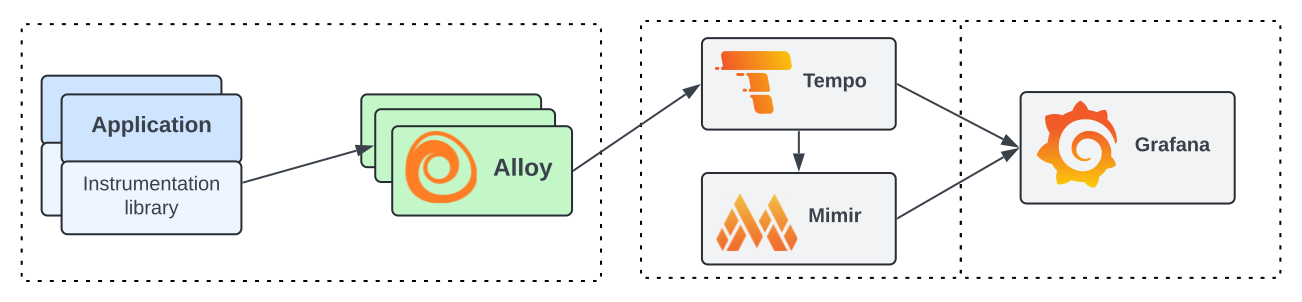
Instrumented applications send traces to the distributor, which writes them to Kafka. The metrics-generator consumes trace data from Kafka and runs it through its configured processors (span metrics, service graphs, and host info). Each processor derives a different set of metrics, which the metrics-generator then remote-writes to a Prometheus-compatible backend such as Prometheus or Grafana Mimir.
Service graphs
Service graphs are the representations of the relationships between services within a distributed system.
This service graphs processor builds a map of services by analyzing traces, with the objective to find edges. Edges are spans with a parent-child relationship, that represent a jump (for example, a request) between two services. The processor records the request count and duration as metrics and uses them to represent the graph.
To learn more about this processor, refer to the service graph documentation.
Span metrics
The span metrics processor derives RED (Request, Error, and Duration) metrics from spans.
The span metrics processor computes the total count and the duration of spans for every unique combination of dimensions. Dimensions can be the service name, the operation, the span kind, the status code and any tag or attribute present in the span. The more dimensions you enable, the higher the cardinality of the generated metrics.
To learn more about this processor, refer to the span metrics documentation.
Host info
The host info processor emits a traces_host_info gauge metric derived from resource attributes on incoming spans.
It identifies hosts sending traces using configurable identifiers (by default, k8s.node.name and host.id) and produces labels grafana_host_id and host_source.
This processor is useful for correlating trace data with host-level infrastructure metrics.
To learn more about the configuration, refer to the Metrics-generator section of the Tempo Configuration documentation.
Remote writing metrics
The metrics-generator runs a Prometheus Agent that periodically sends metrics to a remote_write endpoint.
The remote_write endpoint is configurable and can be any Prometheus-compatible endpoint.
To learn more about the endpoint configuration, refer to the
Metrics-generator section of the Tempo Configuration documentation.
Use metrics_generator.registry.collection_interval to control the writing interval.
When you enable multi-tenancy, the metrics-generator forwards the X-Scope-OrgID header of the original request to the remote_write endpoint. To disable this behavior, set remote_write_add_org_id_header to false.
Native histograms
Native histograms are a data type in Prometheus that can produce, store, and query high-resolution histograms of observations. It usually offers higher resolution and more straightforward instrumentation than classic histograms.
The metrics-generator supports the ability to produce native histograms for high-resolution data. Users must update the receiving endpoint to ingest native histograms, and update histogram queries in their dashboards.
To learn more about the configuration, refer to the Metrics-generator section of the Tempo Configuration documentation.
Use metrics-generator in Grafana Cloud
If you want to enable metrics-generator for your Grafana Cloud account, refer to the Metrics-generator in Grafana Cloud documentation.
Enabling metrics generation and remote writing them to Grafana Cloud Metrics produces extra active series that could impact your billing. For more information on billing, refer to Understand your invoice.
Multitenancy
Tempo supports multitenancy in the metrics-generator through the use of environment variables and per-tenant overrides. Refer to the Multitenant Support for Metrics-Generator documentation for more information.


