

Custom requests
You can create custom initial and update requests with custom code.
Initial request
To create a custom initial request, select Code and then define your custom code:
Note
The
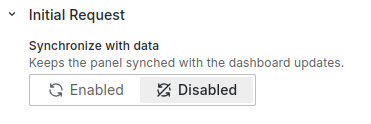
context.panel.onOptionsChange()handler refreshes the panel.If you use this handler in the initial request, disable the Synchronize with data option. Using both the Synchronize with data option and
context.panel.onOptionsChange()in the initial request causes the panel to reload continuously.
const bucketsSelect = context.panel.elements.find(
  (element) => element.id === "buckets"
);

/**
 * Set URL
 */
const url = `http://localhost:3001/test`;

/**
 * Fetch
 */
const resp = fetch(url, {
  method: "GET",
  headers: {
    "Content-Type": "application/json",
    "PRIVATE-TOKEN": "$token",
  },
})
  .catch((error) => {
    console.error(error);
  })
  .then(async (resp) => {
    const body = await resp.json();

    bucketsSelect.options = body.buckets.map((value) => {
      return { label: value, value };
    });

    context.panel.onOptionsChange(options);
  });
Initial values
To support the Highlight changed values and Require Confirmation features, you need to use the setInitial({}) function within your custom code to update initial values:
context.panel.setInitial({ value: 99, name: "Test" });Update request
To create a custom update request, select Code and then define your custom code. Depending on the payload option you select, the request includes either all values or only the updated values.
/**
 * Set body
 */
const body = {};
context.panel.options.elements.forEach((element) => {
  if (!options.update.updatedOnly) {
    body[element.id] = element.value;
    return;
  }

  /**
   * Skip not updated elements
   */
  if (element.value === initial[element.id]) {
    return;
  }

  body[element.id] = element.value;
});

/**
 * Set URL
 */
const url = `http://localhost:3001/${body["name"]}`;

/**
 * Fetch
 */
const resp = fetch(url, {
  method: "POST",
  headers: {
    "Content-Type": "application/json",
    "PRIVATE-TOKEN": "$token",
  },
  body: JSON.stringify(body),
})
  .catch((error) => {
    console.error(error);
  })
  .then((resp) => {
    console.log(resp);
  });


