

Context parameters
context.element
Returns the current element.
Usage
context.element;Example
const currentElement = context.element;Panel
panel.data
Returns the result set of panel queries.
Usage
context.panel.data;Example
const data = context.panel.data;panel.elements
Returns all form elements.
Usage
context.panel.elements;Example
const currentElements = context.panel.elements;panel.initial
Returns the parsed values from the initial request.
Usage
context.panel.initial;Example
const initialValues = context.panel.initial;panel.initialRequest()
Performs an initial request to reload the panel.
Usage
context.panel.initialRequest();Example
if (context.panel.response && context.panel.response.ok) {
  context.grafana.notifySuccess(["Update", "Values updated successfully."]);
  context.panel.initialRequest();
} else {
  context.grafana.notifyError([
    "Error",
    `An error occurred updating values: ${context.panel.response.status}`,
  ]);
}
panel.options
Returns the panel’s options.
Usage
context.panel.options;Example
const options = context.panel.options;panel.onOptionsChange(options)
Modifies the panel options and triggers a refresh. The context.panel.onOptionsChange() handler is required to update the panel.
Note
The
context.panel.onOptionsChange(options)handler calls the refresh panel.If you use it in the initial request, don’t forget to disable the Synchronize option. Enabling the Synchronize option and using it together with
context.panel.onOptionsChange(options)in the Initial Request will cause the panel to reload constantly.
Usage
context.panel.onOptionsChange(options);Example
context.panel.onOptionsChange({
  ...context.panel.options,
  elements: context.panel.options.elements.map((element) => {
    return element.id === "name" ? { ...element, value: "test" } : element;
  }),
});const options = context.panel.options;
context.panel.onOptionsChange({
...options,
sync: true,
});Arguments
optionsObject
Panel options. Useconsole.log('options:',context.panel.options)to check all fields
panel.onChangeElements(options)
Updates elements in the local state. Accepts an array of new elements.
Usage
context.panel.onChangeElements(elements);Example
context.panel.onChangeElements(
  context.panel.elements.map((element) => ({
    ...element,
    value: json[element.id],
  }))
);context.panel.onChangeElements(
elements.map((element) => {
return element.id === "name" ? { ...element, value: "test" } : element;
})
);Arguments
elementsArray
Array of elements.
panel.patchFormValue(values)
Updates the values of the specified elements. Accepts an object.
Usage
context.panel.patchFormValue(elements);Example
// only passed elements should be updated, the rest stay the same
context.panel.patchFormValue({ name: "Alex" });// name and isAdmin
context.panel.patchFormValue({ name: "Alex", isAdmin: true });Arguments
valuesObject
Object. Each key is theidof the element and thevalueof the key is the value of the element
panel.setFormValue(values)
Updates the values of elements. Accepts an object. If a value is not passed for an element, the initial value is used or the value is cleared.
Usage
context.panel.setFormValue(elements);Example
context.panel.setFormValue({ name: "Alex", isAdmin: true });Arguments
valuesObject
Object. Each key is theidof the element and thevalueof the key is the value of the element
panel.formValue()
Returns the current form values as an object.
Usage
context.panel.formValue(elements);Example
const payload = context.panel.formValue;
// return { name: 'Alex', isAdmin: true }
panel.response
Returns the current request’s response.
Usage
context.panel.response;Example
if (context.panel.response && context.panel.response.ok) {
  context.grafana.notifySuccess(["Update", "Values updated successfully."]);
  context.grafana.refresh();
} else {
  context.grafana.notifyError([
    "Update",
    `An error occurred updating values: ${context.panel.response.status}`,
  ]);
}
panel.setInitial(values)
Specifies initial values for a custom initial request to highlight modified values and requests a user’s confirmation.
Usage
context.panel.setInitial(values);Example
// Initial custom code example
const payload = {};

context.panel.elements.forEach((element) => {
  if (!element.value) {
    return;
  }

  payload[element.id] = element.value;
});

context.panel.setInitial(payload);

return;
Arguments
valuesObjectObject. Each key is the
idof the element and thevalueof the key is the value of the element// example { "max": 100, "min": 10, "speed": 54, "option1": "option1", "option2": "option1", "code": "option1" }
Errors
panel.setError(message)
Displays an error on panel.
Usage
context.panel.setError(message);Example
context.panel.setError("Message");
Arguments
messageStringError Message
Buttons
panel.enableSubmit()
Enables the Submit button.
Usage
context.panel.enableSubmit();Example
if (condition) {
  context.panel.enableSubmit();
}

context.panel.enableSubmit();
panel.disableSubmit()
Disables the Submit button.
Usage
context.panel.disableSubmit();Example
if (condition) {
  context.panel.disableSubmit();
}

//

context.panel.disableSubmit();
panel.enableReset()
Enables the Reset button.
Usage
context.panel.enableReset();Example
if (condition) {
  context.panel.enableReset();
}

context.panel.disableSubmit();
panel.disableReset()
Disables the Reset button.
Usage
context.panel.disableReset();Example
if (condition) {
  context.panel.disableReset();
}

context.panel.disableReset();
panel.enableSaveDefault()
Enables the Save Default button.
Usage
context.panel.enableSaveDefault();Example
if (condition) {
  context.panel.enableSaveDefault();
}

context.panel.enableSaveDefault();
panel.disableSaveDefault()
Disables the Save Default button.
Usage
context.panel.disableSaveDefault();Example
if (condition) {
  context.panel.disableSaveDefault();
}

context.panel.disableSaveDefault();
Sections Utils
sectionsUtils.add(section)
Adds a new section.
Added in: v4.9.0
Note
The
context.panel.sectionsUtils.add(section)handler calls the refresh panel.If you use it in the initial request, don’t forget to disable the Synchronize option. Enabling the Synchronize option and using it together with
context.panel.sectionsUtils.add(section)in the Initial Request will cause the panel to reload constantly.
Usage
context.panel.sectionsUtils.add(section);Example
context.panel.sectionsUtils.add({
  name: "Section 1",
  id: "id-s-1",
  elements: [],
});

const newSection = {
  name: "Section 2",
  id: "id-s-2",
  elements: ["elem-1", "elem-2"],
};

context.panel.sectionsUtils.add(newSection);
Arguments
sectionObject
Section. Each section includename,id,elements
Common Section properties
namestring. Section name.idstring. Section Id.elementsArray. Elements ids assign to section. Could Be empty array.
sectionsUtils.update(sections)
Updates existing sections.
Added in: v4.9.0
Note
The
context.panel.sectionsUtils.update(sections)handler calls the refresh panel.If you use it in the initial request, don’t forget to disable the Synchronize option. Enabling the Synchronize option and using it together with
context.panel.sectionsUtils.update(sections)in the Initial Request will cause the panel to reload constantly.
Usage
context.panel.sectionsUtils.update(sections);Example
context.panel.sectionsUtils.update([{ name: "Section 1", id: "id-s-1" }]);Arguments
sectionsArray
Sections. Each section includenameandid
sectionsUtils.remove(id)
Removes a section.
Added in: v4.9.0
Note
The
context.panel.sectionsUtils.remove(id)handler calls the refresh panel.If you use it in the initial request, don’t forget to disable the Synchronize option. Enabling the Synchronize option and using it together with
context.panel.sectionsUtils.remove(id)in the Initial Request will cause the panel to reload constantly.
Usage
context.panel.removeSection(id);Example
context.panel.removeSection("id-s-1");Arguments
idstring. Section id.
sectionsUtils.assign(id,elements)
Assigns elements to a section.
Added in: v4.9.0
Note
The
context.panel.sectionsUtils.assign(id,elements)handler calls the refresh panel.If you use it in the initial request, don’t forget to disable the Synchronize option. Enabling the Synchronize option and using it together with
context.panel.sectionsUtils.assign(id,elements)in the Initial Request will cause the panel to reload constantly.
Usage
context.panel.sectionsUtils.assign(id, elements);Example
context.panel.sectionsUtils.assign("id-s-1", ["elem-1", "elem-2"]);Arguments
idstring. Section Id.elementsArray. Array of elements ids
sectionsUtils.unassign(elements)
Unassigns elements from a section.
Added in: v4.9.0
Note
The
context.panel.sectionsUtils.unassign(elements)handler calls the refresh panel.If you use it in the initial request, don’t forget to disable the Synchronize option. Enabling the Synchronize option and using it together with
context.panel.sectionsUtils.unassign(elements)in the Initial Request will cause the panel to reload constantly.
Usage
context.panel.sectionsUtils.unassign(elements);Example
context.panel.sectionsUtils.unassign(["elem-1", "elem-2"]);Arguments
elementsArray. Array of elements ids
sectionsUtils.get(id)
Returns the section with the specified ID, including all elements assigned to it.
Added in: v4.9.0
Usage
context.panel.sectionsUtils.get(id);Example
context.panel.sectionsUtils.get("section-id");Arguments
idstring. Section Id
sectionsUtils.getAll()
Returns all sections with their assigned elements.
Added in: v4.9.0
Usage
context.panel.sectionsUtils.getAll();Example
context.panel.sectionsUtils.getAll();sectionsUtils.collapse(id)
Collapses the specified section.
Updated in: v4.9.0
Usage
context.panel.sectionsUtils.collapse(id);Example
context.panel.sectionsUtils.collapse("section-id");Arguments
idstring. Section Id
sectionsUtils.expand(id)
Expands the specified section.
Added in: v4.9.0
Usage
context.panel.sectionsUtils.expand(id);Example
context.panel.sectionsUtils.expand("section-id");Arguments
idstring. Section Id
sectionsUtils.toggle(id)
Toggles the specified section between collapsed and expanded states.
Added in: v4.9.0
Usage
context.panel.sectionsUtils.toggle(id);Example
context.panel.sectionsUtils.toggle("section-id");Arguments
idstring. Section Id
sectionsUtils.expandedState
Returns Expand/Collapse State for Sections.
Added in: v4.9.0
Usage
context.panel.sectionsUtils.expandedState;Example
const sectionsExpandedState = context.panel.sectionsUtils.expandedState;Grafana
grafana.locationService
Provides access to Grafana’s locationService for working with the browser’s location and history.
Usage
context.grafana.locationService;Example
context.grafana.locationService.reload();

const history = context.grafana.locationService.history;
grafana.backendService
Provides access to Grafana’s backendService for communicating with remote backends such as the Grafana backend or a data source.
Usage
context.grafana.backendService;Example
const deviceID = context.grafana.backendService.deviceID;grafana.notifyError([header, message])
Displays an error.
Usage
context.grafana.notifyError([header, message]);Example
context.grafana.notifyError([
  "Error",
  `An error occurred updating values: ${context.panel.response.status}`,
]);

context.grafana.notifyError(["Error Title", `Show error message`]);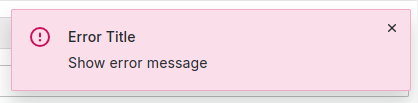
Arguments
headerstring. Error titlemessagestring. Error message
grafana.notifySuccess([header, message])
Displays a success notification.
Usage
context.grafana.notifySuccess([header, message]);Example
context.grafana.notifySuccess(["Success Title", `Success message`]);Arguments
headerstring. Success titlemessagestring. Success message
grafana.notifyWarning([header, message])
Displays a warning.
Usage
context.grafana.notifyWarning([header, message]);Example
context.grafana.notifyWarning(["warning Title", `warning message`]);Arguments
headerstring. Warning titlemessagestring. Warning message
grafana.eventBus
Publish and subscribe to application events.
Usage
context.grafana.eventBus;Example
const subscriber = eventBus.getStream(RefreshEvent).subscribe(() => {
  // to do
});
grafana.templateService
Provides access to Grafana’s templateService for working with variables and updating the time range.
Usage
context.grafana.templateService;Example
const regEx = context.grafana.templateService.regex;grafana.refresh()
Refreshes dashboard panels using application events.
Usage
context.grafana.refresh();Utils
utils.fileToBase64(file)
Converts a file to base64 format.
Usage
context.utils.fileToBase64(file);Example
const payload = {};

context.panel.elements.forEach((element) => {
  if (!element.value) {
    return;
  }

  payload[element.id] = element.value;
});

/**
 * Data Source payload
 */
const getPayload = async () => {
  const file = payload.file[0];
  const base64 = await context.utils.fileToBase64(file);

  return {
    file,
    base64,
  };
};

return getPayload();
Arguments
fileFile. A File provides information about files.
utils.toDataQueryResponse(res)
Parses the results from /api/ds/query into a DataQueryResponse object.
Usage
context.utils.toDataQueryResponse(res);Example
const dataQuery = context.utils.toDataQueryResponse(context.panel.response);Arguments
resresponse. The HTTP response data


