






























How it works
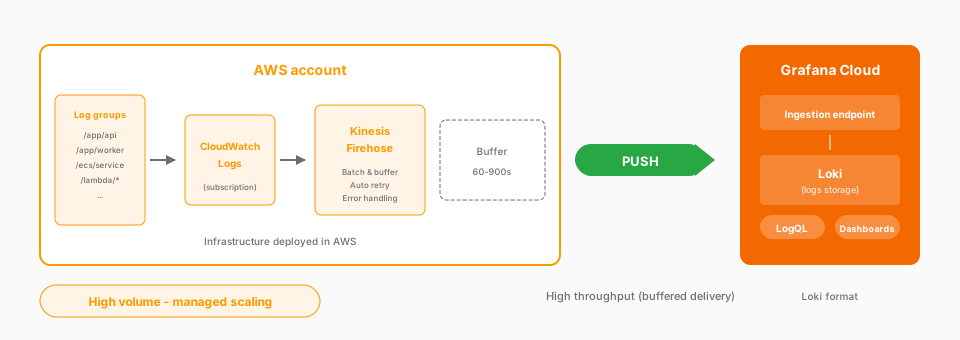
Complexity: Moderate | Infrastructure: Managed | Latency: Buffered (60-900s)
CloudWatch logs collected with Firehose
| Log type | Source | Key insights |
|---|---|---|
| CloudWatch Logs | Applications, services | Application events, errors |
| RDS Instance Logs | Database instances | Query logs, slow queries |
| VPC Flow Logs | Network interfaces | Network traffic, security |
Trade-offs
| Pros | Cons |
|---|---|
| ~3x cheaper than Lambda at scale | Buffering adds latency |
| High-throughput streaming | Firehose costs |
| Managed (automatic scaling) | Limited transformation |
| Automatic retry/error handling | IAM role setup |
| Native CloudWatch integration |
Documentation
View the full documentation. Learning path coming soon!
Script
Amazon Data Firehose is the recommended approach for most AWS log collection. It handles CloudWatch logs from your applications, RDS instance logs, and VPC Flow Logs with better scalability and cost efficiency than Lambda.
Firehose is a managed streaming service. You configure a subscription filter on your CloudWatch log group that sends logs to Firehose.
Logs flow in, get batched automatically, and deliver to Grafana Cloud with built-in retry and error handling. You don’t manage any compute. AWS handles the scaling.
Cost matters at scale. Firehose is about three times cheaper than Lambda for high log volumes, making it the better choice for production workloads.
The trade-off is latency. Firehose buffers logs before delivery, typically anywhere from 60 to 900 seconds, depending on your configuration.
That’s fine for most use cases. You’re not usually doing real-time alerting on raw log lines.
For CloudWatch logs at any scale, Firehose is the recommended approach. It’s simpler to operate, more cost-effective, and scales seamlessly with growing log volumes.