































Elasticsearch template variables
Instead of hard-coding details such as server, application, and sensor names in metric queries, you can use variables. Grafana lists these variables in drop-down select boxes at the top of the dashboard to help you change the data displayed in your dashboard. Grafana refers to such variables as template variables.
For an introduction to templating and template variables, refer to the Templating and Add and manage variables documentation.
Use ad hoc filters
Elasticsearch supports the Ad hoc filters variable type. You can use this variable type to specify any number of key/value filters, and Grafana applies them automatically to all of your Elasticsearch queries.
Ad hoc filters support the following operators:
For more information, refer to Add ad hoc filters.
Choose a variable syntax
The Elasticsearch data source supports two variable syntaxes for use in the Query field:
$varname, such ashostname:$hostname, which is easy to read and write but doesn’t let you use a variable in the middle of a word.[[varname]], such ashostname:[[hostname]]
When the Multi-value or Include all value options are enabled, Grafana converts the labels from plain text to a Lucene-compatible condition. For details, refer to the Multi-value variables documentation.
Use variables in queries
You can use variables in the Lucene query field, metric aggregation fields, bucket aggregation fields, and the alias field.
Variables in Lucene queries
Use variables to filter your Elasticsearch queries dynamically:
hostname:$hostname AND level:$levelChain or nest variables
You can create nested variables, where one variable’s values depend on another variable’s selection.
This example defines a variable named $host that only shows hosts matching the selected $environment:
{ "find": "terms", "field": "hostname", "query": "environment:$environment" }Whenever you change the value of the $environment variable via the drop-down, Grafana triggers an update of the $host variable to contain only hostnames filtered by the selected environment.
Variables in aggregations
You can use variables in bucket aggregation fields to dynamically change how data is grouped. For example, use a variable in the Terms group by field to let users switch between grouping by hostname, service, or datacenter.
Template variable examples
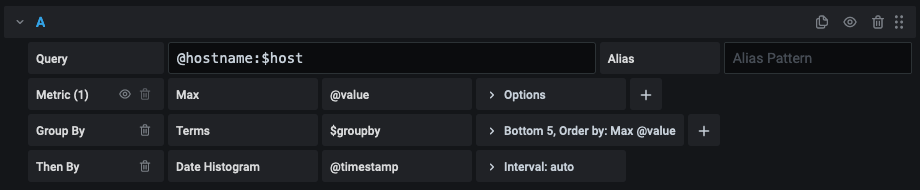
In the above example, a Lucene query filters documents based on the hostname property using a variable named $hostname.
The example also uses a variable in the Terms group by field input box, which you can use to quickly change how data is grouped.
Create a query
Write the query using a custom JSON string, with the field mapped as a keyword in the Elasticsearch index mapping.
If the query is multi-field with both a text and keyword type, use "field":"fieldname.keyword" (sometimes fieldname.raw) to specify the keyword field in your query.
Queries of terms have a 500-result limit by default. To set a custom limit, set the size property in your query.
Sort query results
By default, queries return results in term order (which can then be sorted alphabetically or numerically using the variable’s Sort setting).
To produce a list of terms sorted by document count (a top-N values list), add an orderBy property of doc_count. This automatically selects a descending sort:
{ "find": "terms", "field": "status", "orderBy": "doc_count" }You can also use the order property to explicitly set ascending or descending sort:
{ "find": "terms", "field": "hostname", "orderBy": "doc_count", "order": "asc" }Note
Elasticsearch discourages sorting by ascending doc count because it can return inaccurate results.
To keep terms in the document count order, set the variable’s Sort drop-down to Disabled. You can alternatively use other sorting criteria, such as Alphabetical, to re-sort them.




