
Menu
Documentation Grafana Cloud
Testing and synthetics
Performance testing
Reference pages
Cloud REST API
Grafana Cloud
Testing and synthetics
Performance testing
Reference pages
Cloud REST API
Grafana Cloud
Testing and synthetics
Performance testing
Reference pages
Cloud REST APIGrafana Cloud
Grafana Cloud k6 REST API
The Grafana Cloud k6 REST API provides programmatic access to Grafana Cloud k6 resources.
Authentication and authorization
To authenticate with the Grafana Cloud k6 HTTP API, you’ll need:
- A Personal API token or a Grafana Stack API token. Refer to Authenticate on the CLI to learn how to get a token.
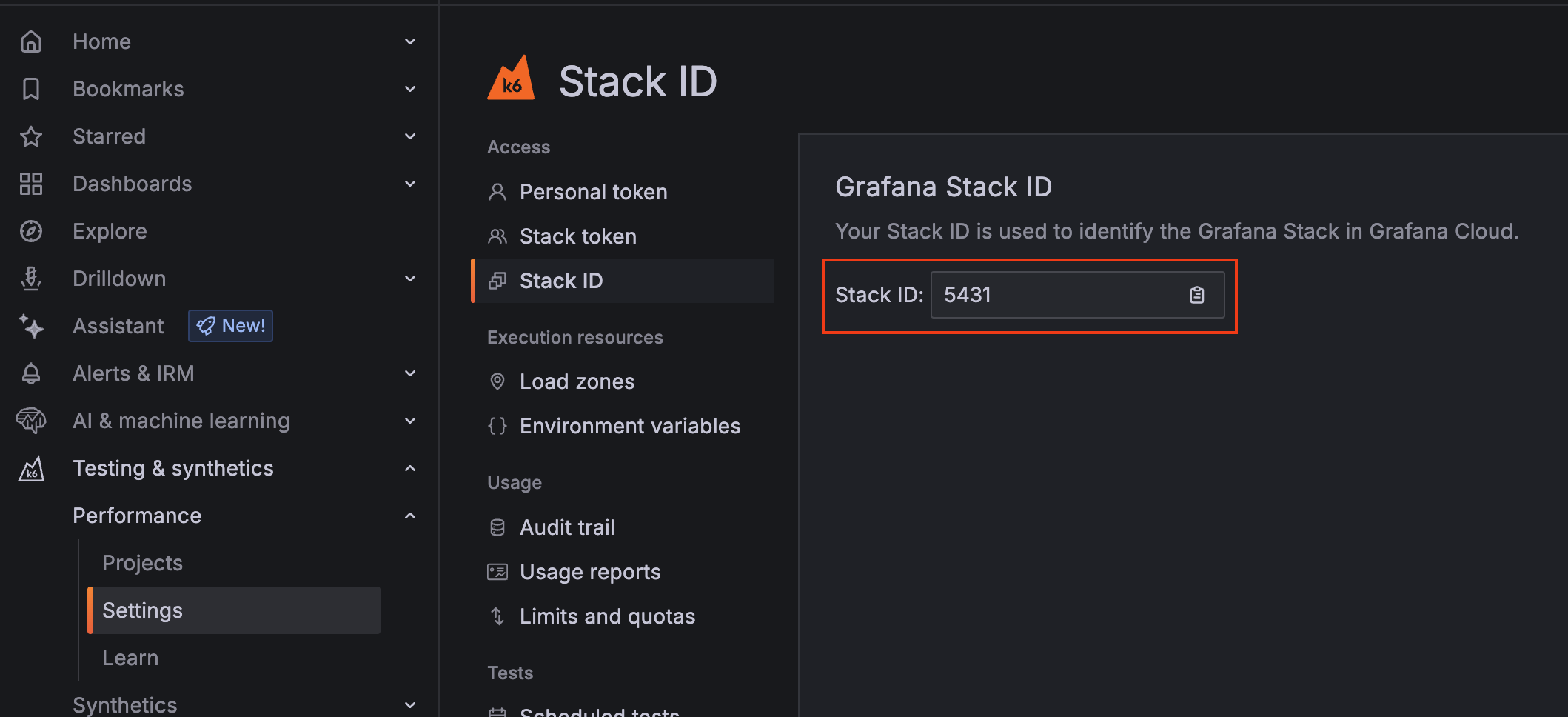
- A Grafana stack instance ID that can be retrieved in Testing & synthetics -> Performance -> Settings -> Stack ID.
Note
Refer to Your Grafana Cloud Stack to learn alternative ways of getting your stack instance ID.
Include the API token in the Authorization header and the instance ID in the X-Stack-Id header for all requests to the API. For example:
GET https://api.k6.io/cloud/v6/projects
Authorization: Bearer 56c166885f9a7fc1e579a1b3cb66f6dd
X-Stack-Id: 12345
HTTP APIs
Cloud resources
Note
You can download the OpenAPI specification file for the cloud resource endpoints here.




