
 Grafana Cloud
Monitor infrastructure
Kubernetes Monitoring
Configure Kubernetes Monitoring
Configure with Helm chart
Helm chart
Grafana Cloud
Monitor infrastructure
Kubernetes Monitoring
Configure Kubernetes Monitoring
Configure with Helm chart
Helm chartOverview of Grafana Kubernetes Monitoring Helm chart
The Grafana Kubernetes Monitoring Helm chart offers a complete solution for configuring infrastructure, zero-code instrumentation, and gathering telemetry. The benefits of using this chart include:
- Flexible architecture
- Compatibility with existing systems such as OpenTelemetry and Prometheus Operators
- Dynamic creation of Alloy objects based on your configuration choices
- Scalability for all Cluster sizes
- Built-in testing and schemas to help you avoid errors
Release notes
Refer to Helm chart release notes for all updates.
Helm chart structure
The Helm chart includes the following folders:
- charts: Contains the chart for each feature and the telemetry-services subchart for backing services
- collectors: The values files for each collector
- destinations: The values file for each destination
- docs: The settings for Alloy, example files for each feature and each destination
- schema mods: Schema modules to prevent input errors
- scripts
- templates: Templates used by the Helm chart
- tests: A set of tests to validate chart functionality to ensure it works as expected
Features
In addition to the required contents for any Helm chart, this chart has guidance for each feature. A feature is a common monitoring task that contains:
- The Alloy configuration used to discover, gather, process, and deliver the appropriate telemetry data
- Additional Kubernetes workloads to supplement Alloy’s functionality
Each feature contains multiple configuration options. You can enable or disable a feature with the enabled flag.
The following features are available:
- Annotation autodiscovery: Collects metrics from any Pod or Service that uses a specific annotation
- Application Observability: Opens receivers to collect telemetry data from instrumented applications, including tail sampling
- Beyla: Options for enabling zero-code instrumentation with Grafana Beyla
- Cluster events: Collects Kubernetes Cluster events from the Kubernetes API server
- Cluster metrics: Collects metrics about the Kubernetes Cluster, including
kubelet, cAdvisor, kube-state-metrics, and control plane - Cost metrics: Collects cost metrics via OpenCost
- Host metrics: Collects host-level metrics from Linux Nodes (Node Exporter), Windows Nodes (Windows Exporter), and energy usage (Kepler)
- Node logs: Collects logs from Kubernetes Cluster Nodes
- Pod logs via Loki: Collects logs from Kubernetes Pods using the Loki pipeline
- Pod logs via OpenTelemetry: Collects logs from Kubernetes Pods natively in OTLP format
- Pod logs objects: Collects logs using PodLogs objects
- Pod logs via Kubernetes API: Collects Pod logs by streaming them from the Kubernetes API
- Profiling: Gathers profiles from the Kubernetes Cluster and delivers them to Pyroscope, with granular toggles for eBPF, Java, and pprof profilers
- Profiles receiver: Opens receivers to collect profiles pushed from instrumented applications
- Prometheus Operator objects: Collects metrics from Prometheus Operator objects, such as PodMonitors and ServiceMonitors
- Service integrations: Collects metrics from services deployed on the Cluster, such as databases and caches
Packages installed with Helm chart
The Grafana Kubernetes Monitoring Helm chart deploys a complete monitoring solution for your Cluster and applications running within it. The chart installs systems, such as Node Exporter and Grafana Alloy Operator, along with their configuration to make these systems run. These elements are kept up to date in the Kubernetes Monitoring Helm chart with a dependency updating system to ensure that the latest versions are used.
The Helm chart installs Alloy Operator, which renders a kind: Alloy object dynamically that depends on the options you choose for configuration. When an Alloy object is deployed to the Cluster based on the values.yaml file, Alloy Operator:
- Determines the workload type and creates the components needed by the Alloy object (such as file system access, permissions, or the capability to read secrets)
- Performs a Helm install of the Alloy object and its components
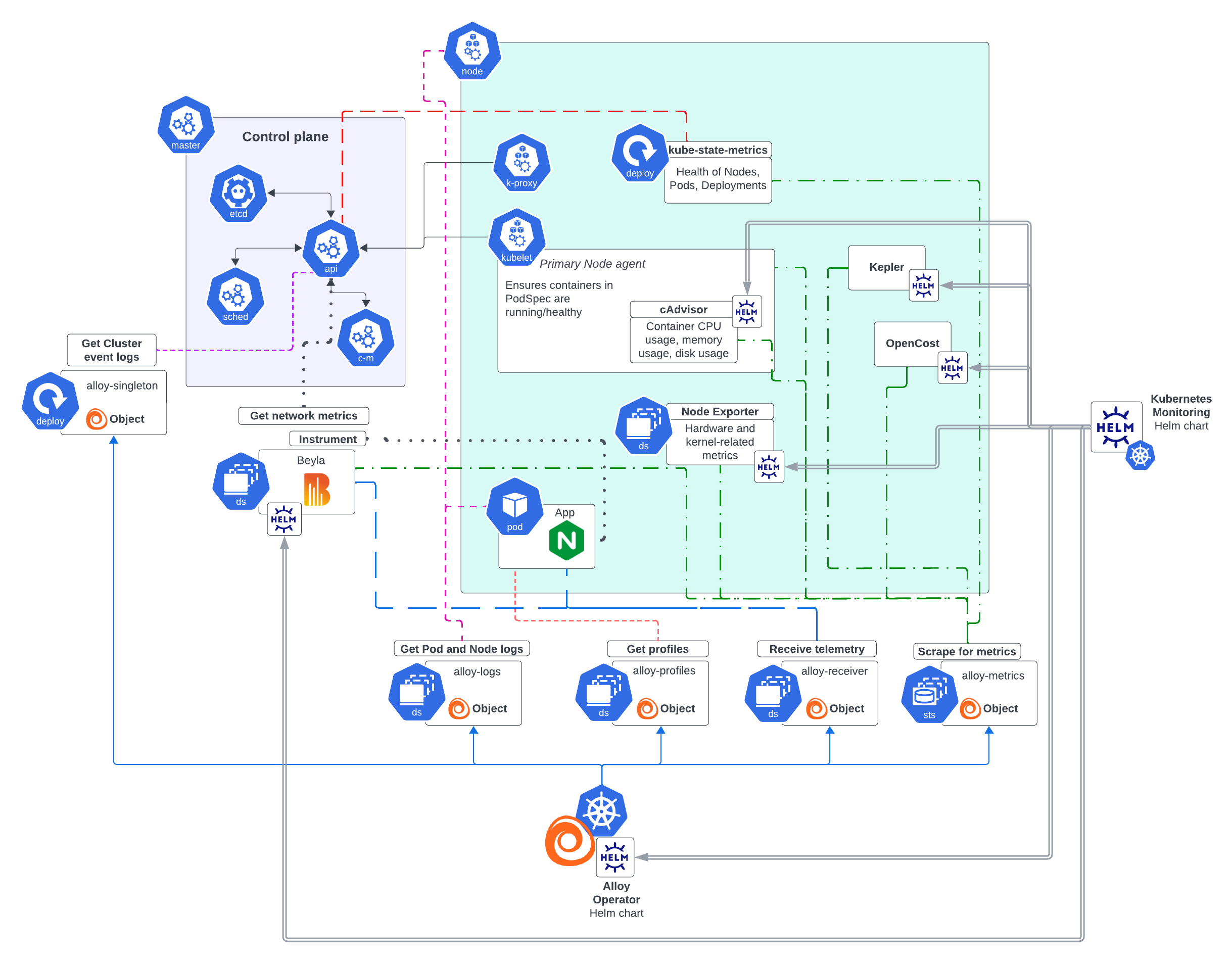
The Helm chart creates configuration files for the Grafana Alloy instances, and stores them in ConfigMaps.
Note
Multiple instances of Grafana Alloy support the scalability of your infrastructure. To learn more, refer to Deployment of multiple Alloy instances.
All configuration related to telemetry data destinations are automatically loaded onto the Grafana Alloy instances that require them.
Infrastructure metrics
Alloy Operator installs a collector with the clustered and statefulset presets which gathers metrics related to the Cluster itself and accepts metrics, logs, and traces via receivers. This instance can retrieve metrics from:
kubelet, the primary Node agent which ensures containers are running and healthy- cAdvisor, which provides container CPU, memory, and disk usage
- Node Exporter within a Daemonset, which gathers hardware device and kernel-related metrics from Linux Nodes of the Cluster. The exported Prometheus metrics indicate the health and state of Nodes in the Cluster.
- Windows Exporter within a Daemonset, which provides hardware device and kernel-related metrics from Windows Nodes. The exported Prometheus metrics indicate the health and state of Nodes in the Cluster.
- kube-state-metrics within a Deployment, which listens to the API server and generates metrics on the health of objects inside the Cluster such as Deployments, Nodes, and Pods.
This service generates metrics from Kubernetes API objects, and uses
client-goto communicate with Clusters. For Kubernetes client-go version compatibility and any other related details, refer to kube-state-metrics. - Prometheus Operator CRDs, provide the custom resources for the Prometheus Operator. Use when you want to deploy PodMonitors, ServiceMonitors, or Probes. Prometheus Operator CRDs must be installed separately.
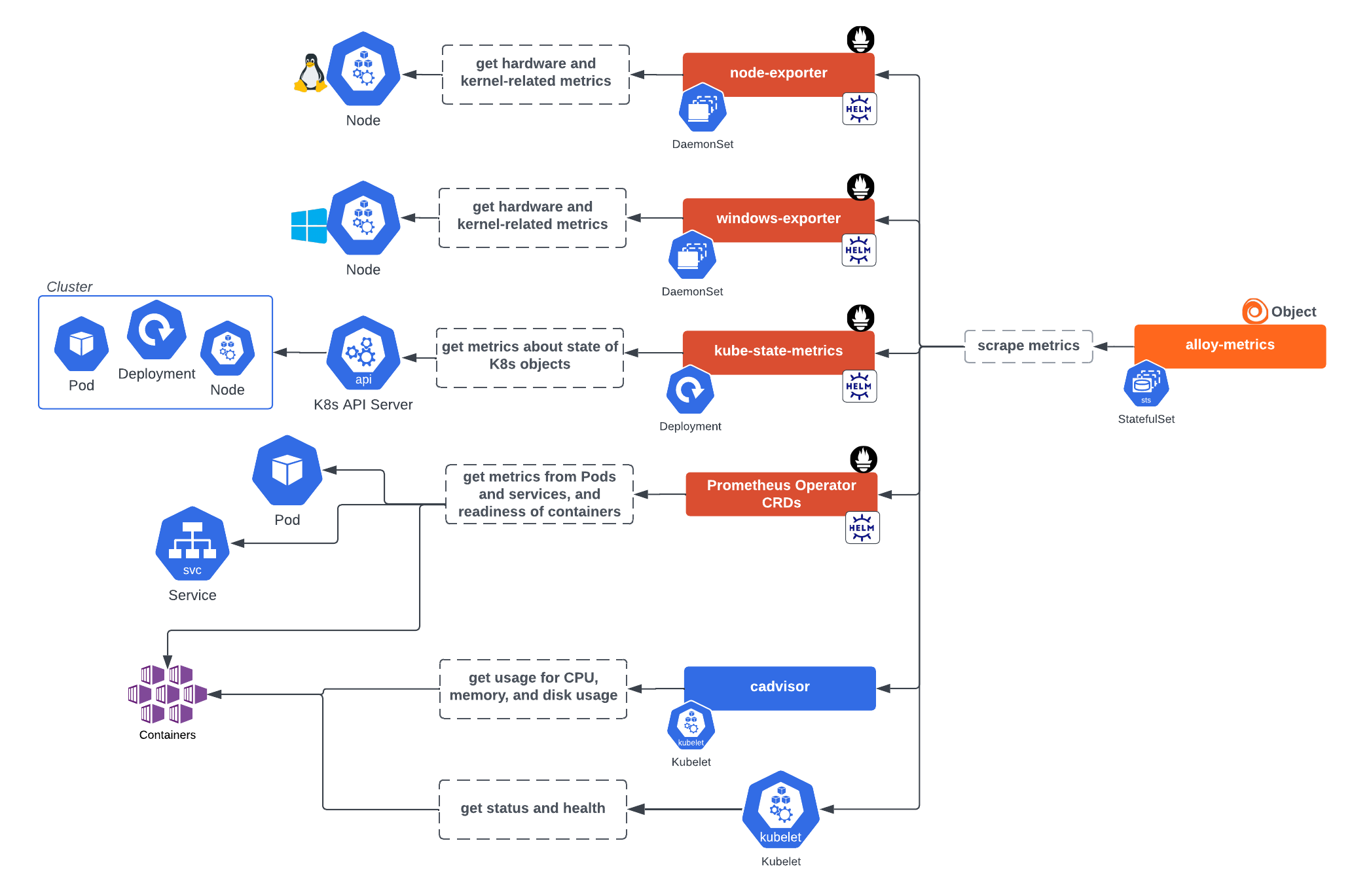
This Alloy instance can also gather metrics from:
- OpenCost, to calculate Kubernetes infrastructure and container costs. OpenCost requires Kubernetes 1.8+ Clusters.
- Kepler for energy metrics
Note
These metrics are organized into three separate features:
clusterMetrics(kubelet, cAdvisor, kube-state-metrics, control plane),hostMetrics(Node Exporter, Windows Exporter, Kepler), andcostMetrics(OpenCost). The backing services (kube-state-metrics, Node Exporter, and so on) are deployed or discovered through thetelemetryServiceskey, separately from the features that consume their data.
Infrastructure logs
The following collectors retrieve logs:
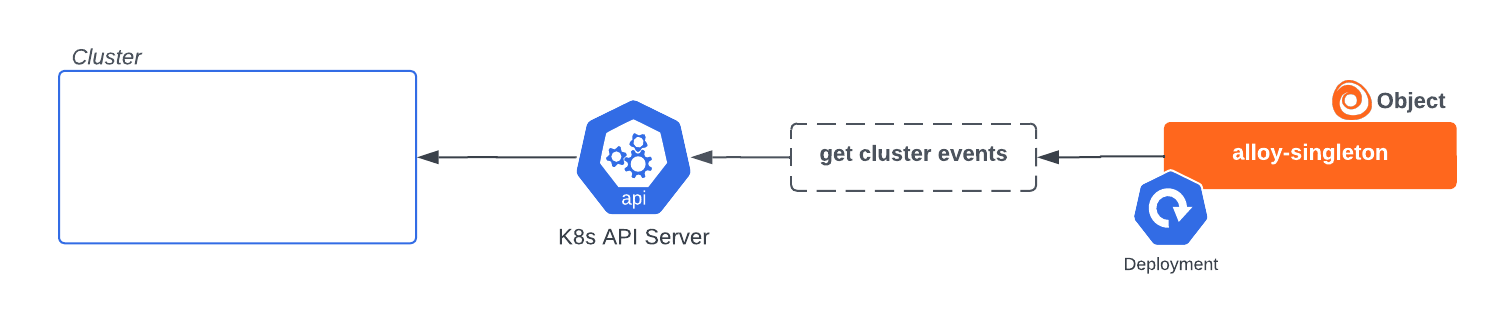
- A collector with the
singletonpreset for Cluster events, to get Kubernetes lifecycle events from the API server and transform them into logs. This collector must remain a single instance to avoid duplicate data.
Alloy singleton collector instance installed by Helm chart to gather events - A collector with the
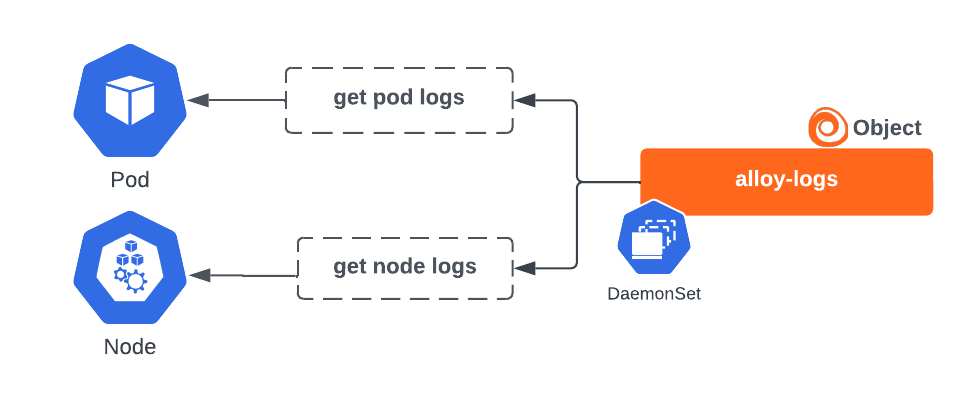
filesystem-log-readeranddaemonsetpresets to retrieve Pod logs and Node logs. By default, it uses HostPath volume mounts to read Pod log files directly from the Nodes. It can alternatively get logs via the API server.
Alloy logs collector instance for gathering logs
Application telemetry
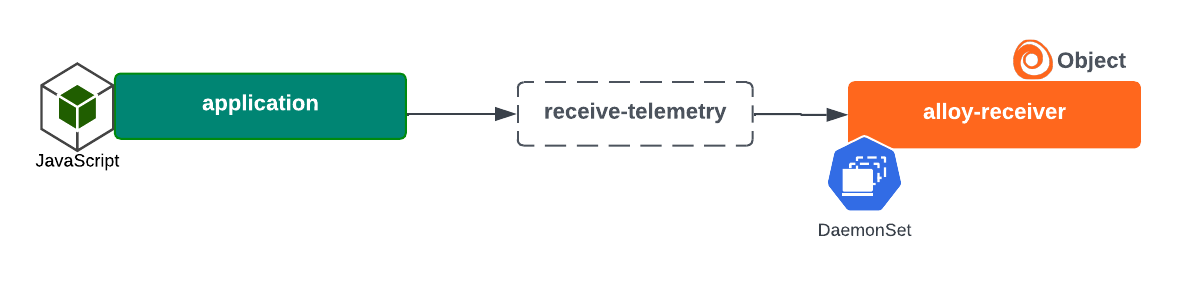
The Alloy Operator can also create the following to gather metrics, logs, traces, and profiles from applications running in the Cluster:
- A collector with the
daemonsetpreset, which opens receiver ports to process data delivered directly to itself from applications instrumented with OpenTelemetry SDKs
Alloy receiver collector instance installed by Helm chart to receive telemetry - A collector with the
privilegedanddaemonsetpresets to gather profiles
Alloy profiles collector instance installed by Helm chart and the profiles gathered

Automatic instrumentation
With the Helm chart, you can install a Grafana Beyla DaemonSet to perform zero code instrumentation of applications and gather network metrics.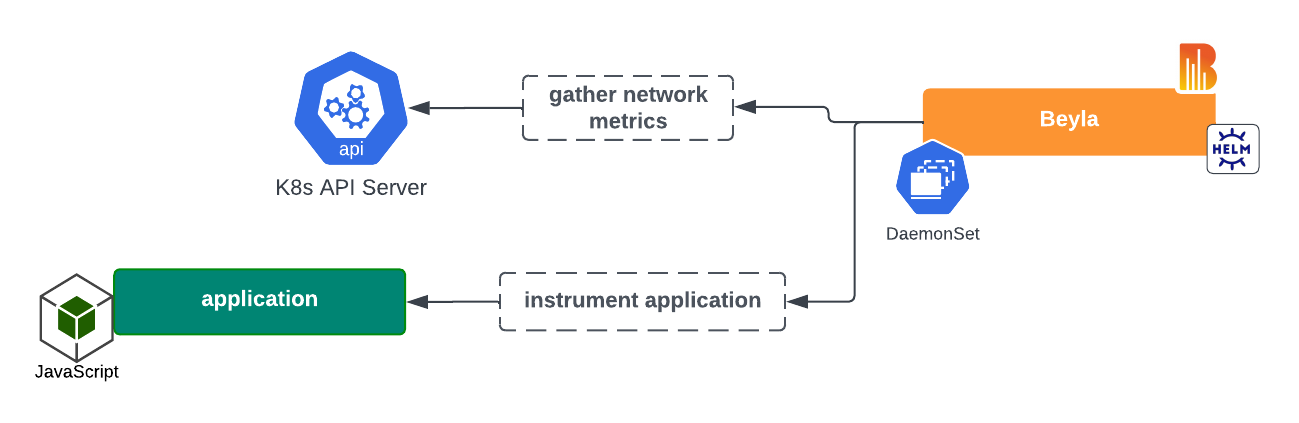
Deployment of multiple Alloy instances
Multiple instances of Grafana Alloy are deployed instead of one instance that includes all functions. This design is necessary for security and balancing functionality and scalability.
You define your own collectors as a map with presets that describe the deployment shape. For example, a typical setup might include a metrics collector, a logs collector, and an events collector, each with appropriate presets. Features are explicitly assigned to collectors using the collector field. Refer to the collector reference for details.
Security
The use of distinct instances minimizes the security footprint required. For example, a log-reading collector with the filesystem-log-reader preset requires a HostPath volume mount, but other collectors do not. Instead they can be deployed with a more restrictive and appropriate security context. Each object, whether Alloy, Node Exporter, cAdvisor, or Beyla is restricted to the permissions required for it to perform its function, leaving Grafana Alloy to act solely as a collector.
Functionality/scalability balance
Each instance has unique functionality and scalability requirements. For example, the default functionality of the alloy-log instance is to gather logs via HostPath volume mounts, which requires the instance to be deployed as a DaemonSet. The alloy-metrics instance is deployed as a StatefulSet, which allows it to be scaled (optionally with a HorizontalPodAutoscaler) based on load. Otherwise, it would lose its ability to scale. The alloy-singleton instance cannot be scaled beyond one replica, because that would result in duplicate data being sent.
Images
The following list shows the images and tags used by the Kubernetes Monitoring Helm chart version 4.0.0. Newer chart versions might use different image tags; refer to the Helm chart release notes for the most current tags.
Alloy
The telemetry data collector. Deployed by the Alloy Operator.
Image: docker.io/grafana/alloy:v1.14.0
Deploy: Define at least one entry in collectors
Alloy Operator
Deploys and manages Grafana Alloy collector instances.
Image: ghcr.io/grafana/alloy-operator:1.6.2
Deploy: alloy-operator.deploy=true
Beyla
Performs zero-code instrumentation of applications on the Cluster, generating metrics and traces.
Image: docker.io/grafana/beyla:3.1.2
Deploy: autoInstrumentation.beyla.enabled=true
Beyla K8s Cache
Provides Kubernetes metadata caching for Beyla auto-instrumentation.
Image: docker.io/grafana/beyla-k8s-cache:3.1.2
Deploy: autoInstrumentation.beyla.enabled=true
Config Reloader
Sidecar for Alloy instances that reloads the Alloy configuration upon changes.
Image: quay.io/prometheus-operator/prometheus-config-reloader:v0.81.0
Deploy: collectors.<name>.configReloader.enabled=true
Kepler
Image: quay.io/sustainable_computing_io/kepler:release-0.8.0
Deploy: telemetryServices.kepler.deploy=true
kube-state-metrics
Gathers Kubernetes Cluster object metrics.
Image: registry.k8s.io/kube-state-metrics/kube-state-metrics:v2.18.0
Deploy: telemetryServices.kube-state-metrics.deploy=true
kubectl
Used for Helm hooks for properly sequencing the Alloy Operator deployment and removal.
Image: ghcr.io/grafana/helm-chart-toolbox-kubectl:0.1.2
Deploy: alloy-operator.waitForAlloyRemoval.enabled=true
Node Exporter
Gathers Kubernetes Cluster Node metrics for Linux nodes.
Image: quay.io/prometheus/node-exporter:v1.10.2
Deploy: telemetryServices.node-exporter.deploy=true
OpenCost
Gathers cost metrics for Kubernetes objects.
Image: ghcr.io/opencost/opencost:1.119.2@sha256:4b8de6e029b9dc1f7e68bdf1cf02fca7649614c23812e51a63820f113ca97b89
Deploy: telemetryServices.opencost.deploy=true
Windows Exporter
Gathers Kubernetes Cluster Node metrics for Windows nodes.
Image: ghcr.io/prometheus-community/windows-exporter:0.31.5
Deploy: telemetryServices.windows-exporter.deploy=true
Container image security
The container images deployed by the Kubernetes Monitoring Helm chart are built and managed by the following subcharts. The Helm chart itself uses a dependency updating system to ensure that the latest version of the dependent charts are used. Subchart authors are responsible for maintaining the security of the container images they build and release.
Deployment
After you have made configuration choices, the values.yaml file is altered to reflect your selections for configuration.
Note
In the configuration GUI, you can choose to switch on or off the collection of metrics, logs, events, traces, costs, or energy metrics during the configuration process.
When you deploy the chart, the Alloy Operator dynamically creates the Alloy objects based on your choices and the Helm chart installs the appropriate components required for collecting telemetry data. Separate instances of Alloy deploy so that there are no issues with scaling.
After deployment, you can check the Metrics status tab under Configuration. This page provides a snapshot of the overall health of the metrics being ingested.

Customization
You can also customize the chart for your specific needs and tailor it to specific Cluster environments. For example:
- Your configuration might already have an existing kube-state-metrics in your Cluster, so you don’t want the Helm chart to install another one.
- Enterprise Clusters with many workloads running can have specific requirements.
For links to examples for customization, refer to the Customize the Kubernetes Monitoring Helm chart.
Troubleshoot
For Kubernetes Monitoring configuration issues, refer to Troubleshooting. For issues more specifically related to the Helm chart, refer to Troubleshooting deployment with Helm chart.
Metrics management
To learn more about managing metrics, refer to Metrics management and control.
Uninstall
To uninstall the Helm chart:
Delete the Alloy instances:
kubectl delete alloy --all --namespace <namespace>Uninstall the Helm chart:
helm uninstall --namespace <namespace> grafana-k8s-monitoring




