































Elasticsearch query editor
Grafana provides a query editor for Elasticsearch. Elasticsearch queries are in Lucene format. For more information about query syntax, refer to Lucene query syntax and Query string syntax.
Note
When composing Lucene queries, ensure that you use uppercase boolean operators:
AND,OR, andNOT. Lowercase versions of these operators are not supported by the Lucene query syntax.

For general documentation on querying data sources in Grafana, including options and functions common to all query editors, refer to Query and transform data.
Aggregation types
Elasticsearch groups aggregations into three categories:
Bucket - Bucket aggregations don’t calculate metrics, they create buckets of documents based on field values, ranges and a variety of other criteria. Refer to Bucket aggregations for additional information. Use bucket aggregations under
Group bywhen creating a metrics query in the query builder.Metrics - Metrics aggregations perform calculations such as sum, average, min, etc. They can be single-value or multi-value. Refer to Metrics aggregations for additional information. Use metrics aggregations in the metrics query type in the query builder.
Pipeline - Pipeline aggregations work on the output of other aggregations rather than on documents or fields. Refer to Pipeline aggregations for additional information.
Select a query type
There are three types of queries you can create with the Elasticsearch query builder. Each type is explained in detail below.
Metrics query type
Metrics queries aggregate data and produce calculations such as count, min, max, and more. Click the metric box to view options in the drop-down menu. The default is count.
Alias - Aliasing only applies to time series queries, where the last group is
date histogram. This is ignored for any other type of query.Metric - Metrics aggregations include:
- count - refer to Value count aggregation
- average - refer to Avg aggregation
- sum - refer to Sum aggregation
- max - refer to Max aggregation
- min - refer to Min aggregation
- extended stats - refer to Extended stats aggregation
- percentiles - refer to Percentiles aggregation
- unique count - refer to Cardinality aggregation
- top metrics - refer to Top metrics aggregation
- rate - refer to Rate aggregation
Pipeline aggregations - Pipeline aggregations work on the output of other aggregations rather than on documents. The following pipeline aggregations are available:
- moving function - Calculates a value based on a sliding window of aggregated values. Refer to Moving function aggregation.
- derivative - Calculates the derivative of a metric. Refer to Derivative aggregation.
- cumulative sum - Calculates the cumulative sum of a metric. Refer to Cumulative sum aggregation.
- serial difference - Calculates the difference between values in a time series. Refer to Serial differencing aggregation.
- bucket script - Executes a script on metric values from other aggregations. Refer to Bucket script aggregation.
You can select multiple metrics and group by multiple terms or filters when using the Elasticsearch query editor.
Use the + sign to the right to add multiple metrics to your query. Click on the eye icon next to Metric to hide metrics, and the garbage can icon to remove metrics.
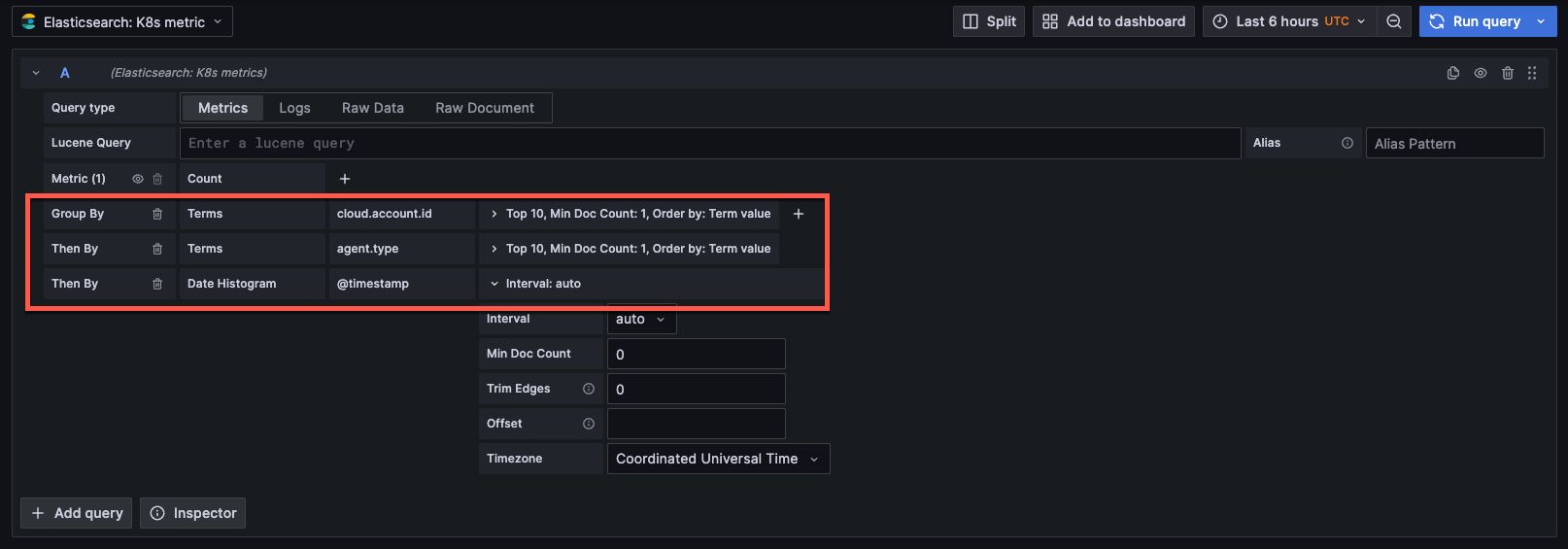
- Group by options - Create multiple group by options when constructing your Elasticsearch query. Date histogram is the default option. The following options are available in the drop-down menu:
- terms - refer to Terms aggregation.
- filter - refer to Filter aggregation.
- geo hash grid - refer to Geohash grid aggregation.
- date histogram - for time series queries. Refer to Date histogram aggregation.
- histogram - Depicts frequency distributions. Refer to Histogram aggregation.
- nested (experimental) - Refer to Nested aggregation.
Each group by option will have a different subset of options to further narrow your query.
The following options are specific to the date histogram bucket aggregation option.
- Time field - The field used for time-based queries. The default can be set when configuring the data source in the Time field name setting under
Elasticsearch details. The default is
@timestamp. - Interval - The time interval for grouping data. Select from the drop-down menu or enter a custom interval such as
30d(30 days). The default isAuto. - Min doc count - The minimum number of documents required to include a bucket. The default is
0. - Trim edges - Removes partial buckets at the edges of the time range. The default is
0. - Offset - Shifts the start of each bucket by the specified duration. Use positive (
+) or negative (-) values. Examples:1h,5s,1d. - Timezone - The timezone for date calculations. The default is
Coordinated Universal Time.
Configure the following options for the terms bucket aggregation option:
- Order - Sets the order of data. Options are
toporbottom. - Size - Limits the number of documents, or size of the data set. You can set a custom number or
no limit. - Min doc count - The minimum amount of data to include in your query. The default is
0. - Order by - Order terms by
term value,doc countorcount. - Missing - Defines how documents missing a value should be treated. Missing values are ignored by default, but they can be treated as if they had a value. Refer to Missing value in the Elasticsearch documentation for more information.
Configure the following options for the filters bucket aggregation option:
- Query - Specify the query to create a bucket of documents (data). Examples are
hostname:"hostname1",product:"widget5". Use the * wildcard to match any number of characters. - Label - Add a label or name to the bucket.
Configure the following options for the geo hash grid bucket aggregation option:
- Precision - Specifies the number of characters of the geo hash.
Configure the following options for the histogram bucket aggregation option:
- Interval - The numeric interval for grouping values into buckets.
- Min doc count - The minimum number of documents required to include a bucket. The default is
0.
The nested group by option is currently experimental, you can select a field and then settings specific to that field.
Click the + sign to add multiple group by options. The data will grouped in order (first by, then by).
Logs query type
Logs queries analyze Elasticsearch log data. You can configure the following options:
- Logs Options/Limit - Limits the number of logs to analyze. The default is
500.
Raw data query type
Run a raw data query to retrieve a table of all fields that are associated with each log line.
- Raw data size - Number of raw data documents. You can specify a different amount. The default is
500.
Note
The option to run a raw document query is deprecated as of Grafana v10.1.
Use template variables
You can also augment queries by using template variables.
Queries of terms have a 500-result limit by default.
To set a custom limit, set the size property in your query.




