






























Plugins 〉SPC CAD


SPC CAD


SPC CAD Panel
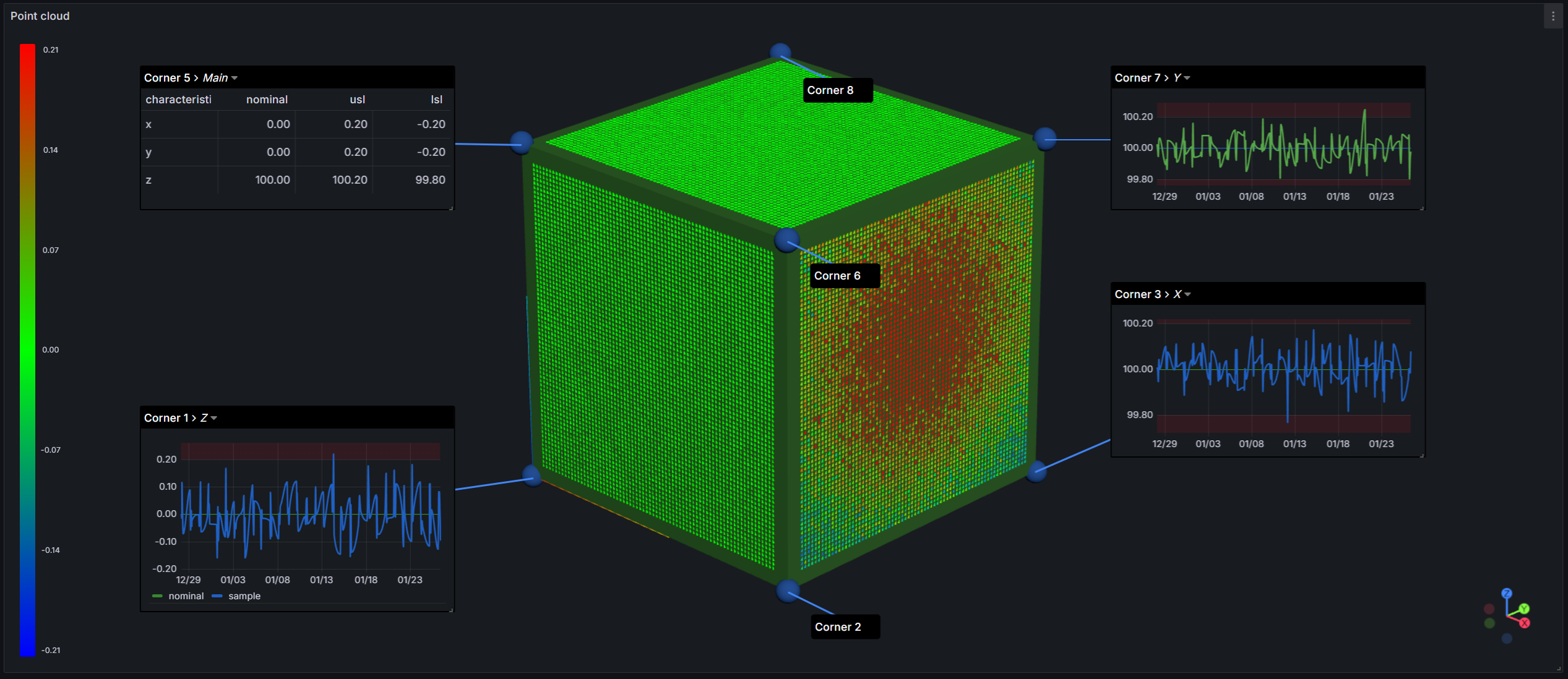
A Grafana panel plugin for visualizing 3D CAD models, point clouds, and metrology data within Grafana dashboards. Designed for quality control, manufacturing inspection, and metrology data visualization workflows.
Features
- Import CAD Models - Load STL, 3MF, ASC, and PLY files directly into dashboards
- Feature Annotations - Add labels, tables, and time-series charts to geometric features
- Template System - 13 built-in templates for different feature types (point, circle, cylinder, etc.)
- Color Coding - Apply conditional colors to features based on measurement data
- Interactive 3D View - Rotate, pan, and zoom with trackball camera controls
Quick Start
- Install the plugin in your Grafana instance
- Create a new panel and select "CAD" visualization
- Add a SPC CAD model path in panel options
- Configure your data query with feature positions
- Click features to create annotations
Supported File Formats
| Format | Extension | Description |
|---|---|---|
| STL | .stl | Stereolithography (binary/ASCII) |
| 3MF | .3mf | 3D Manufacturing Format |
| PLY | .ply | Polygon File Format |
| ASC | .asc | ASCII Point Cloud |
ASC Deviation File Format
The application requires deviation data in ASC format, where each line represents a single measurement point with space-separated values. The format for each line is: Name X Y Z Nx Ny Nz DevX DevY DevZ DevTotal, where Name is a string identifier for the surface comparison, X Y Z are the coordinates of the measurement point, Nx Ny Nz are the components of the surface normal vector at that point, DevX DevY DevZ are the deviation components along each axis, and DevTotal is the absolute magnitude of the total deviation. All numeric values should be floating-point numbers with six decimal places. The file should contain no header row - each line contains point data only.
Surface_comparison_cube 5.000000 5.000000 0.000000 0.000000 0.000000 -1.000000 -0.000000 -0.000000 0.080942 0.080942
Documentation
- Adding CAD models (from URL or data source)
- Supported file formats (STL, 3MF, PLY, ASC)
- Features and characteristics configuration
- Annotations and the annotation editor
- Built-in templates (13 feature types)
- Point clouds and scan timelines
- 3D navigation and panel options
Getting Help
- SPC CAD docs - Documentation
- KensoBI Discord - Community support
- Create an issue to report bugs, issues, and feature suggestions
License
This software is distributed under the GNU Affero General Public License v3.0.
Copyright
Copyright (c) 2026 Kenso Software
Grafana Cloud Free
- Free tier: Limited to 3 users
- Paid plans: $55 / user / month above included usage
- Access to all Enterprise Plugins
- Fully managed service (not available to self-manage)
Self-hosted Grafana Enterprise
- Access to all Enterprise plugins
- All Grafana Enterprise features
- Self-manage on your own infrastructure
Grafana Cloud Free
- Free tier: Limited to 3 users
- Paid plans: $55 / user / month above included usage
- Access to all Enterprise Plugins
- Fully managed service (not available to self-manage)
Self-hosted Grafana Enterprise
- Access to all Enterprise plugins
- All Grafana Enterprise features
- Self-manage on your own infrastructure
Grafana Cloud Free
- Free tier: Limited to 3 users
- Paid plans: $55 / user / month above included usage
- Access to all Enterprise Plugins
- Fully managed service (not available to self-manage)
Self-hosted Grafana Enterprise
- Access to all Enterprise plugins
- All Grafana Enterprise features
- Self-manage on your own infrastructure
Grafana Cloud Free
- Free tier: Limited to 3 users
- Paid plans: $55 / user / month above included usage
- Access to all Enterprise Plugins
- Fully managed service (not available to self-manage)
Self-hosted Grafana Enterprise
- Access to all Enterprise plugins
- All Grafana Enterprise features
- Self-manage on your own infrastructure
Grafana Cloud Free
- Free tier: Limited to 3 users
- Paid plans: $55 / user / month above included usage
- Access to all Enterprise Plugins
- Fully managed service (not available to self-manage)
Self-hosted Grafana Enterprise
- Access to all Enterprise plugins
- All Grafana Enterprise features
- Self-manage on your own infrastructure
Installing SPC CAD on Grafana Cloud:
Installing plugins on a Grafana Cloud instance is a one-click install; same with updates. Cool, right?
Note that it could take up to 1 minute to see the plugin show up in your Grafana.
Warning
Plugin installation from this page will be removed in February 2026. Use the Plugin Catalog in your Grafana instance instead. Refer to Install a plugin in the Grafana documentation for more information.
Installing plugins on a Grafana Cloud instance is a one-click install; same with updates. Cool, right?
Note that it could take up to 1 minute to see the plugin show up in your Grafana.
Warning
Plugin installation from this page will be removed in February 2026. Use the Plugin Catalog in your Grafana instance instead. Refer to Install a plugin in the Grafana documentation for more information.
Installing plugins on a Grafana Cloud instance is a one-click install; same with updates. Cool, right?
Note that it could take up to 1 minute to see the plugin show up in your Grafana.
Warning
Plugin installation from this page will be removed in February 2026. Use the Plugin Catalog in your Grafana instance instead. Refer to Install a plugin in the Grafana documentation for more information.
Installing plugins on a Grafana Cloud instance is a one-click install; same with updates. Cool, right?
Note that it could take up to 1 minute to see the plugin show up in your Grafana.
Warning
Plugin installation from this page will be removed in February 2026. Use the Plugin Catalog in your Grafana instance instead. Refer to Install a plugin in the Grafana documentation for more information.
Installing plugins on a Grafana Cloud instance is a one-click install; same with updates. Cool, right?
Note that it could take up to 1 minute to see the plugin show up in your Grafana.
Warning
Plugin installation from this page will be removed in February 2026. Use the Plugin Catalog in your Grafana instance instead. Refer to Install a plugin in the Grafana documentation for more information.
Installing plugins on a Grafana Cloud instance is a one-click install; same with updates. Cool, right?
Note that it could take up to 1 minute to see the plugin show up in your Grafana.
Installing plugins on a Grafana Cloud instance is a one-click install; same with updates. Cool, right?
Note that it could take up to 1 minute to see the plugin show up in your Grafana.
Warning
Plugin installation from this page will be removed in February 2026. Use the Plugin Catalog in your Grafana instance instead. Refer to Install a plugin in the Grafana documentation for more information.
Installing plugins on a Grafana Cloud instance is a one-click install; same with updates. Cool, right?
Note that it could take up to 1 minute to see the plugin show up in your Grafana.
For more information, visit the docs on plugin installation.
Installing on a local Grafana:
For local instances, plugins are installed and updated via a simple CLI command. Plugins are not updated automatically, however you will be notified when updates are available right within your Grafana.
1. Install the Panel
Use the grafana-cli tool to install SPC CAD from the commandline:
grafana-cli plugins install The plugin will be installed into your grafana plugins directory; the default is /var/lib/grafana/plugins. More information on the cli tool.
Alternatively, you can manually download the .zip file for your architecture below and unpack it into your grafana plugins directory.
Alternatively, you can manually download the .zip file and unpack it into your grafana plugins directory.
2. Add the Panel to a Dashboard
Installed panels are available immediately in the Dashboards section in your Grafana main menu, and can be added like any other core panel in Grafana.
To see a list of installed panels, click the Plugins item in the main menu. Both core panels and installed panels will appear.
Changelog
3.0.0
Features
- Added file upload support for CAD models (STL, 3MF, PLY, ASC) directly from the panel options
- Uploaded files are embedded in the dashboard JSON and can be shared with other users
- Maximum upload size: 5MB
- Added interactive view helper that visualizes camera transformation with clickable X, Y, Z axes to animate camera view
- Refactored data loading to use DataFrame-centric architecture
- 60-80% memory reduction by eliminating data duplication
- 30-50% faster initial load by removing data copying during parse
- Refactored data queries to use
characteristic_idinstead of characteristic names- Minimum required columns:
feature,characteristic_id,nominal
- Minimum required columns:
Bug Fixes
- Fixed close button (X) not appearing on annotation windows for unpositioned features
- Fixed unpositioned features not returning to the Unpositioned Features list when their annotation window is closed

