






























Brokkr Monitoring - BMC
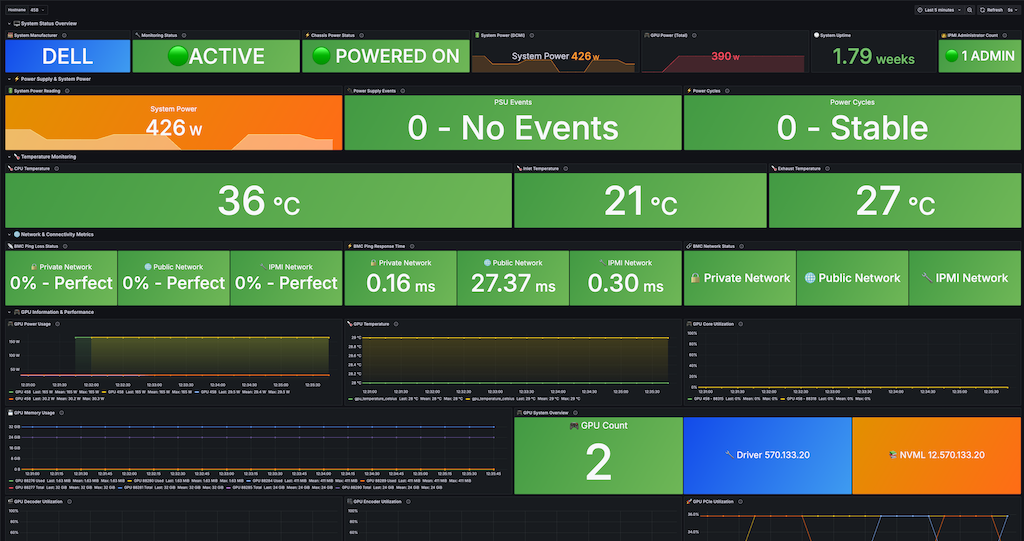
Brokkr Monitoring - Comprehensive BMC Dashboard
A complete monitoring dashboard for bare metal servers with BMC (Baseboard Management Controller) integration, designed for data centers and infrastructure monitoring.
Overview
This dashboard provides comprehensive monitoring for physical servers including:
- System Status & Power Management - Real-time power consumption, chassis status, and uptime monitoring
- Temperature Monitoring - CPU, inlet, and exhaust temperature sensors with thermal management alerts
- Network Connectivity - BMC ping monitoring, response times, and network interface traffic
- GPU Performance - Complete GPU metrics including power, temperature, utilization, and memory usage
- Hardware Health - IPMI administrator count, power supply events, and system reliability metrics
Data Sources
- Primary: Prometheus/Thanos
- Metrics Source: IPMI sensors, BMC monitoring, GPU telemetry
- Collection: Hardware sensors and system monitoring agents
Key Features
🖥️ System Overview
- System manufacturer detection
- Real-time monitoring status
- Chassis power state (ON/OFF)
- DCMI power consumption readings
- System uptime tracking
- IPMI administrator user count
⚡ Power Management
- Real-time system power consumption (DCMI)
- GPU power consumption (total and per-GPU)
- Power supply events monitoring
- Power cycle frequency tracking
- Smart power thresholds and alerts
🌡️ Thermal Management
- CPU temperature monitoring
- Inlet temperature (ambient air)
- Exhaust temperature (cooling efficiency)
- Hardware-agnostic temperature sensors
- Thermal threshold alerts
🌐 Network Monitoring
- BMC ping loss percentage for all interfaces
- Network response time monitoring
- Connectivity status (Private/Public/IPMI networks)
- Host/OS network traffic (RX/TX)
- Network error rate monitoring
🎮 GPU Monitoring
- GPU count and system information
- Real-time power usage per GPU
- GPU temperature monitoring
- Core utilization metrics
- Memory usage (used/total)
- Encoder/Decoder utilization
- PCIe utilization (TX/RX)
- NVML and driver version tracking
🖥️ Host/OS Metrics
- CPU utilization percentage
- System load average
- Memory utilization
- Disk usage monitoring
Dashboard Variables
- hostname: Select target server for monitoring
- Automatically detects available hosts with monitoring data
- Filters to show only hosts with complete metric coverage
Metric Examples
System power consumption
chassis_power_reading{hostname=~"$hostname"}
Network traffic
sum(rate({name="interface_.*_bits_received",hostname="$hostname"}[5m]))/8
GPU utilization
gpu_utilization{hostname=~"$hostname"}
Temperature monitoring
temp_degrees_c{hostname=~"$hostname"}
Alerts & Thresholds
Power
- Green: < 300W
- Yellow: 300-400W
- Orange: 400-500W
- Red: > 500W
Temperature
- Green: 20-40°C
- Yellow: 40-60°C
- Orange: 60-80°C
- Red: > 80°C
Network
- Green: 0% packet loss, <100ms response
- Yellow: 0.1-1% loss, 100-500ms response
- Orange: 1-5% loss, 500-1000ms response
- Red: >5% loss, >1000ms response
Requirements
- Grafana 8.0+
- Prometheus/Thanos data source
- BMC/IPMI enabled servers with monitoring agents
- GPU monitoring (optional - shows "NO GPU DETECTED" if unavailable)
Installation
- Import the JSON dashboard file into Grafana
- Configure your Prometheus/Thanos data source
- Update data source UID to match your environment
- Set up hostname variable to match your server naming convention
- Configure refresh rate (default: 5 seconds)
Supported Hardware
- Cross-platform: Dell, HP, Supermicro, and other BMC-enabled servers
- GPUs: NVIDIA GPUs with NVML support
- Networks: Standard ethernet interfaces (eno1, eno2, eno3, etc.)
- IPMI: Standard IPMI 2.0 compatible BMCs
Use Cases
- Data Center Monitoring: Real-time infrastructure health
- GPU Cluster Management: AI/ML workload monitoring
- Thermal Management: Cooling system optimization
- Power Management: Energy consumption tracking
- Network Monitoring: Connectivity and performance tracking
- Hardware Health: Proactive maintenance alerts
Dashboard Sections
- System Status Overview - At-a-glance system health
- Power Supply & System Power - Energy consumption monitoring
- Temperature Monitoring - Thermal management
- Network & Connectivity Metrics - Network performance
- GPU Information & Performance - Complete GPU telemetry
- Host/OS System Metrics - Operating system metrics
Configuration Notes
- Auto-refresh: Set to 5 seconds for real-time monitoring
- Time Range: Default last 5 minutes (adjustable)
- Variables: Hostname selection auto-populates from available metrics
- Thresholds: Pre-configured for typical data center environments
- Colors: Green/Yellow/Orange/Red system for quick health assessment
Data source config
Collector config:
Upload an updated version of an exported dashboard.json file from Grafana
| Revision | Description | Created | |
|---|---|---|---|
| Download |