































Determine if a collector is configured for Fleet Management
Grafana Fleet Management is a Grafana Cloud feature that enables you to manage collector deployments at scale.
Streamlined configuration management. With a central control hub, you can easily manage configurations across all collectors. Create, activate, deactivate, or adjust configuration pipelines remotely without complex scripts or time-consuming change management processes, all from the Grafana Cloud interface.
Centralized health monitoring. You have complete visibility into the health of your collector fleet. View out-of-the-box dashboards that track metrics for component health, system resources, and deployment infrastructure. Connect erroring collectors with faulty configuration without leaving the application. Troubleshoot more efficiently and identify issues with individual collectors more quickly.
Cost and collection control. Tailor data collection pipelines to match specific use cases and ensure observability data stays focused on what’s most important. Turn data streams on and off as needed to optimize your costs and reduce data overload.
A Grafana Alloy instance is installed whenever you install:
- A Grafana Cloud integration
- Kubernetes Monitoring
- Cloud Provider Observability
- Application Observability
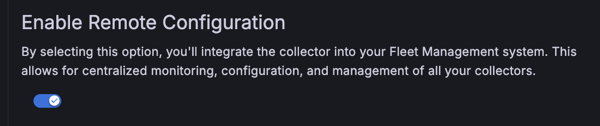
The registration of a Grafana Alloy collector in Fleet Management depends on the Enable Remote Configuration toggle shown during Alloy installation. By default, this toggle is enabled, so Grafana Alloy is registered as part of your fleet. If you disable the toggle during installation, or if Alloy was installed before the Fleet Management feature was released, the collector will not be registered in Fleet Management.
The following image shows the Enable Remote Configuration toggle that appears during Alloy installation.
To determine if a collector is registered with Fleet Management, complete the following steps:
- Sign in to your Grafana Cloud environment, for example
mystack.grafana.net. - Navigate to Connections > Collector > Fleet Management.
If your collector doesn’t appear on the list, you can manually add it. Continue to the next milestone to learn how to register a Grafana Alloy instance with Fleet Management.
At this point in your journey, you can explore the following paths:
Monitor multiple Linux hosts with the grafana_agent role