































How Adaptive Metrics works
The following diagram gives you an overview of Adaptive Metrics and introduces you to some of the fundamental features that are the principles of how Adaptive Metrics works.
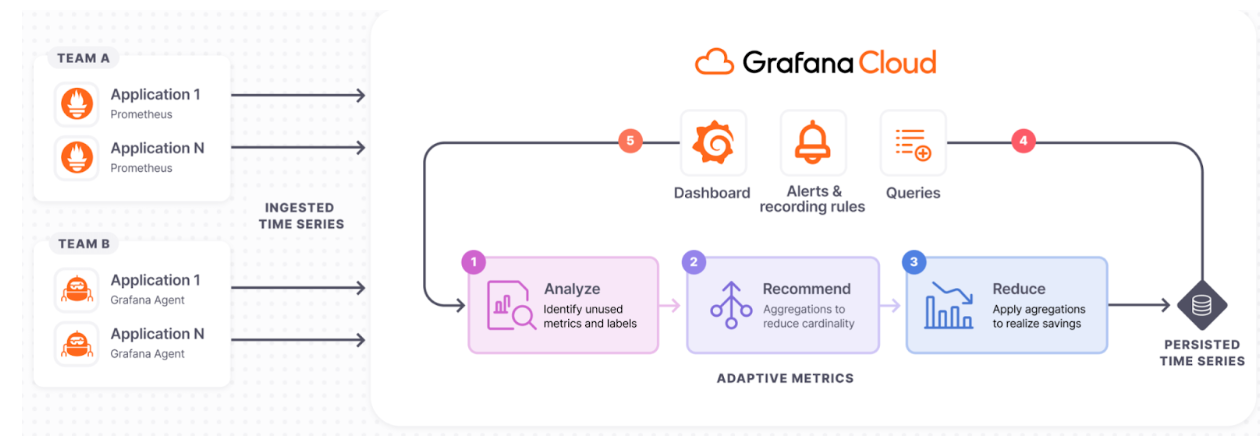
Analyze
Adaptive Metrics works by analyzing how your organization interacts with its metrics in Grafana Cloud. It determines whether a metric is unused, partially unused, or an integral part of your observability ecosystem.
It also analyzes factors such as metric type, number of label values associated, and churn, so that it can provide efficient aggregation recommendations.
Recommend
Adaptive Metrics recommends aggregations to reduce cardinality.
For unused metrics, Adaptive Metrics recommends aggregating away the ones that are driving the majority of the cardinality while preserving the others. For already aggregated metrics, if they’ve been queried recently, Adaptive Metrics may suggest removing the aggregation rules to restore full granularity.
Reduce
Based on user approval, the system applies the chosen recommendations to lower the count of persisted time series. The process is seamless, ensuring that existing dashboards, rules, and ad-hoc queries continue to work without modification.
Recommendations are applied, modified, or skipped entirely based on user input.
For a fully automated workflow, the auto-apply feature enables the system to implement new recommendations without manual intervention.
Integrate
Dashboards, alerts, and queries use persisted time series, ensuring seamless operation of existing observability artefacts.
Adapt
Analysis is continuous, so changes in dashboards, alerts, and query patterns prompt new aggregation suggestions.
Metrics usage can change over time, so Adaptive Metrics continually updates its recommendations to meet your changing needs and to reflect what is best for your current usage. It is just as easy to remove aggregations as it is to apply them. Once you tell Adaptive Metrics you want to stop aggregating a metric that’s currently being aggregated, the metric is stored in its full cardinality state going forward.