Slide 2 of 7

What problems does Level 2 solve?

The key question

“Which service is the problem?”

At Level 2, you shift from looking at servers to looking at services. Same underlying infrastructure, but a completely different lens.
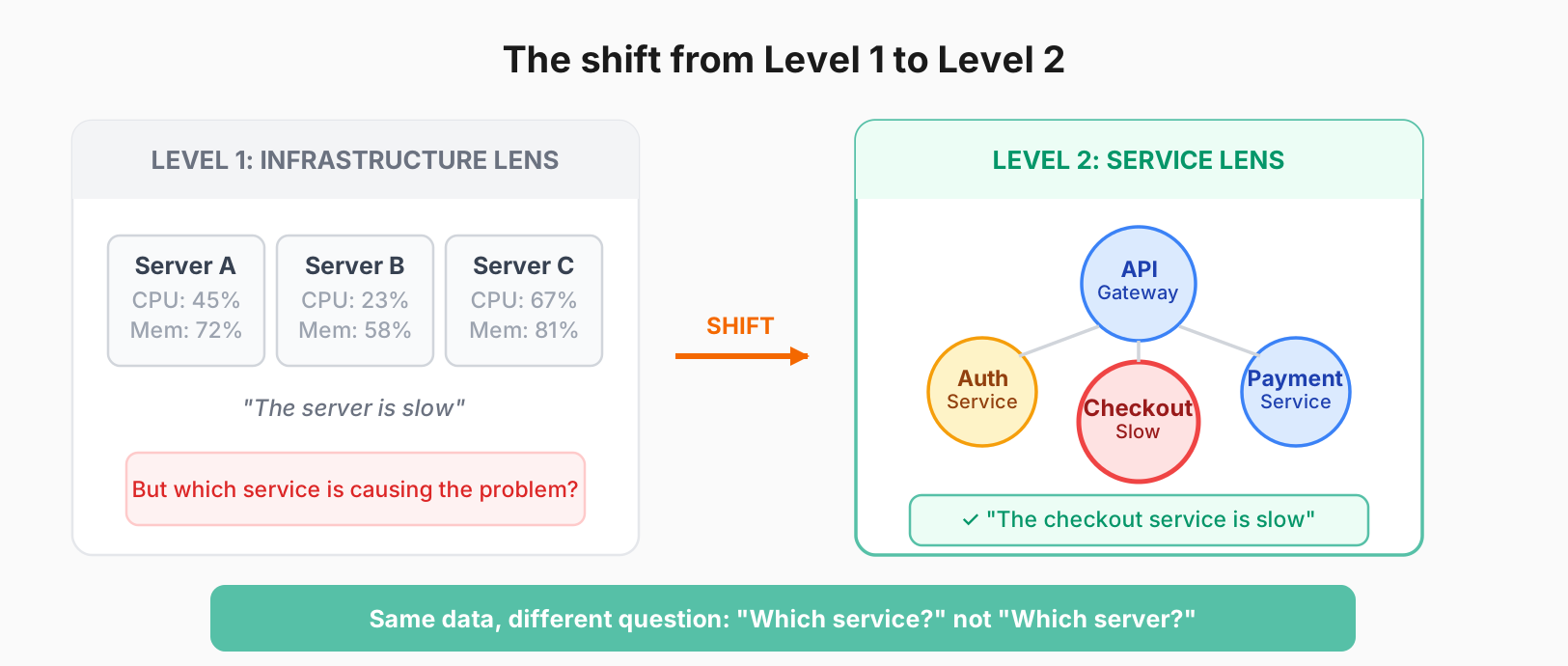
Level 2 lens shift showing the transition from infrastructure view (servers with CPU/memory) to service view (service map with dependencies)

Problems you can solve at Level 2

ProblemHow Level 2 helps
“Users report slowness, where do I look?”Service-level RED metrics show which service is degraded
“What services do we even have?”Service Inventory auto-discovers from traces
“How do our services connect?”Service graph visualizes dependencies
“What’s normal for this service?”Baseline metrics establish healthy behavior

What you get

  • RED metrics: Rate, Errors, Duration for every service
  • Service Inventory: Auto-discovered list of all services
  • Service Graph: Visual map of service dependencies
  • Consistent triage: Same metrics, same view, every service

The mental shift: Stop asking “which server?” Start asking “which service?” This lens is much more useful when users are complaining.

Script

Here’s a scenario you’ve probably lived. A customer reports the site is slow. You check your servers. CPU looks fine, memory is fine, disk is fine. So what now?

This is exactly the problem Level 2 solves. Instead of looking at infrastructure, you’re looking at services. And you’re asking which service is degraded.

At Level 2, you get RED metrics for every service, including Rate, Errors, and Duration. You get a Service Inventory that auto-discovers all your services from traces. You get a Service Graph that shows how services connect to each other.

This shifts your thinking. Instead of “the server is slow,” you say “the checkout service is slow.” Instead of per-host metrics, you have per-service metrics. It’s a completely different lens on the same underlying infrastructure, and it’s much more useful when users are complaining.