

Telemetry signal workflows
Metrics, logs, traces, and profiles work together so you can follow a problem from symptom to root cause without switching tools.
For example, you spot a latency spike in metrics, pull up the matching requests, examine their traces to find the slow service, and then profile that service to identify the exact function.
When your signals use shared labels or attributes, for example, service or environment, you can move between them without manually correlating timestamps.
You get a clear path from “what broke” to “why it broke.”
These workflows show you how to use correlated signals to solve common problems using only the basic telemetry signals: metrics, logs, traces, and profiles.
Before you begin
You can try these workflows on play.grafana.org or on your own Grafana Cloud instance.
If you’re using your own Grafana Cloud instance, you need:
- Metrics plus at least one other signal (logs, traces, or profiles) available in Grafana Cloud.
- Shared labels or attributes, for example,
serviceorenvironment, for correlation between signals.
All Grafana Cloud instances include Explore and the Grafana Drilldown apps.
Grafana Assistant, an AI-powered tool, may require an additional license. Refer to Grafana Assistant pricing for more information.
Workflows use core Grafana Cloud features
The telemetry signals workflows use features available on all Grafana Cloud tiers, including the free tier.
You can follow along using play.grafana.org or on your own Grafana Cloud instance.
The workflows focus on core capabilities:
- Drilldown apps for visual exploration of metrics, logs, traces, and profiles
- Explore for free-form queries across all signal types
- Built-in correlation between signals using shared labels and attributes
For more advanced observability capabilities, Grafana Cloud offers additional features like Grafana Assistant, Application Observability, Kubernetes Monitoring, and Frontend Observability. These tools provide deeper insights, automated analysis, and specialized views for specific use cases.
Choose your workflow
Use this flowchart to quickly identify which workflow matches your situation:
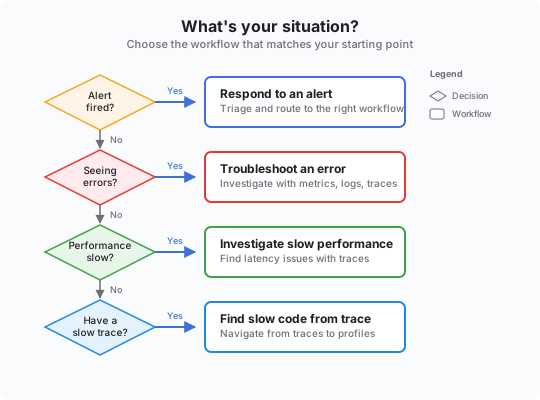
- Alert fired and need to triage? Respond to an alert (quick routing to the right workflow)
- Seeing error messages in logs or metrics? Troubleshoot an error
- Application is slow or unresponsive? Investigate slow performance
- Have a slow trace and need to find the code issue? Find slow code from a trace
Investigation starting points
Use this table to decide which signal to check first.




