

Best practices for Grafana IRM
This section provides operational guidance for configuring Grafana IRM effectively. Understanding how alerts flow through the system helps you design better routing, grouping, and escalation strategies.
Understand how alerts flow through IRM
The following diagram shows how alerts flow from detection to notification delivery. Alerts can originate from Grafana Alerting, Prometheus Alertmanager, or any other monitoring tool that can send webhooks to IRM:
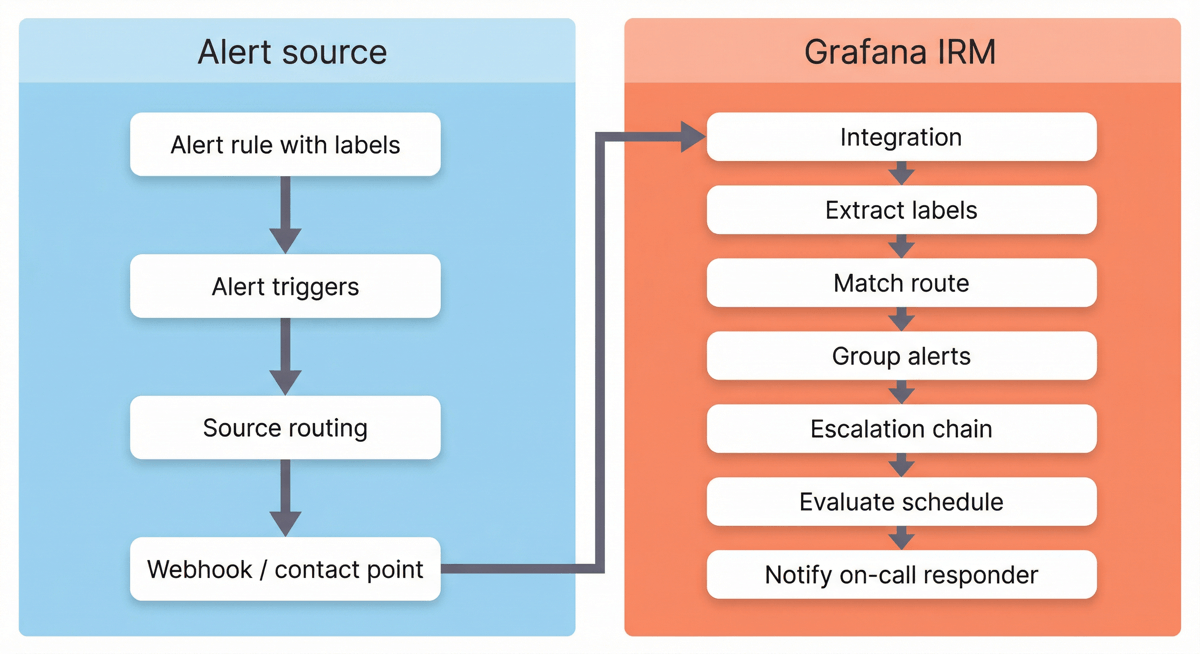
Types of alert sources include:
- Grafana Alerting: Uses Notification Policies and Contact Points
- Prometheus Alertmanager: Uses routing rules and receivers
- External tools: Datadog, PagerDuty, Sentry, custom webhooks, and more
Key concepts
Understanding these concepts helps you configure IRM more effectively:
Alert routing
Alerts typically pass through two routing stages:
- Source routing: Your alerting tool (Grafana Alerting, Alertmanager, or other) routes alerts to the appropriate IRM integration.
- IRM routing: Routes in IRM match alerts to escalation chains using Jinja2 expressions, labels, or regex.
Design your routing strategy to use coarse-grained routing at the source (team or domain level) and fine-grained routing in IRM (severity or service level).
Alert grouping
IRM groups alerts using a Jinja grouping template, which when evaluated with the alert context produces an id to group incoming alerts.
Proper grouping is essential. It can be the difference between receiving 1 phone call and 10 phone calls at 4am.
Escalation chains
Escalation chains define who gets notified and when, ensuring alerts reach the right responders through a series of notification steps.
IRM snapshots escalation chains when it creates an alert group. Changes to chains don’t affect in-flight escalations, which provides stability but means you need to test changes with new alerts.
Dynamic schedule evaluation
Schedules define who is on-call at any given time. Escalation chains reference schedules to determine who to notify.
When an escalation chain step runs, IRM checks the schedule at that moment to find the current on-call responder. This means schedule updates and shift changes take effect immediately for any pending escalation steps.
Service Center and labels
The Service Center ties together alerts, alert groups, incidents, and SLOs using the service_name label.
Consistent labeling across your alerts enables powerful operational views and facilitates visibility during on-call handoffs.
Best practices topics
The following topics are organized to follow the alert processing flow, from integration to incident. Explore detailed guidance for each area:
- Optimize integrations to connect your monitoring tools
- Design a labeling strategy for routing, triage, and analytics
- Configure alert routing to direct alerts to the right teams
- Configure alert groups for effective grouping
- Design escalation chains for timely response
- Set up schedules for reliable on-call coverage
- Manage incidents and leverage Service Center
- Configure teams, access control, and settings for your organization




