This is documentation for the next version of Grafana Beyla documentation. For the latest stable release, go to the latest version.
 Beyla
BeylaGrafana Beyla
eBPF application auto-instrumentation
Instrumenting an application to obtain metrics and traces typically requires adding a language agent to the application deployment/packages. In some compiled languages like Go or Rust, you must manually add tracepoints to the code.
Grafana Beyla is an eBPF-based application auto-instrumentation tool to easily get started with Application Observability. Beyla uses eBPF to automatically inspect application executables and the OS networking layer, and capture trace spans related to web transactions and Rate Errors Duration (RED) metrics for Linux HTTP/S and gRPC services. All data capture occurs without any modifications to application code or configuration.
Beyla offers the following features:
- auto-instrument applications written in various programming languages, for example: Go, C/C++, Rust, Python, Ruby, Java (including GraalVM Native), NodeJS, .NET, and others
- efficient instrumentation and the low-overhead data capture with natively compiled code even for interpreted languages
- vendor agnostic data exports in the OpenTelemetry format and as native Prometheus metrics
- distributed traces with Beyla 2
- runs in any Linux environment
- listens to the Kubernetes API to decorate metrics and traces with Pods and Services metadata
- Grafana Alloy integration
eBPF overview and how it differs from other types of instrumentation
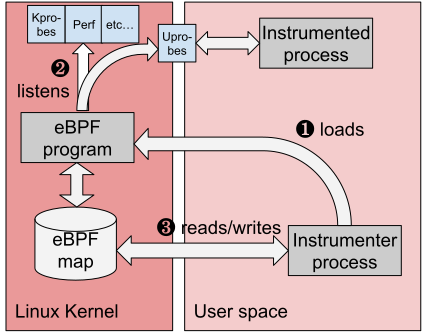
eBPF allows you to attach applications to different points of the Linux Kernel. eBPF applications run in privileged mode and allow you to specify the runtime information of the Linux Kernel: system calls, network stack, as well as inserting probes in user space applications.
The eBPF code is loaded from ordinary applications running in user space. The kernel and the user space applications can share information through a set of well defined communication mechanisms, which are provided by the eBPF specification. For example: ring buffers, arrays, hash maps, etc.
eBPF instrumentation is safe and improves security
The eBPF programs are safe and compiled for their own Virtual Machine instruction set and run in a sandboxed environment that verifies each loaded eBPF program for memory access safety and finite execution time. Unlike previous technologies, such as natively compiled kernel modules, there is no chance that a poorly programmed probe can cause the Linux Kernel to hang.
eBPF binaries get verified and compiled with a Just-In-Time (JIT) compiler for the native host architecture such as x86-64 or ARM64 for efficient and fast execution.
Unlike other types of instrumentation, for example language specific SDK libraries or instrumentation agents, eBPF instrumentation doesn’t add anything to your application as a dependency. This means that the eBPF instrumentation code, which extracts and generates all of the application telemetry, doesn’t run within your application process memory. When you add an instrumentation library dependency to your code, any vulnerabilities in the instrumentation library are all of a sudden vulnerabilities in your application as well. This is inherently true for all application dependencies, and instrumentation dependencies are not any different. With eBPF, since all instrumentation is done outside of your application process memory, any vulnerability to the eBPF user-space components impacts just the telemetry collection and generation part of your system.
Since eBPF instrumentation runs out of your application process, you can apply very restrictive access policies to the eBPF agent and secure the telemetry generation process. For example, you can ensure that the eBPF agent (Beyla) doesn’t open any ports and only uses push for the generated telemetry, which wouldn’t be feasible if the application is instrumented using language specific SDK libraries or instrumentation agents.
Beyla eBPF instrumentation is also safer than proxy based black box instrumentation. When you use a proxy service to generate telemetry for a service that’s not instrumented, the problem of security concerns still applies. While proxies don’t run within your process application space, they are separate programs that handle all of your application traffic and expose ports. If there’s a security vulnerability in the proxy, an attacker can gain access to your application traffic, by virtue that the proxy handles all of your application traffic.
eBPF instrumentation is non-intrusive
Beyla can instrument all of your applications without restart and without disrupting your application performance. The eBPF instrumentation can be added and removed without any impact to the system or application performance. Since the eBPF instrumentation runs outside of the application process, it doesn’t add any memory, CPU, IO or locking overhead to your application performance. Any instability of the eBPF monitoring stack is purely an instability of that component. This means that performance or functional bugs in the eBPF instrumentation, do not cause performance or stability issues to your applications.
Since eBPF instrumentation can be added or removed without disrupting the application behavior, this also means that you can safely update/upgrade your observability. Upgrading Beyla to a newer version, for example to gain access to new functionality or to upgrade the OpenTelemetry standard, is painless and it immediately takes an effect on all of your instrumented services.
eBPF instrumentation produces correct latency metrics
All library or agent based instrumentation has the same fundamental flaw when it comes down to measuring request latency. They instrument the service time, that is, the time it takes for a request handler to process a request. However, requests may need to wait in an internal framework queue before they are being serviced. A common example of when requests are waiting for a handler, is when all threads in the incoming application thread pool are busy. These wait times are never accounted for by library level instrumentation.
As a result, the telemetry provided by library or agent instrumentation, may indicate low request duration times even though clients experience high latency. This is especially problematic if there are SLOs on response times. In fact, this situation typically arises when the service is overloaded, which is a very common scenario in which SLOs can be breached and application workloads need to be scaled.
Beyla looks at interactions from outside of the application, on the kernel’s network level. Therefore, the latency numbers produced by Beyla represent the behavior as seen by the client, including queue times. This is not just a nuance: Queue times may be orders of magnitude higher than the actual service times if an application is struggling to keep up with the amount of requests being sent its way. To read more about this, refer to the Measuring total request times, instead of service times section of the documentation.
Requirements
- Linux with Kernel 5.8 or higher with BPF Type Format (BTF)
enabled. BTF became enabled by default on most Linux distributions with kernel 5.14 or higher.
You can check if your kernel has BTF enabled by verifying if
/sys/kernel/btf/vmlinuxexists on your system. If you need to recompile your kernel to enable BTF, the configuration optionCONFIG_DEBUG_INFO_BTF=ymust be set. - Beyla also supports RedHat-based distributions: RHEL8, CentOS 8, Rocky8, AlmaLinux8, and others, which ship a Kernel 4.18 that backports eBPF-related patches.
- eBPF enabled in the host.
- For instrumenting Go programs, compile with at least Go 1.17. Beyla support Go applications built with a major Go version no earlier than 3 versions behind the current stable major release.
- Administrative access rights to execute Beyla.
Limitations
Beyla has its limitations too. It only provides generic metrics and transaction level trace span information. Language agents and manual instrumentation is still recommended, so that you can specify the granularity of each part of the code to be instrumented, putting the focus on your critical operations.
While most eBPF programs require elevated privileges, Beyla allow you to specify finer grained permissions to run with minimum required permissions, such as: CAP_DAC_READ_SEARCH, CAP_SYS_PTRACE, CAP_PERFMON, CAP_BPF, CAP_CHECKPOINT_RESTORE, and CAP_NET_RAW.
Some Beyla functionality requires further permissions, for example using the network observability probes with Linux Traffic Control requires CAP_NET_ADMIN, but it’s a feature you have to optionally enable.
For a comprehensive list of capabilities required by Beyla, refer to Security, permissions and capabilities.
Get started
Follow the setup documentation to get started with Beyla either with Docker or Kubernetes.
Follow the language quickstart guides for quick instructions about how to set up Beyla to instrument applications written in a particular language.
Learn more about Grafana Beyla
- Set up Beyla
- Beyla quickstart guides
- Network metrics
- Configure Beyla
- Beyla exported metrics
- Beyla security, permissions, and capabilities
- Cilium compatibility
- Distributed traces with Beyla
- Beyla RED metrics dashboard
- Beyla metrics cardinality
- Beyla performance overhead
- Measuring total request times, instead of service times