
 Investigate alerts and incidents with Grafana Assistant in IRM
Investigate alerts and incidents with Grafana Assistant in IRM
Grafana IRM brings Grafana Assistant into the places where you respond to alerts and incidents. Start an investigation and review what it found without switching tools.
Investigate an alert from Slack
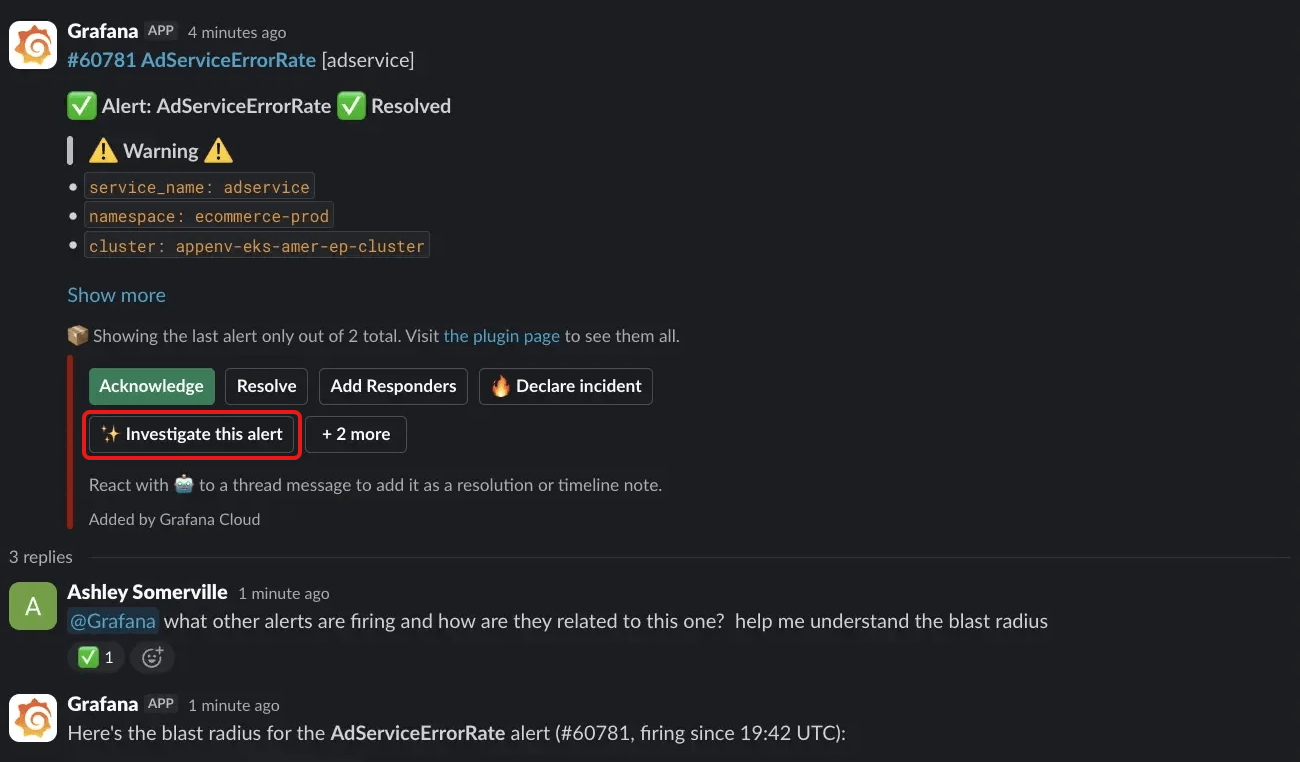
Click Investigate this alert on an IRM alert group message in Slack. Grafana Assistant then does the following:
- Summarizes what’s firing and its current status.
- Checks for related incidents and other firing alerts.
- Assesses the blast radius and impact.
- Suggests next steps for triage.
Assistant replies in the alert group’s thread so the whole team can see it.
Ask Assistant in incident channels
In an incident channel, click Ask Assistant in the welcome message or the /grafana quick actions. Assistant summarizes the incident and suggests next steps. For more detail, refer to Ask Grafana Assistant from Slack.
Review investigations on alert groups
An alert can carry an Assistant investigation, for example from an alert enrichment that uses the Assistant Investigations enricher. When it does, the alert group page shows an Investigation tab with the summary inline and a link to the full report. If you declare an incident from that alert group, the investigation is attached to the incident.
Run investigations from incidents
Start an investigation in one click from the Assistant Investigation panel on an incident. While the investigation runs, the panel shows its status and a link to the live workspace. When it completes, the panel shows a short Summary of the findings and a link to the full report. For more detail, refer to Grafana Assistant Investigations.
These features are available when Grafana Assistant is enabled in your Grafana Cloud stack.
