
 New escalation options in Grafana IRM
New escalation options in Grafana IRM
Escalation chains in Grafana IRM have new options that give you more control over who gets paged, and when.
Spread pages across everyone on a shift, or pull in the responder coming off the last shift. When an alert group is waiting, move it to its next step without waiting out the timer.
Round-robin from an on-call schedule
The Notify on-call users from schedule one by one (round-robin) step pages one of the people currently on call in a schedule. The next alert group goes to the next person.
Use it to spread the load when several people share a shift, for example a support desk, a NOC, or a team with multiple engineers on call at once. People are paged in the order they appear in the schedule, starting with the rotation that began first. If only one person is on call, they’re notified as usual.
Notify the previous on-call shift
The Notify previous on-call shift from schedule step complements the existing Notify next on-call shift from schedule step. It notifies the people from the most recently ended shift. Use it to pull in the responder who handed off and likely has the most context.
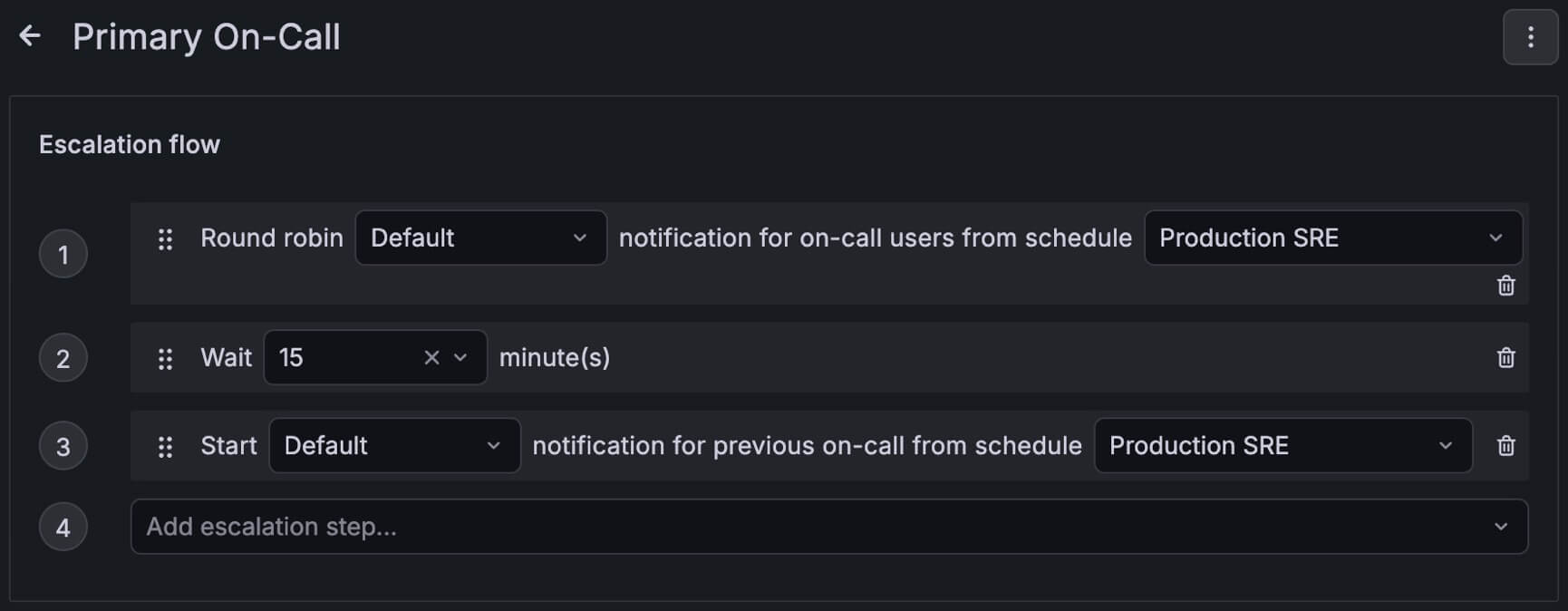
Skip to the next escalation
When an alert group is waiting at a Wait or other delay step, you don’t have to wait out the timer. Select Skip to next escalation from any of these places:
- The alert group’s More menu in IRM
- The alert group message overflow menu in Slack
- The alert card in Microsoft Teams
- The Grafana mobile app
IRM shows who will be notified before you confirm. If the alert group is acknowledged or silenced, skipping clears that state and resumes escalation.
