
 Custom label retention for Knowledge Graph
Custom label retention for Knowledge Graph
Grafana Cloud Knowledge Graph normalizes your telemetry into a fixed set of well-known labels, which means organization-specific labels like team, region, or cost_center are dropped during processing. With custom label retention, you can choose which of your own labels to keep on knowledge graph entities and recording rules.
Retained labels let you filter, group, and drill down on your own dimensions across the entity catalog, entity graph, and RCA workbench. They also propagate to the knowledge graph’s recording rules in Mimir, so you can use them in dashboards and alerting.
Use cases
Retained labels unlock workflows that aren’t possible with the default label set:
- Filter the entity graph by team. Retain your
teamlabel to scope the graph to a single team’s services instead of browsing thousands of entities. - Route Knowledge Graph alerts by owner. With an ownership label on entities, Alertmanager can route out-of-the-box alerts to the right team.
- Break down recording metrics in dashboards. Use
sum by(team)oravg by(region)on knowledge graph recording metrics for team- or region-level views. - Attribute usage to cost centers. Retain a
cost_centerlabel to support internal chargeback reporting.
How it works
Navigate to Observability > Configuration > Retained labels. Pick a label from the drop-down menu and it saves immediately. Each label is validated for cardinality before it’s persisted; labels that would cause excessive series growth are rejected.
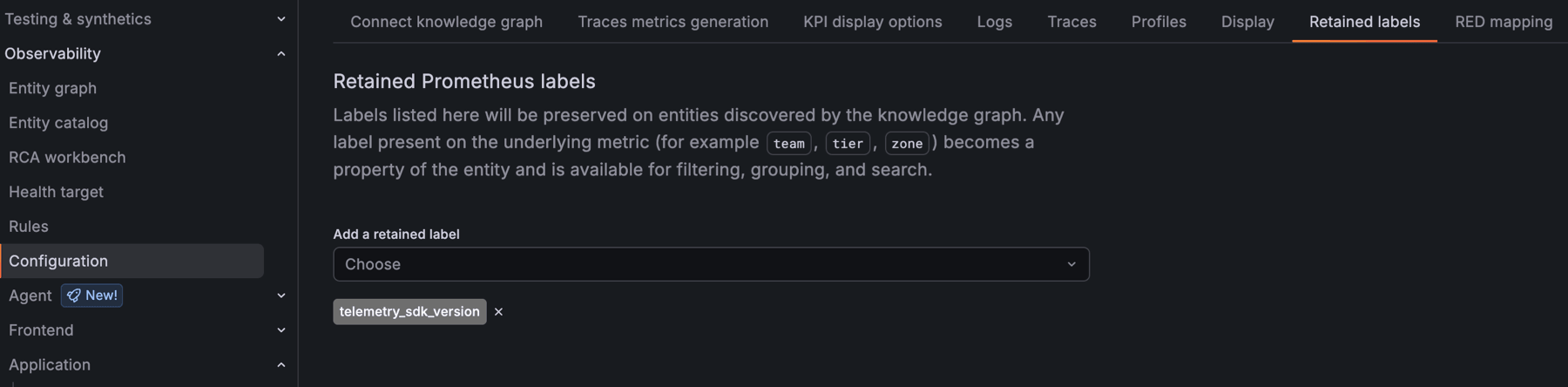
Retained labels take effect at two speeds. Entities in the graph start carrying the label as a property within minutes. The knowledge graph’s recording rules in Mimir update more gradually and can take a few days to fully propagate.
Get started
Custom label retention is in private preview. The customLabelRetention feature flag must be enabled on your Grafana Cloud stack. Contact your Grafana Labs representative to have it enabled.
For configuration details, refer to the Retained labels documentation.
