
What's new from Grafana Labs Git Sync: Import dashboards from the UI to simplify adding them in a synced folder
Git Sync: Import dashboards from the UI to simplify adding them in a synced folderWhat's new from Grafana Labs

Git Sync: Import dashboards from the UI to simplify adding them in a synced folder
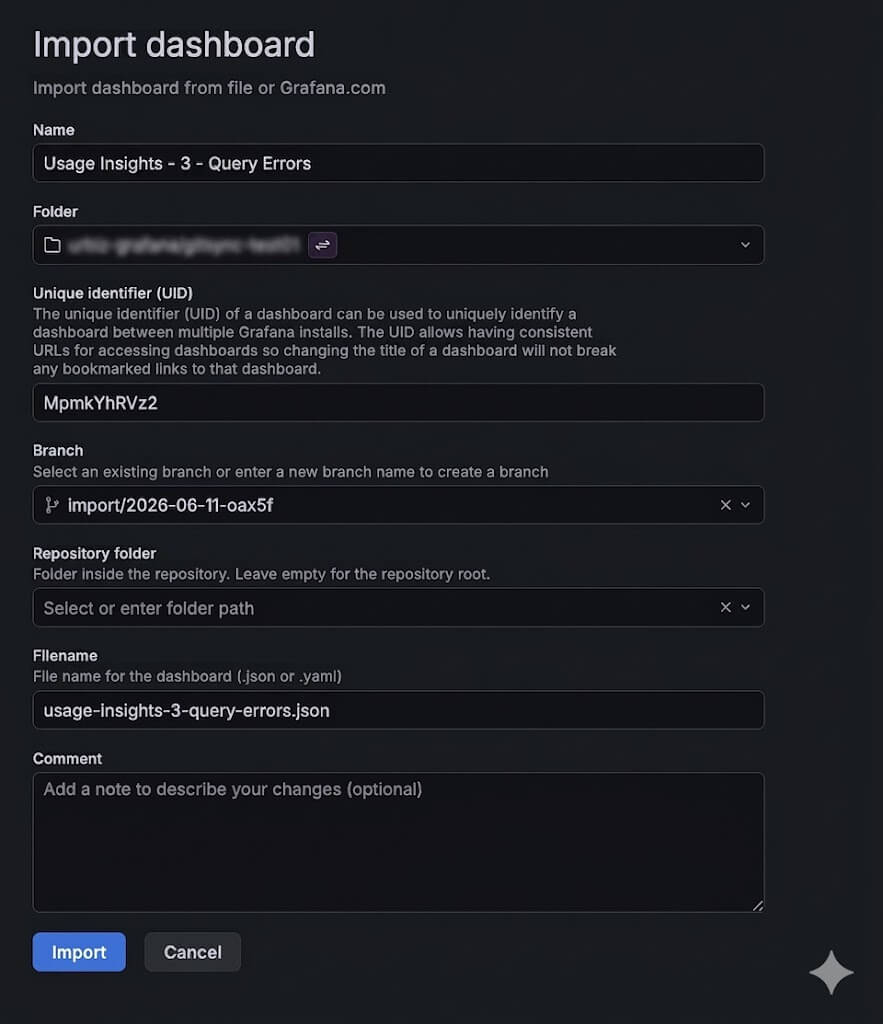
You can now import a dashboard JSON straight into a Git Sync–provisioned folder. From the folder’s browse view, hit Import and Grafana will route you through a provisioned import flow: pick the file path, branch, commit message, and workflow, and the dashboard gets committed back to your repository as part of the import.
A couple of differences from regular imports worth knowing about:
- Uniqueness is path-based. Two dashboards can share a title as long as they live at different file paths in the repo. The file path is the constraint, not the title.
- UIDs are still globally unique per org. Two repos with dashboards sharing a UID will conflict.
- Path conflicts block import. If a file already exists at the target path, the import is stopped before it overwrites anything.
This feature is currently rolling out in Grafana Cloud and is enabled by default.
Related What's new posts
