
 Grafana Cloud k6: Starred test runs and updated test result retention
Grafana Cloud k6: Starred test runs and updated test result retention
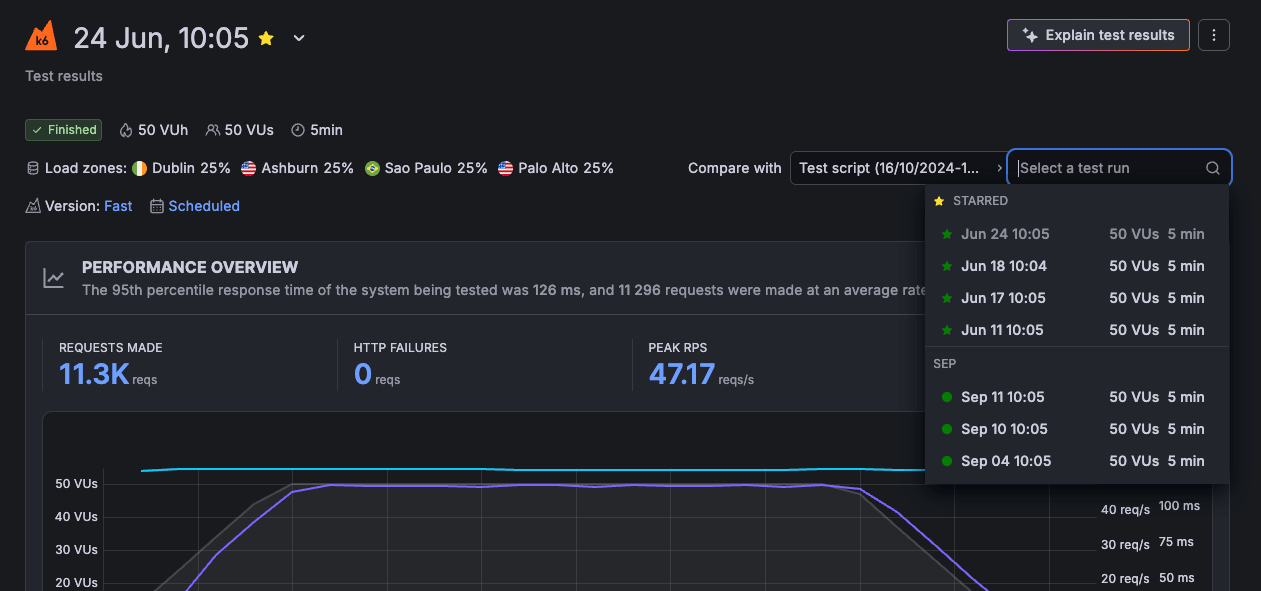
You can now star test runs in Grafana Cloud k6 to mark the results that matter and find them again quickly. Starring gives you one consistent way to flag a test run as a reference point, whether you’re tracking a release, validating a performance optimization, or keeping an important run on hand to compare against.
Starred runs are grouped at the top of the Compare with dropdown on any test run page, so the results you care about are always a click away when you compare two runs. You can star or unstar a run directly from its results page using the star icon, or from the three-dot menu.
Test run results now follow a single, consistent data retention window for every run, based on your plan’s Grafana Cloud Metrics retention (up to 13 months on Pro plans). Starring a run marks it for comparison and organizes your results; it doesn’t change how long a run’s data is retained.
Starred test runs are rolling out in public preview, starting with Free plans and expanding to all other plans over the following days.
To learn more, refer to the Manage test results documentation.
